





Free AI Girlfriend Generator: Create Realistic AI GF Online
Transform your ideas into visual reality using our professional AI GF generator. From customized fashion to unique personalities, this realistic AI girlfriend maker ensures every detail, from lighting to facial expressions, is captured perfectly for your needs.


By clicking Generate Image you agree to our Terms of Use and Privacy Policy

Turn One Prompt into a Character You Actually Want
Start with a simple idea and keep it specific. You can ask for a bright campus crush, a calm office woman, or a playful anime lead, then let Pokecut build the first version for you. This is where an AI girlfriend generator works best: you bring the mood, hair, outfit, and setting, and the image gives those details a face.
If you already use an AI text generator to sketch ideas, Pokecut helps you move from words to a picture you can tweak. It is a practical way to create AI girlfriend art without learning drawing tools first.

Create AI Girlfriend from Photos into One Story
Pokecut goes past one-shot image output. You can upload artwork you like, make it feel more lifelike, or use your own selfie to build a shared frame with the character. That matters when you want more than a pretty portrait and need a scene with chemistry, context, or a clearer point of view.
Users who start with an AI girl creator often stop at the first result. Pokecut lets you keep going. You can create AI girlfriend from photo ideas, blend real and generated elements, and shape the final image into something that feels more personal and less random.
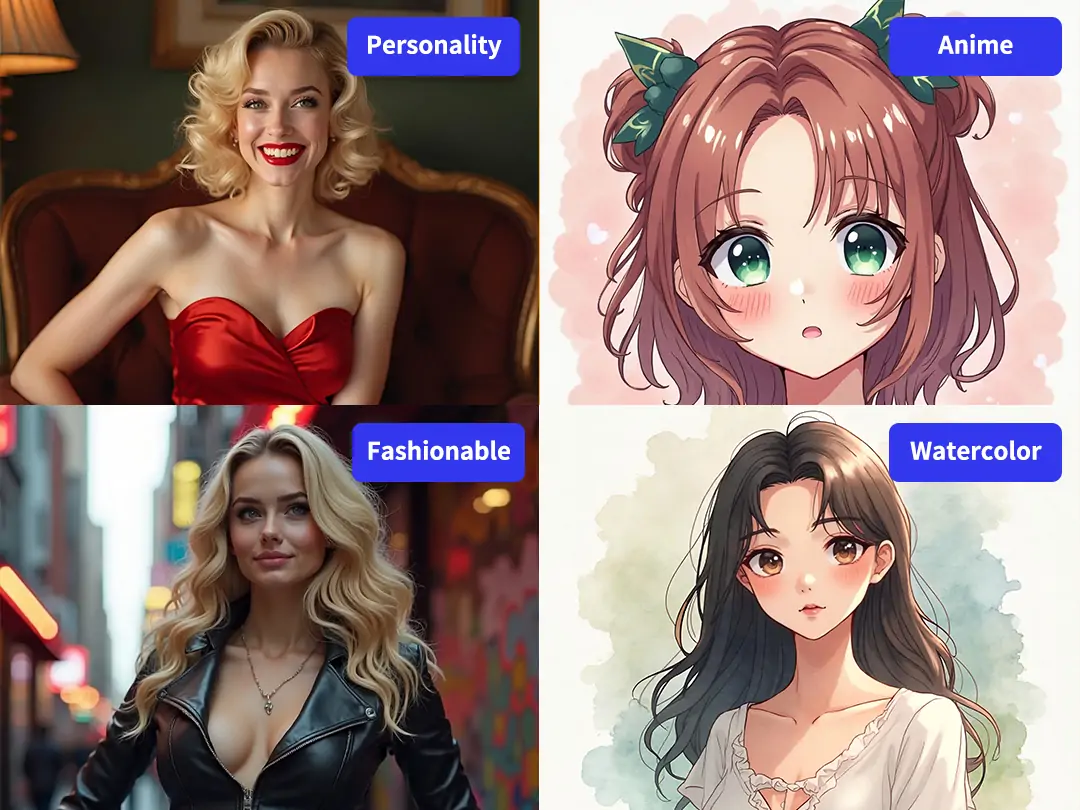
Switch Between Realistic, Soft Anime, and Cinematic Styles
One person may want a realistic AI girlfriend generator for glossy portraits with skin texture and clean light. Another may want a softer anime frame with big color contrast and a more stylized face. Pokecut covers both ends without forcing you into one visual lane, so the same idea can move across looks until it clicks.
If your first draft is close but not there yet, this is also where an AI image generator mindset helps. You keep the character, change the style, and guide the result instead of throwing everything away and starting over.
Edit Your AI Girlfriend More

Change Outfits with Better Control
Use local edits when the character is right but the outfit is wrong. You can change clothes for AI GF scenes, swap in schoolwear, kimono, cheongsam, or office looks, and keep the same face and mood instead of rolling a new image every time.

Move Her into a New Background
The background does not have to stay. Remove it, describe a cafe, neon street, bedroom, or travel view, and let Pokecut rebuild the setting around the same character. This gives your AI girlfriend photo generator result a cleaner story and a stronger sense of place.

Clean up Soft or Blurry Details
When a draft looks good but the details fall apart, use Pokecut to enhance AI girlfriend photos and recover facial texture, edges, and overall sharpness. It helps when you want to save a favorite image instead of settling for a fuzzy export.
Where to Use AI Girlfriend Art?

Make a Personal Wallpaper
A custom wallpaper feels better than another recycled download. Build a 4K portrait with the pose, outfit, and mood you like, then use it as a lock screen or home screen image. That is a simple win for anyone who wants a personal AI girlfriend picture generator result they will actually keep.

Add Visuals to Roleplay
Text-only roleplay can feel thin after a while. A matching character image gives your chats more presence, especially when you want the face, styling, and vibe to line up with the personality you already built. It is a natural next step for users who search for an AI girlfriend creator and want more immersion.

Build Clips and Short Video Assets
Creators can use Pokecut to make repeatable source images for shorts, edits, and story posts. Generate the same character with new angles, expressions, or outfits, then turn those frames into a stronger content set. It is useful when you need an AI girlfriend image generator that supports ongoing series work.

More Ways to Build and Edit Characters
What Users Say About Pokecut AI Girlfriend Generator
People like the control, style range, and follow-up edits.


Mia L.

"I came in with one rough prompt and expected a throwaway image. The first result was decent, but the real win was being able to keep shaping the same character until she matched what I had in mind."
Jason P.
"Most tools give me one pretty face and then I am stuck. Pokecut let me swap outfits and backgrounds without losing the look I already liked, which saved a lot of time."
Nora C.
"I used it for anime-style character art first, then tried a more realistic version of the same girl. That part surprised me. The style switch felt much smoother than I expected."
Ethan R.
"The photo-based workflow helped the most. I uploaded a reference image, adjusted the scene, and got something that felt more directed than random prompt gambling."
Clara D.
"I make short edits for social posts, so being able to keep one character and generate more angles was the main reason I stayed with this tool."
Leo W.
"It is one of the few pages where the follow-up editing matters as much as the first image. That makes the final result feel more usable and less like a lucky accident."
Mia L.
"I came in with one rough prompt and expected a throwaway image. The first result was decent, but the real win was being able to keep shaping the same character until she matched what I had in mind."
Jason P.
"Most tools give me one pretty face and then I am stuck. Pokecut let me swap outfits and backgrounds without losing the look I already liked, which saved a lot of time."
Nora C.
"I used it for anime-style character art first, then tried a more realistic version of the same girl. That part surprised me. The style switch felt much smoother than I expected."
Ethan R.
"The photo-based workflow helped the most. I uploaded a reference image, adjusted the scene, and got something that felt more directed than random prompt gambling."
Clara D.
"I make short edits for social posts, so being able to keep one character and generate more angles was the main reason I stayed with this tool."
Leo W.
"It is one of the few pages where the follow-up editing matters as much as the first image. That makes the final result feel more usable and less like a lucky accident."
Mia L.
"I came in with one rough prompt and expected a throwaway image. The first result was decent, but the real win was being able to keep shaping the same character until she matched what I had in mind."
Jason P.
"Most tools give me one pretty face and then I am stuck. Pokecut let me swap outfits and backgrounds without losing the look I already liked, which saved a lot of time."
Nora C.
"I used it for anime-style character art first, then tried a more realistic version of the same girl. That part surprised me. The style switch felt much smoother than I expected."
Ethan R.
"The photo-based workflow helped the most. I uploaded a reference image, adjusted the scene, and got something that felt more directed than random prompt gambling."
Clara D.
"I make short edits for social posts, so being able to keep one character and generate more angles was the main reason I stayed with this tool."
Leo W.
"It is one of the few pages where the follow-up editing matters as much as the first image. That makes the final result feel more usable and less like a lucky accident."
Mia L.
"I came in with one rough prompt and expected a throwaway image. The first result was decent, but the real win was being able to keep shaping the same character until she matched what I had in mind."
Jason P.
"Most tools give me one pretty face and then I am stuck. Pokecut let me swap outfits and backgrounds without losing the look I already liked, which saved a lot of time."
Nora C.
"I used it for anime-style character art first, then tried a more realistic version of the same girl. That part surprised me. The style switch felt much smoother than I expected."
Ethan R.
"The photo-based workflow helped the most. I uploaded a reference image, adjusted the scene, and got something that felt more directed than random prompt gambling."
Clara D.
"I make short edits for social posts, so being able to keep one character and generate more angles was the main reason I stayed with this tool."
Leo W.
"It is one of the few pages where the follow-up editing matters as much as the first image. That makes the final result feel more usable and less like a lucky accident."
Mia L.
"I came in with one rough prompt and expected a throwaway image. The first result was decent, but the real win was being able to keep shaping the same character until she matched what I had in mind."
Jason P.
"Most tools give me one pretty face and then I am stuck. Pokecut let me swap outfits and backgrounds without losing the look I already liked, which saved a lot of time."
Nora C.
"I used it for anime-style character art first, then tried a more realistic version of the same girl. That part surprised me. The style switch felt much smoother than I expected."
Ethan R.
"The photo-based workflow helped the most. I uploaded a reference image, adjusted the scene, and got something that felt more directed than random prompt gambling."
Clara D.
"I make short edits for social posts, so being able to keep one character and generate more angles was the main reason I stayed with this tool."
Leo W.
"It is one of the few pages where the follow-up editing matters as much as the first image. That makes the final result feel more usable and less like a lucky accident."
Ethan R.
"The photo-based workflow helped the most. I uploaded a reference image, adjusted the scene, and got something that felt more directed than random prompt gambling."
Clara D.
"I make short edits for social posts, so being able to keep one character and generate more angles was the main reason I stayed with this tool."
Leo W.
"It is one of the few pages where the follow-up editing matters as much as the first image. That makes the final result feel more usable and less like a lucky accident."
Mia L.
"I came in with one rough prompt and expected a throwaway image. The first result was decent, but the real win was being able to keep shaping the same character until she matched what I had in mind."
Jason P.
"Most tools give me one pretty face and then I am stuck. Pokecut let me swap outfits and backgrounds without losing the look I already liked, which saved a lot of time."
Nora C.
"I used it for anime-style character art first, then tried a more realistic version of the same girl. That part surprised me. The style switch felt much smoother than I expected."
Ethan R.
"The photo-based workflow helped the most. I uploaded a reference image, adjusted the scene, and got something that felt more directed than random prompt gambling."
Clara D.
"I make short edits for social posts, so being able to keep one character and generate more angles was the main reason I stayed with this tool."
Leo W.
"It is one of the few pages where the follow-up editing matters as much as the first image. That makes the final result feel more usable and less like a lucky accident."
Mia L.
"I came in with one rough prompt and expected a throwaway image. The first result was decent, but the real win was being able to keep shaping the same character until she matched what I had in mind."
Jason P.
"Most tools give me one pretty face and then I am stuck. Pokecut let me swap outfits and backgrounds without losing the look I already liked, which saved a lot of time."
Nora C.
"I used it for anime-style character art first, then tried a more realistic version of the same girl. That part surprised me. The style switch felt much smoother than I expected."
Ethan R.
"The photo-based workflow helped the most. I uploaded a reference image, adjusted the scene, and got something that felt more directed than random prompt gambling."
Clara D.
"I make short edits for social posts, so being able to keep one character and generate more angles was the main reason I stayed with this tool."
Leo W.
"It is one of the few pages where the follow-up editing matters as much as the first image. That makes the final result feel more usable and less like a lucky accident."
Mia L.
"I came in with one rough prompt and expected a throwaway image. The first result was decent, but the real win was being able to keep shaping the same character until she matched what I had in mind."
Jason P.
"Most tools give me one pretty face and then I am stuck. Pokecut let me swap outfits and backgrounds without losing the look I already liked, which saved a lot of time."
Nora C.
"I used it for anime-style character art first, then tried a more realistic version of the same girl. That part surprised me. The style switch felt much smoother than I expected."
Ethan R.
"The photo-based workflow helped the most. I uploaded a reference image, adjusted the scene, and got something that felt more directed than random prompt gambling."
Clara D.
"I make short edits for social posts, so being able to keep one character and generate more angles was the main reason I stayed with this tool."
Leo W.
"It is one of the few pages where the follow-up editing matters as much as the first image. That makes the final result feel more usable and less like a lucky accident."
Mia L.
"I came in with one rough prompt and expected a throwaway image. The first result was decent, but the real win was being able to keep shaping the same character until she matched what I had in mind."
Jason P.
"Most tools give me one pretty face and then I am stuck. Pokecut let me swap outfits and backgrounds without losing the look I already liked, which saved a lot of time."
Nora C.
"I used it for anime-style character art first, then tried a more realistic version of the same girl. That part surprised me. The style switch felt much smoother than I expected."
Ethan R.
"The photo-based workflow helped the most. I uploaded a reference image, adjusted the scene, and got something that felt more directed than random prompt gambling."
Clara D.
"I make short edits for social posts, so being able to keep one character and generate more angles was the main reason I stayed with this tool."
Leo W.
"It is one of the few pages where the follow-up editing matters as much as the first image. That makes the final result feel more usable and less like a lucky accident."
Mia L.
"I came in with one rough prompt and expected a throwaway image. The first result was decent, but the real win was being able to keep shaping the same character until she matched what I had in mind."
Jason P.
"Most tools give me one pretty face and then I am stuck. Pokecut let me swap outfits and backgrounds without losing the look I already liked, which saved a lot of time."
Nora C.
"I used it for anime-style character art first, then tried a more realistic version of the same girl. That part surprised me. The style switch felt much smoother than I expected."
Reviews from: Reddit, Product Hunt, G2, TrustRadius, Google Play, App Store, and more.
Pokecut Trusted by Millions of Leaders and Users

1M+ Users Worldwide
Pokecut generates over 500,000 images every day

#2 on Product Hunt
Pokecut launched and won #2 product of the day

Professional Privacy Protection
Ensure 100% data privacy for every photo

Trusted by Well-known Brands
Apple, Google, PayPal, Stripe, Product Hunt, G2, TrustRadius
Frequently Asked Questions
Will my uploaded photo be used for training or shared?
Your photo is used to generate the result you asked for, but privacy is a fair concern when personal images are involved. Before you upload anything sensitive, check the current Pokecut privacy policy and storage terms on the page so you know how uploads are handled.
Why do hands sometimes look off, and can I fix them?
Hands are still one of the hardest parts for image models, especially when fingers overlap or the pose is cropped. Start with a clearer source image, then use local edits or a new prompt pass to repair the area instead of throwing away the whole picture.
Does the free version add a watermark to exports?
Pokecut provides free credits so you can explore our hot AI girlfriend generator at no cost. Unlike many other tools, Pokecut allows you to download your creations without any watermarks even on the free plan! Upgrading to premium simply unlocks faster generation speeds and unlimited high-resolution downloads for your unique AI GF generator results.
Can I choose a specific outfit or scene for her?
Yes. You can describe a clothing style, mood, setting, or camera feel in the prompt, and you can also edit the result after the first draft. That is useful when you want schoolwear, office clothing, anime scenes, nightlife shots, or a more realistic everyday setting.
Can I post these images on Instagram or TikTok safely?
You can post AI-made images, but platform rules still matter. The safer move is to avoid deceptive claims, misleading identity use, or content that breaks local rules or age policies. Review the latest platform guidelines before publishing if the image looks highly realistic.





