





Viral Instagram Lofi Dusk Filter Online for Free
Give portraits the viral Lofi Dusk mood with a purpose-built effect tuned for soft backlight, dark backgrounds, hazy flash, and cinematic grain. Get a recognizable social-ready look without writing or adjusting a prompt.
✨ No Sign-Up 📱 Cross-Platform 📸 HD & 4K Export 🎛️ Granular Adjustments


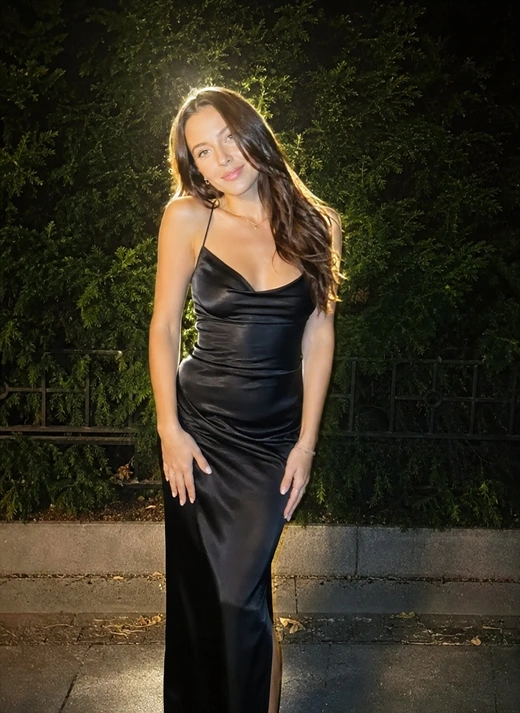


Recreate the Viral Instagram Lofi Dusk Filter Instantly

Try the Instagram Dusk Filter in One Click
The viral Lofi Dusk filter is easy to copy in Pokecut. Upload a portrait and apply the same soft low-light mood without hunting for hidden app effects or writing a complex Lofi Dusk prompt. Your photo keeps its real face shape while the color, grain, and glow move closer to the look people share on TikTok.
Great Lofi Dusk photos do not look overworked. Pokecut protects skin texture, keeps shadows gentle, and adds just enough grain to make the scene feel personal. The result works like an aesthetic filter, but the face still looks like you, just calmer and moodier.
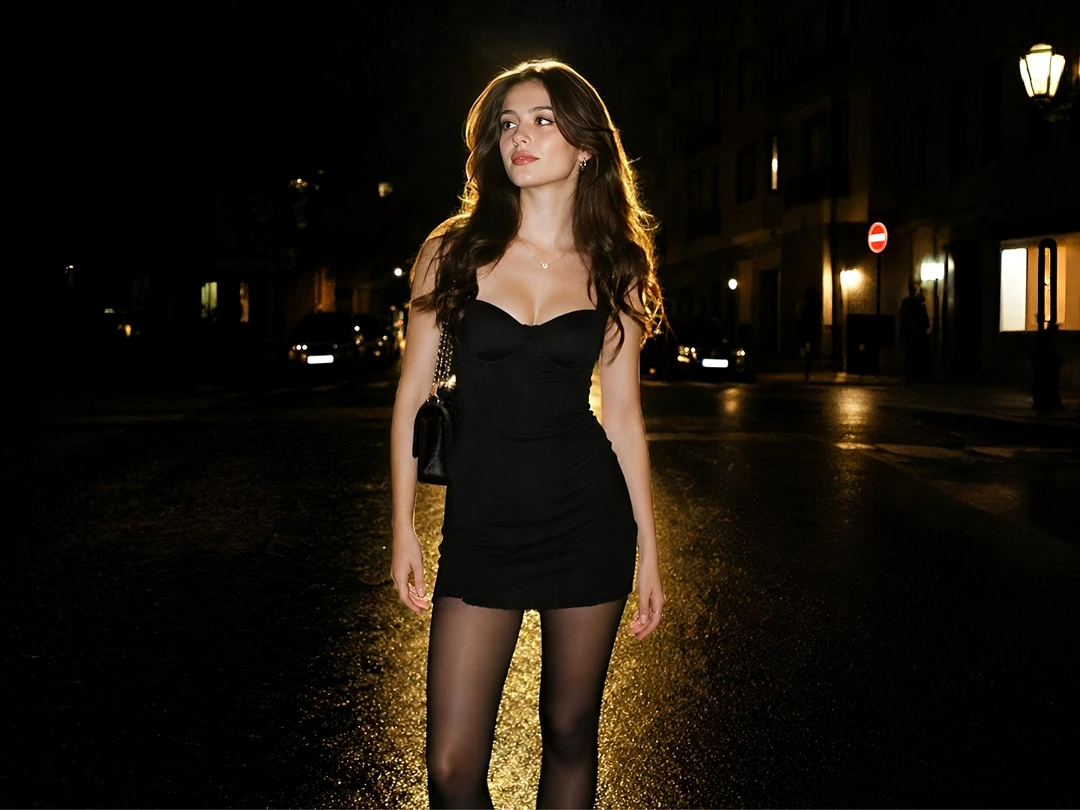
Add Hair Rim Light for a Movie-Like Portrait
Flat portraits get a clearer shape with hair rim lighting. Pokecut reads the edges around hair and clothing, then adds a warm backlight effect that feels like sunset light passing behind the subject. The glow gives the face more depth without drawing a hard outline around every strand.
Indoor selfies and dull snapshots can still turn into a backlit portrait with drama. Pokecut lowers messy backgrounds, adds a natural flash effect, and pulls attention back to the person. The Lofi Dusk effect feels cinematic without making the edit look fake.

Shape Retro Dusk Color with Film Grain
Retro dusk color gives ordinary photos a stronger mood. Pokecut lets you move from amber warmth to blue-hour shadow while keeping the face readable. A street snap, mirror selfie, or quiet portrait can pick up that cinematic dusk feeling without losing the original pose or expression.
Fine cinematic grain keeps the edit from feeling too clean. Pokecut can make a digital shot feel closer to a CCD camera or a 35mm frame, with texture that sits inside the photo instead of floating on top. The Lofi Dusk aesthetic stays soft, rough, and believable.

Adapt Any Light Into the Perfect Dusk Vibe
Bright afternoon sunshine or flat indoor lighting can change into a moody dusk setting. Pokecut reads the original exposure of your photo and automatically cools down bright highlights, deepens heavy shadows, and balances the overall contrast.
The AI shift works on nighttime snapshots just as easily as daytime clicks. Pokecut drops harsh background glares, injects a soft retro flash onto the subject, and builds a believable twilight glow out of thin air. Whether it is a bright beach selfie or a dark bedroom snap, the Lofi Dusk vision stays consistent, rich, and effortless.
Want More Freedom? Try These Custom AI Lofi Dusk Prompts
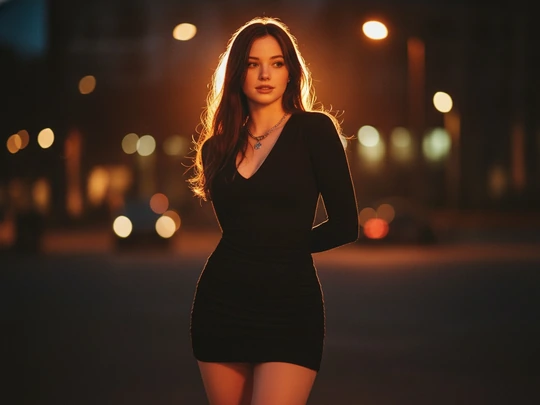
Romantic Soft Glow Dusk
Prompt: A cozy candid portrait of a beautiful girl, Lofi Dusk aesthetic, dramatic rim lighting illuminating her soft hair strands, intense backlighting, cinematic atmosphere. Shot on 35mm vintage camera, subtle film grain, soft warm amber glow contrast against deep dark background. Shallow depth of field, golden hour bokeh, highly detailed, emotional and premium.
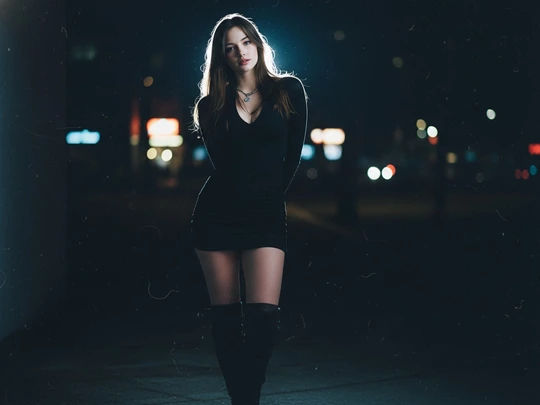
Neon Street Blue-Hour
Prompt: A moody candid portrait of a stylish young woman, Lofi Dusk aesthetic, dramatic rim lighting illuminating his hair strands, intense backlighting, cinematic atmosphere. Shot on 35mm vintage camera, subtle film grain, cool blue-hour shadows contrast against warm neon streetlights bokeh in the deep dark background. Shallow depth of field, highly detailed, raw and premium.
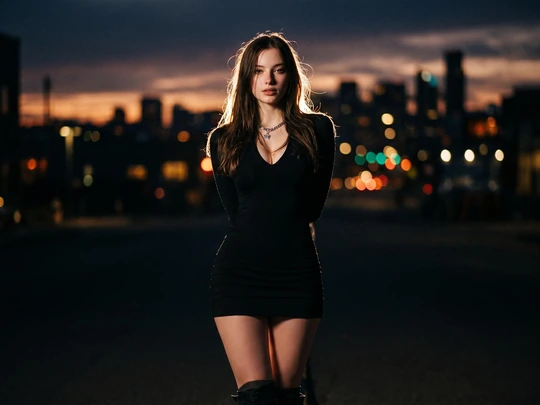
Retro Flash Night Portrait
Prompt: A bold candid portrait of a gorgeous person, Lofi Dusk aesthetic, dramatic rim lighting illuminating the hair strands, intense backlighting, cinematic atmosphere. Shot on 35mm vintage digital camera look, flash photography style with deep sharp shadows, soft glow contrast against deep dark background. Shallow depth of field, bokeh, highly detailed, ready for Instagram.

Cozy Café Lofi Dusk Afterglow
Prompt: A cozy candid portrait of a beautiful person sitting by a café window at dusk, Lofi Dusk aesthetic, dramatic rim lighting illuminating the soft hair strands, intense sunset backlighting, cinematic atmosphere. Shot on a 35mm vintage camera, subtle film grain, warm amber afterglow contrast against a deep shadowy café background. Shallow depth of field, soft tungsten bokeh, highly detailed, intimate and premium.

Beach Twilight Film Portrait
Prompt: A dreamy candid portrait of a beautiful person standing on a beach at twilight, Lofi Dusk aesthetic, dramatic rim lighting illuminating the windblown hair strands, intense backlighting from the fading sunset, cinematic atmosphere. Shot on a 35mm vintage camera, subtle film grain, soft peach afterglow contrast against deep blue-hour shadows. Shallow depth of field, blurred ocean bokeh, highly detailed, emotional and premium.

Couple Portrait in Dusk Light
Prompt: A romantic candid portrait of a beautiful couple standing close together at dusk, Lofi Dusk aesthetic, dramatic rim lighting illuminating their hair strands, intense sunset backlighting, cinematic atmosphere. Shot on a 35mm vintage camera, subtle film grain, warm amber glow contrast against a deep dark background. Shallow depth of field, golden-hour bokeh, natural facial details, intimate and ready for Instagram.
Why Choose Pokecut Over Prompt-Only Tools?
Pokecut is built specifically to recreate the viral Instagram Lofi Dusk aesthetic. While other tools force you to type complex text prompts or rely on unpredictable AI image generation that completely alters your face, Pokecut's dedicated AI filter is trained around the look's signature backlight, dusk tones, film grain, and flash-like texture, giving you a more direct and consistent way to recreate the style than starting from a general-purpose prompt.
How to Use Lofi Dusk Filter
Step 1: Upload Your Portrait Photo
Choose a clear selfie or portrait. Pokecut works best with clear face and hair edges, especially in low-light environments, allowing the dusk lighting filter to shape the glow cleanly.
Step 2: Apply the Lofi Dusk Filter
Apply the trending Lofi Dusk filter with a single click. Pokecut's AI automatically rebuilds the light, color, and grain for a dramatic backlighting effect.
Step 3: Preview and Download the Photo
Check the face, hair glow, and background mood before saving. Download the finished Lofi Dusk photo when it feels natural enough to post.


How Users Experience Pokecut's Lofi Dusk Filter
Creators like how Pokecut turns plain portraits into natural dusk edits without a long setup.


Maya L.

"I tried it on an indoor selfie that looked flat. The rim light made my hair stand out, but my face still looked like me."
Chris W.
"The color feels close to the Lofi Dusk edits I kept seeing on Instagram. I did not have to write a prompt or tweak settings for an hour."
Nora P.
"My favorite part is the grain. It makes phone photos feel less plastic, and the skin does not turn orange."
Ethan R.
"I used Pokecut for a profile photo. The background got darker, the face stayed clear, and the whole image looked more cinematic."
Ava S.
"The filter worked best on portraits with visible hair. The backlight looked soft instead of pasted on."
Leo M.
"I needed a quick photo for a post, and Pokecut gave me the dusk mood without making the picture look heavily edited."
Mia C.
"I would still use a custom prompt for a very specific location, but the dedicated filter is my quicker choice for a recognizable Lofi Dusk mood."
Ethan J.
"The warm rim light made my evening portrait stand out, and I liked that I did not have to describe every lighting detail in a prompt."
Grace W.
"I liked the subtle compact-camera texture. The result felt dusky and imperfect instead of overly polished, which suited my indoor portrait."
Emily R.
"I wanted the Instagram-style dusk glow without hunting for the effect again. The dedicated filter gave my portrait a dark, soft atmosphere in one pass."
Maya L.
"I tried it on an indoor selfie that looked flat. The rim light made my hair stand out, but my face still looked like me."
Chris W.
"The color feels close to the Lofi Dusk edits I kept seeing on Instagram. I did not have to write a prompt or tweak settings for an hour."
Nora P.
"My favorite part is the grain. It makes phone photos feel less plastic, and the skin does not turn orange."
Ethan R.
"I used Pokecut for a profile photo. The background got darker, the face stayed clear, and the whole image looked more cinematic."
Ava S.
"The filter worked best on portraits with visible hair. The backlight looked soft instead of pasted on."
Leo M.
"I needed a quick photo for a post, and Pokecut gave me the dusk mood without making the picture look heavily edited."
Mia C.
"I would still use a custom prompt for a very specific location, but the dedicated filter is my quicker choice for a recognizable Lofi Dusk mood."
Ethan J.
"The warm rim light made my evening portrait stand out, and I liked that I did not have to describe every lighting detail in a prompt."
Grace W.
"I liked the subtle compact-camera texture. The result felt dusky and imperfect instead of overly polished, which suited my indoor portrait."
Emily R.
"I wanted the Instagram-style dusk glow without hunting for the effect again. The dedicated filter gave my portrait a dark, soft atmosphere in one pass."
Maya L.
"I tried it on an indoor selfie that looked flat. The rim light made my hair stand out, but my face still looked like me."
Chris W.
"The color feels close to the Lofi Dusk edits I kept seeing on Instagram. I did not have to write a prompt or tweak settings for an hour."
Nora P.
"My favorite part is the grain. It makes phone photos feel less plastic, and the skin does not turn orange."
Ethan R.
"I used Pokecut for a profile photo. The background got darker, the face stayed clear, and the whole image looked more cinematic."
Ava S.
"The filter worked best on portraits with visible hair. The backlight looked soft instead of pasted on."
Leo M.
"I needed a quick photo for a post, and Pokecut gave me the dusk mood without making the picture look heavily edited."
Mia C.
"I would still use a custom prompt for a very specific location, but the dedicated filter is my quicker choice for a recognizable Lofi Dusk mood."
Ethan J.
"The warm rim light made my evening portrait stand out, and I liked that I did not have to describe every lighting detail in a prompt."
Grace W.
"I liked the subtle compact-camera texture. The result felt dusky and imperfect instead of overly polished, which suited my indoor portrait."
Emily R.
"I wanted the Instagram-style dusk glow without hunting for the effect again. The dedicated filter gave my portrait a dark, soft atmosphere in one pass."
Maya L.
"I tried it on an indoor selfie that looked flat. The rim light made my hair stand out, but my face still looked like me."
Chris W.
"The color feels close to the Lofi Dusk edits I kept seeing on Instagram. I did not have to write a prompt or tweak settings for an hour."
Nora P.
"My favorite part is the grain. It makes phone photos feel less plastic, and the skin does not turn orange."
Ethan R.
"I used Pokecut for a profile photo. The background got darker, the face stayed clear, and the whole image looked more cinematic."
Ava S.
"The filter worked best on portraits with visible hair. The backlight looked soft instead of pasted on."
Leo M.
"I needed a quick photo for a post, and Pokecut gave me the dusk mood without making the picture look heavily edited."
Mia C.
"I would still use a custom prompt for a very specific location, but the dedicated filter is my quicker choice for a recognizable Lofi Dusk mood."
Ethan J.
"The warm rim light made my evening portrait stand out, and I liked that I did not have to describe every lighting detail in a prompt."
Grace W.
"I liked the subtle compact-camera texture. The result felt dusky and imperfect instead of overly polished, which suited my indoor portrait."
Emily R.
"I wanted the Instagram-style dusk glow without hunting for the effect again. The dedicated filter gave my portrait a dark, soft atmosphere in one pass."
Maya L.
"I tried it on an indoor selfie that looked flat. The rim light made my hair stand out, but my face still looked like me."
Chris W.
"The color feels close to the Lofi Dusk edits I kept seeing on Instagram. I did not have to write a prompt or tweak settings for an hour."
Nora P.
"My favorite part is the grain. It makes phone photos feel less plastic, and the skin does not turn orange."
Ethan R.
"I used Pokecut for a profile photo. The background got darker, the face stayed clear, and the whole image looked more cinematic."
Ava S.
"The filter worked best on portraits with visible hair. The backlight looked soft instead of pasted on."
Leo M.
"I needed a quick photo for a post, and Pokecut gave me the dusk mood without making the picture look heavily edited."
Mia C.
"I would still use a custom prompt for a very specific location, but the dedicated filter is my quicker choice for a recognizable Lofi Dusk mood."
Ethan J.
"The warm rim light made my evening portrait stand out, and I liked that I did not have to describe every lighting detail in a prompt."
Grace W.
"I liked the subtle compact-camera texture. The result felt dusky and imperfect instead of overly polished, which suited my indoor portrait."
Emily R.
"I wanted the Instagram-style dusk glow without hunting for the effect again. The dedicated filter gave my portrait a dark, soft atmosphere in one pass."
Ethan R.
"I used Pokecut for a profile photo. The background got darker, the face stayed clear, and the whole image looked more cinematic."
Ava S.
"The filter worked best on portraits with visible hair. The backlight looked soft instead of pasted on."
Leo M.
"I needed a quick photo for a post, and Pokecut gave me the dusk mood without making the picture look heavily edited."
Mia C.
"I would still use a custom prompt for a very specific location, but the dedicated filter is my quicker choice for a recognizable Lofi Dusk mood."
Ethan J.
"The warm rim light made my evening portrait stand out, and I liked that I did not have to describe every lighting detail in a prompt."
Grace W.
"I liked the subtle compact-camera texture. The result felt dusky and imperfect instead of overly polished, which suited my indoor portrait."
Emily R.
"I wanted the Instagram-style dusk glow without hunting for the effect again. The dedicated filter gave my portrait a dark, soft atmosphere in one pass."
Maya L.
"I tried it on an indoor selfie that looked flat. The rim light made my hair stand out, but my face still looked like me."
Chris W.
"The color feels close to the Lofi Dusk edits I kept seeing on Instagram. I did not have to write a prompt or tweak settings for an hour."
Nora P.
"My favorite part is the grain. It makes phone photos feel less plastic, and the skin does not turn orange."
Ethan R.
"I used Pokecut for a profile photo. The background got darker, the face stayed clear, and the whole image looked more cinematic."
Ava S.
"The filter worked best on portraits with visible hair. The backlight looked soft instead of pasted on."
Leo M.
"I needed a quick photo for a post, and Pokecut gave me the dusk mood without making the picture look heavily edited."
Mia C.
"I would still use a custom prompt for a very specific location, but the dedicated filter is my quicker choice for a recognizable Lofi Dusk mood."
Ethan J.
"The warm rim light made my evening portrait stand out, and I liked that I did not have to describe every lighting detail in a prompt."
Grace W.
"I liked the subtle compact-camera texture. The result felt dusky and imperfect instead of overly polished, which suited my indoor portrait."
Emily R.
"I wanted the Instagram-style dusk glow without hunting for the effect again. The dedicated filter gave my portrait a dark, soft atmosphere in one pass."
Maya L.
"I tried it on an indoor selfie that looked flat. The rim light made my hair stand out, but my face still looked like me."
Chris W.
"The color feels close to the Lofi Dusk edits I kept seeing on Instagram. I did not have to write a prompt or tweak settings for an hour."
Nora P.
"My favorite part is the grain. It makes phone photos feel less plastic, and the skin does not turn orange."
Ethan R.
"I used Pokecut for a profile photo. The background got darker, the face stayed clear, and the whole image looked more cinematic."
Ava S.
"The filter worked best on portraits with visible hair. The backlight looked soft instead of pasted on."
Leo M.
"I needed a quick photo for a post, and Pokecut gave me the dusk mood without making the picture look heavily edited."
Mia C.
"I would still use a custom prompt for a very specific location, but the dedicated filter is my quicker choice for a recognizable Lofi Dusk mood."
Ethan J.
"The warm rim light made my evening portrait stand out, and I liked that I did not have to describe every lighting detail in a prompt."
Grace W.
"I liked the subtle compact-camera texture. The result felt dusky and imperfect instead of overly polished, which suited my indoor portrait."
Emily R.
"I wanted the Instagram-style dusk glow without hunting for the effect again. The dedicated filter gave my portrait a dark, soft atmosphere in one pass."
Maya L.
"I tried it on an indoor selfie that looked flat. The rim light made my hair stand out, but my face still looked like me."
Chris W.
"The color feels close to the Lofi Dusk edits I kept seeing on Instagram. I did not have to write a prompt or tweak settings for an hour."
Nora P.
"My favorite part is the grain. It makes phone photos feel less plastic, and the skin does not turn orange."
Ethan R.
"I used Pokecut for a profile photo. The background got darker, the face stayed clear, and the whole image looked more cinematic."
Ava S.
"The filter worked best on portraits with visible hair. The backlight looked soft instead of pasted on."
Leo M.
"I needed a quick photo for a post, and Pokecut gave me the dusk mood without making the picture look heavily edited."
Mia C.
"I would still use a custom prompt for a very specific location, but the dedicated filter is my quicker choice for a recognizable Lofi Dusk mood."
Ethan J.
"The warm rim light made my evening portrait stand out, and I liked that I did not have to describe every lighting detail in a prompt."
Grace W.
"I liked the subtle compact-camera texture. The result felt dusky and imperfect instead of overly polished, which suited my indoor portrait."
Emily R.
"I wanted the Instagram-style dusk glow without hunting for the effect again. The dedicated filter gave my portrait a dark, soft atmosphere in one pass."
Maya L.
"I tried it on an indoor selfie that looked flat. The rim light made my hair stand out, but my face still looked like me."
Chris W.
"The color feels close to the Lofi Dusk edits I kept seeing on Instagram. I did not have to write a prompt or tweak settings for an hour."
Nora P.
"My favorite part is the grain. It makes phone photos feel less plastic, and the skin does not turn orange."
Ethan R.
"I used Pokecut for a profile photo. The background got darker, the face stayed clear, and the whole image looked more cinematic."
Ava S.
"The filter worked best on portraits with visible hair. The backlight looked soft instead of pasted on."
Leo M.
"I needed a quick photo for a post, and Pokecut gave me the dusk mood without making the picture look heavily edited."
Mia C.
"I would still use a custom prompt for a very specific location, but the dedicated filter is my quicker choice for a recognizable Lofi Dusk mood."
Ethan J.
"The warm rim light made my evening portrait stand out, and I liked that I did not have to describe every lighting detail in a prompt."
Grace W.
"I liked the subtle compact-camera texture. The result felt dusky and imperfect instead of overly polished, which suited my indoor portrait."
Emily R.
"I wanted the Instagram-style dusk glow without hunting for the effect again. The dedicated filter gave my portrait a dark, soft atmosphere in one pass."
Maya L.
"I tried it on an indoor selfie that looked flat. The rim light made my hair stand out, but my face still looked like me."
Chris W.
"The color feels close to the Lofi Dusk edits I kept seeing on Instagram. I did not have to write a prompt or tweak settings for an hour."
Nora P.
"My favorite part is the grain. It makes phone photos feel less plastic, and the skin does not turn orange."
Reviews from: Reddit, Product Hunt, G2, TrustRadius, Google Play, App Store, and more.
FAQs About the Lofi Dusk Filter
Why can't I find the Lofi Dusk filter on Instagram?
Instagram effects and Restyle presets may appear differently across accounts, regions, or app versions. Pokecut gives you a browser-based route: upload a portrait, apply the purpose-built Lofi Dusk effect, preview the result, and download it.
Can I use a Lofi Dusk filter online?
Yes. Open Pokecut in a desktop or mobile browser and upload your photo to apply the Lofi Dusk look online. You can work with a selfie, portrait, street photo, or indoor image without installing a separate desktop editor.
Do I need a prompt for the Lofi Dusk effect?
No prompt is required for Pokecut's purpose-built Lofi Dusk effect. Choose the filter when you want the signature direction quickly. The nine optional prompts are available when you want to change the setting, weather, color, or camera mood.
Should I use the filter or a custom prompt?
Use the dedicated filter for a faster, more focused Lofi Dusk result with fewer setup decisions. Choose a custom prompt when a specific café, rainy street, beach, rooftop, outfit, or color palette matters more than speed.
Will the Lofi Dusk filter change my face?
The dedicated effect focuses on lighting and background mood instead of asking you to redescribe the person. It also controls color and grain. Results still depend on the source photo, so review facial and clothing details before downloading.
What photos work best with the Lofi Dusk filter?
Clear portraits with visible hair edges and some space behind the subject make rim light and background separation easier to see. Indoor, evening, and shaded photos are natural fits, while bright photos can still support a more dramatic transformation.
Can I customize the Lofi Dusk look with prompts?
Yes. Copy one of the nine prompts when you want to change the location, weather, palette, backlight, grain, or camera character. Each prompt gives the image-to-image editor a defined scene while asking it to preserve the original composition.
How do I apply the Lofi Dusk filter in Pokecut?
Upload your portrait, select and apply the Lofi Dusk effect, then review the preview and download the finished image. The complete main filter workflow does not require you to create layers or write a prompt.
Which image formats can I upload?
Pokecut accepts JPG, JPEG, PNG, BMP, and WebP uploads. Start with a clear source image where the subject is in focus. Use the preview to check rim light and shadow depth, then inspect color balance and fine portrait details.
Can I download a Lofi Dusk photo without a watermark?
Pokecut supports JPG and PNG downloads at the original resolution without a watermark. AI-generated edits may not always retain every original-resolution detail, so inspect the preview and choose the output that best fits your post or project.
Why Creators and Brands Trust Pokecut

1M+ Users Worldwide
Pokecut generates over 500,000 images every day

#2 on Product Hunt
Pokecut was voted #2 Product of the Day on launch

Professional Privacy Protection
Ensure 100% data privacy for every photo

Trusted by Well-Known Brands
Apple, Google, PayPal, Stripe, Product Hunt, G2, TrustRadius





