





AI Height Editor: Look Taller in Photos Online
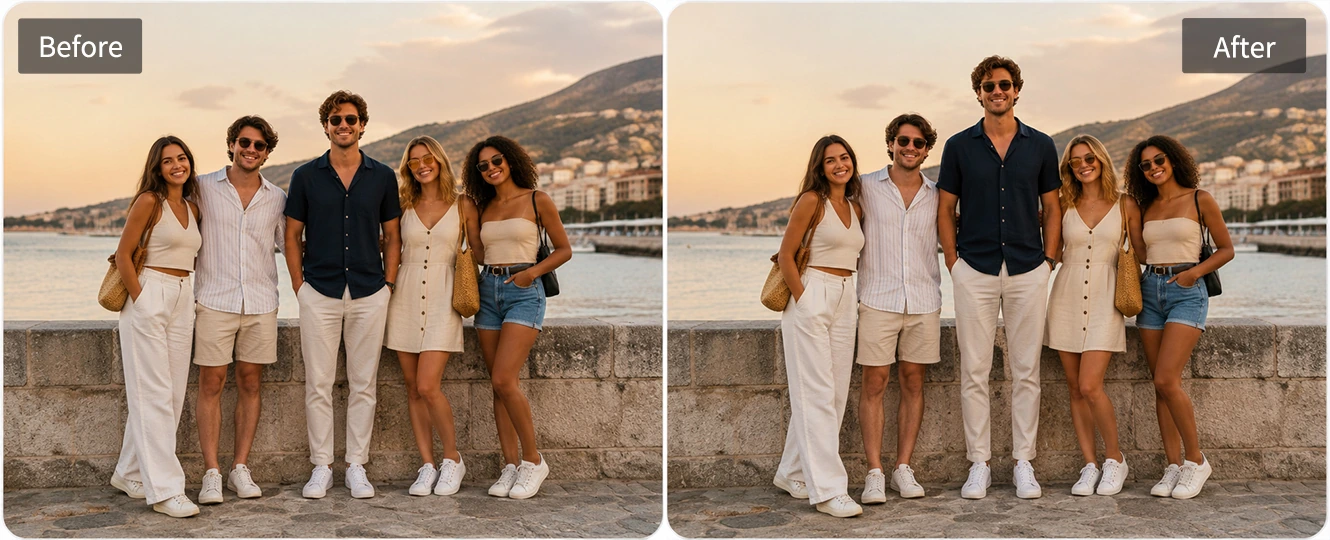
Upload a full-body image and use Pokecut to create a taller, balanced look. Try AI leg lengthening to refine your silhouette for outfit, travel, and profile photos.


How to Look Taller in Photos with Pokecut's Height Editor
Step 1: Upload Your Full-Body Photo
Click the "Upload" button to submit your full-body photo. Ensure the image is clear and evenly lit. This helps in achieving optimal height modification results.
Step 2: Apply the Taller Effect
After uploading your photo, Pokecut will apply the taller filter automatically. No prompt writing or manual height ratio setting is needed. The AI adjusts your body proportions to create a natural taller look.
Step 3: Download Your Transformed Image
Preview the enhanced result, and once satisfied, hit "Download" to save it to your device.


Edit Photos to Look Taller Naturally
Make yourself look taller in photos with a natural, balanced result. Pokecut's body editor helps adjust your body proportions in a subtle way, so your full-body photo looks more confident without obvious editing marks.
Upload your image and apply the taller effect in one click. The AI height editor can refine your shape, improve your silhouette, and keep the result realistic for portraits, outfit photos, travel shots, and social media posts.

AI Leg Lengthening for Natural Proportions
Create longer-looking legs and better body proportions with AI leg lengthening. Pokecut helps extend the leg line naturally, making your full-body photo look taller, cleaner, and more balanced.
This feature is ideal for outfit photos, mirror selfies, beach shots, and fashion-style portraits. With one click, the AI can lengthen your legs while keeping your upper body, shoes, and overall pose looking realistic.

Height Photo Editor Without Stretching the Background
Edit your height without stretching the whole photo. Pokecut works as a smart height photo editor that focuses on the person, helping you look taller while keeping the background clean and natural.
Unlike simple stretch filters, it avoids warped floors, pulled walls, or distorted objects. Use it to create a taller-looking photo that still feels real, polished, and ready to share online.
Where Can You Use a Height Photo Editor to Look Taller?
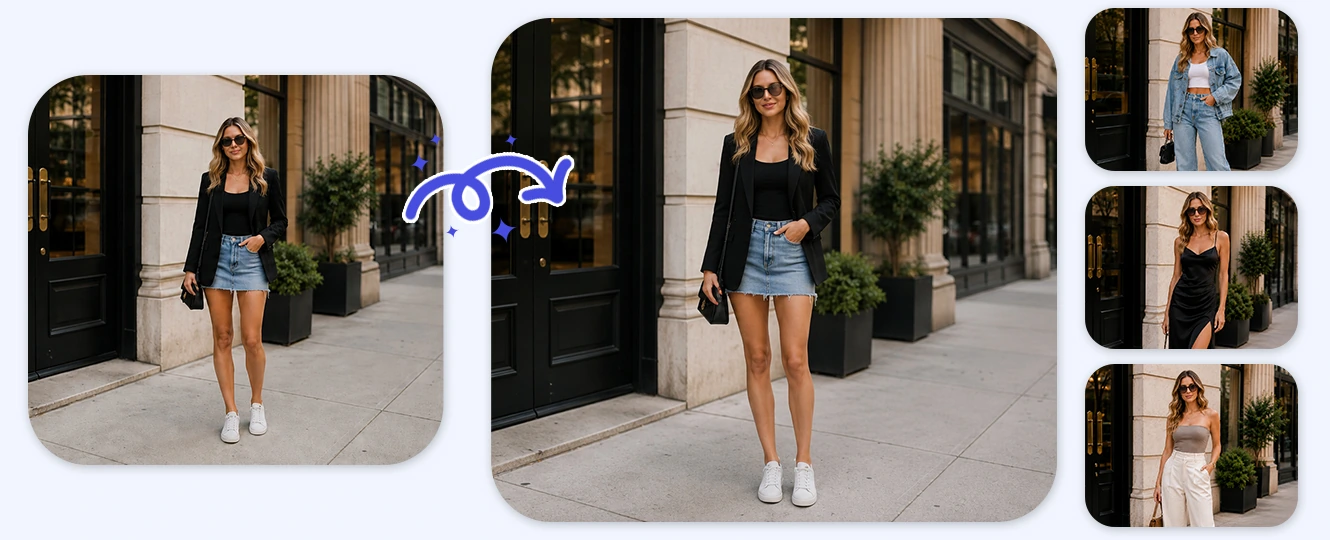
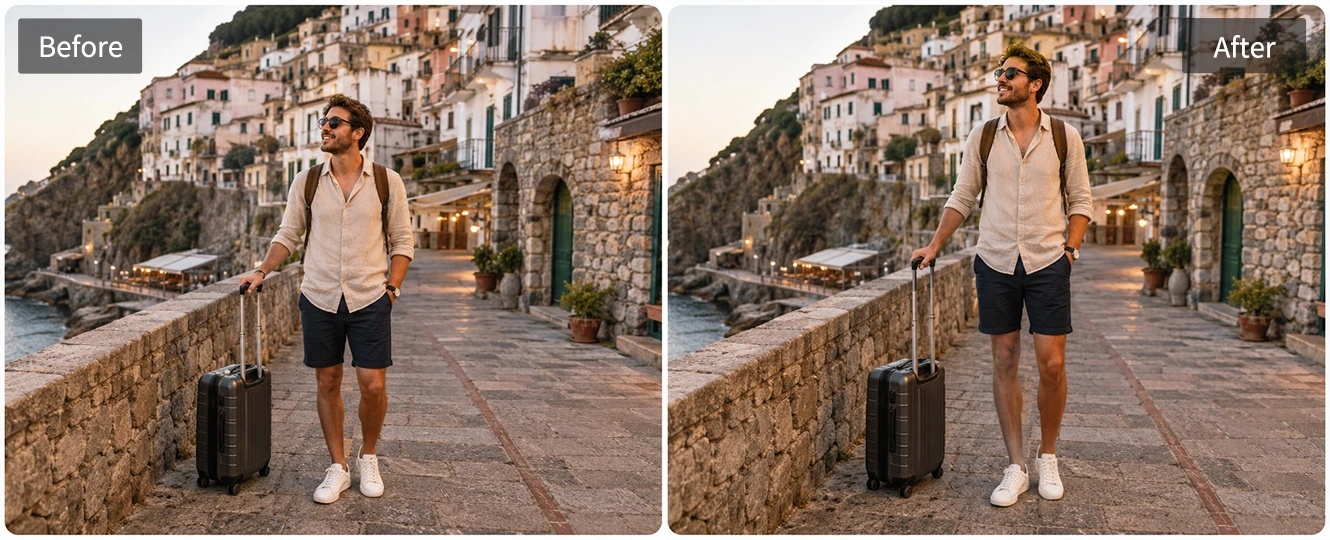
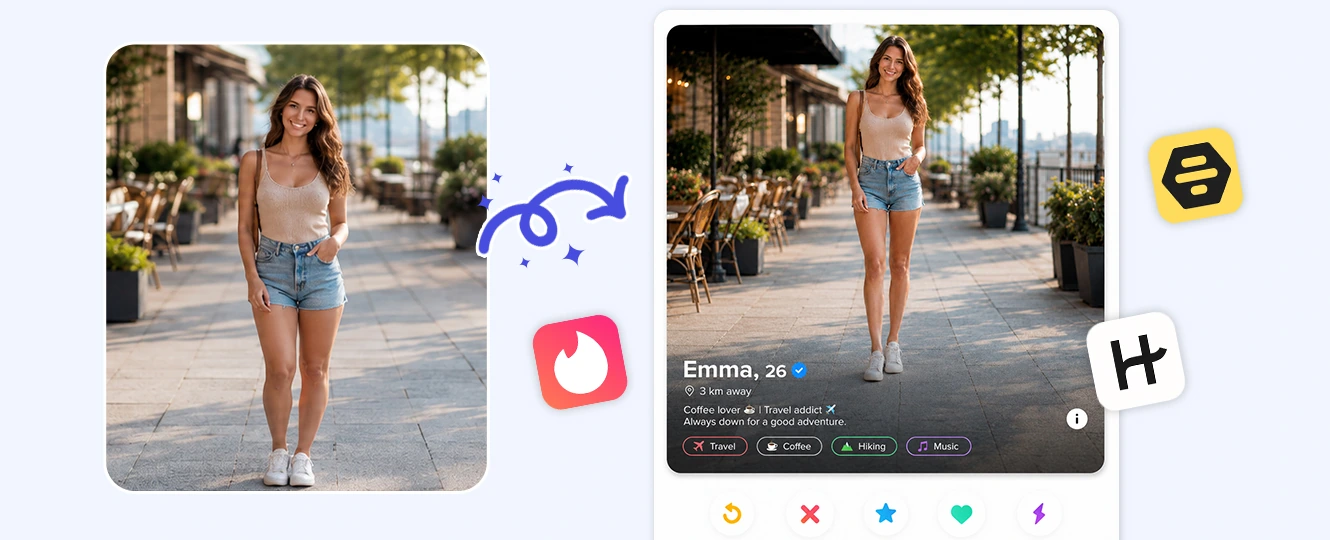
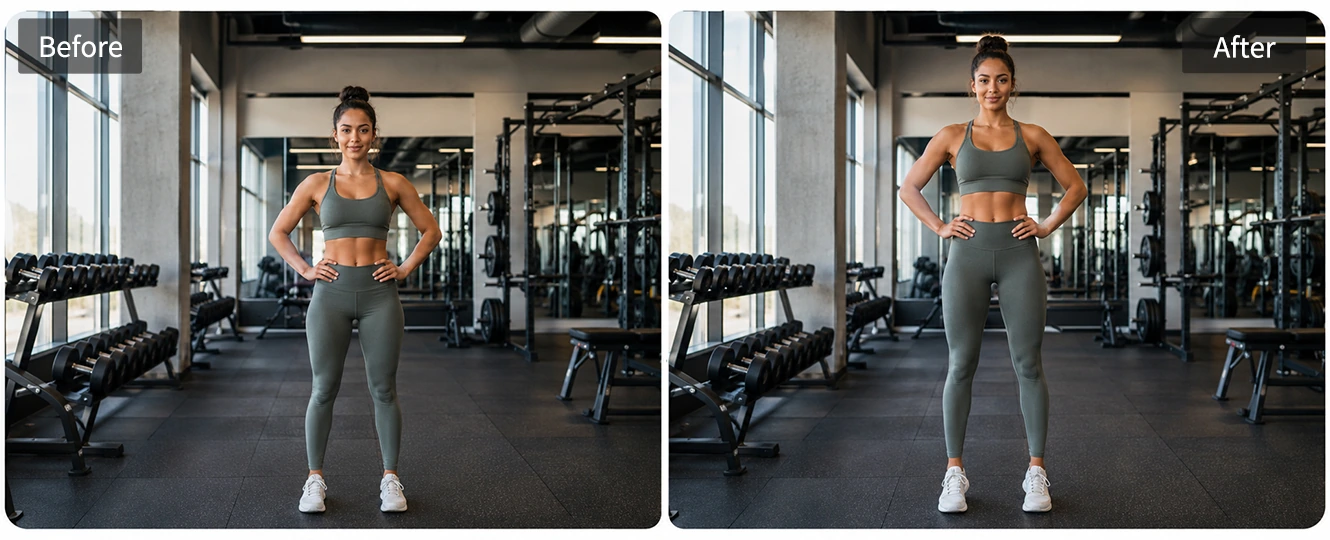

Explore More Features of Pokecut
What Users Say About Pokecut Height Editor
Users like how Pokecut helps them look taller in photos without making the edit feel obvious. From outfit shots to group photos, the one-click taller effect makes full-body pictures look more balanced and natural.


Maya C.

"I used it on an OOTD photo where my legs looked super short. The taller effect fixed the proportion, and the outfit looked much better."
Ethan B.
"My travel photo was cute, but the angle made me look shorter. Pokecut helped me look taller without messing up the background or landmark."
Sofia R.
"I tried it for a dating profile photo, and it looked natural. It didn't make me look fake, just a bit more confident."
Noah B.
"I liked that I didn't need to write a prompt. I uploaded my photo, clicked the effect, and got a cleaner full-body picture."
Lily M.
"The leg lengthening looked way better than a normal stretch app. My shoes and background stayed normal, which made the edit feel real."
Aiden P.
"I used it on a group photo where everyone looked taller than me. The change was subtle, but I looked more balanced beside my friends."
Maya C.
"I used it on an OOTD photo where my legs looked super short. The taller effect fixed the proportion, and the outfit looked much better."
Ethan B.
"My travel photo was cute, but the angle made me look shorter. Pokecut helped me look taller without messing up the background or landmark."
Sofia R.
"I tried it for a dating profile photo, and it looked natural. It didn't make me look fake, just a bit more confident."
Noah B.
"I liked that I didn't need to write a prompt. I uploaded my photo, clicked the effect, and got a cleaner full-body picture."
Lily M.
"The leg lengthening looked way better than a normal stretch app. My shoes and background stayed normal, which made the edit feel real."
Aiden P.
"I used it on a group photo where everyone looked taller than me. The change was subtle, but I looked more balanced beside my friends."
Maya C.
"I used it on an OOTD photo where my legs looked super short. The taller effect fixed the proportion, and the outfit looked much better."
Ethan B.
"My travel photo was cute, but the angle made me look shorter. Pokecut helped me look taller without messing up the background or landmark."
Sofia R.
"I tried it for a dating profile photo, and it looked natural. It didn't make me look fake, just a bit more confident."
Noah B.
"I liked that I didn't need to write a prompt. I uploaded my photo, clicked the effect, and got a cleaner full-body picture."
Lily M.
"The leg lengthening looked way better than a normal stretch app. My shoes and background stayed normal, which made the edit feel real."
Aiden P.
"I used it on a group photo where everyone looked taller than me. The change was subtle, but I looked more balanced beside my friends."
Maya C.
"I used it on an OOTD photo where my legs looked super short. The taller effect fixed the proportion, and the outfit looked much better."
Ethan B.
"My travel photo was cute, but the angle made me look shorter. Pokecut helped me look taller without messing up the background or landmark."
Sofia R.
"I tried it for a dating profile photo, and it looked natural. It didn't make me look fake, just a bit more confident."
Noah B.
"I liked that I didn't need to write a prompt. I uploaded my photo, clicked the effect, and got a cleaner full-body picture."
Lily M.
"The leg lengthening looked way better than a normal stretch app. My shoes and background stayed normal, which made the edit feel real."
Aiden P.
"I used it on a group photo where everyone looked taller than me. The change was subtle, but I looked more balanced beside my friends."
Maya C.
"I used it on an OOTD photo where my legs looked super short. The taller effect fixed the proportion, and the outfit looked much better."
Ethan B.
"My travel photo was cute, but the angle made me look shorter. Pokecut helped me look taller without messing up the background or landmark."
Sofia R.
"I tried it for a dating profile photo, and it looked natural. It didn't make me look fake, just a bit more confident."
Noah B.
"I liked that I didn't need to write a prompt. I uploaded my photo, clicked the effect, and got a cleaner full-body picture."
Lily M.
"The leg lengthening looked way better than a normal stretch app. My shoes and background stayed normal, which made the edit feel real."
Aiden P.
"I used it on a group photo where everyone looked taller than me. The change was subtle, but I looked more balanced beside my friends."
Noah B.
"I liked that I didn't need to write a prompt. I uploaded my photo, clicked the effect, and got a cleaner full-body picture."
Lily M.
"The leg lengthening looked way better than a normal stretch app. My shoes and background stayed normal, which made the edit feel real."
Aiden P.
"I used it on a group photo where everyone looked taller than me. The change was subtle, but I looked more balanced beside my friends."
Maya C.
"I used it on an OOTD photo where my legs looked super short. The taller effect fixed the proportion, and the outfit looked much better."
Ethan B.
"My travel photo was cute, but the angle made me look shorter. Pokecut helped me look taller without messing up the background or landmark."
Sofia R.
"I tried it for a dating profile photo, and it looked natural. It didn't make me look fake, just a bit more confident."
Noah B.
"I liked that I didn't need to write a prompt. I uploaded my photo, clicked the effect, and got a cleaner full-body picture."
Lily M.
"The leg lengthening looked way better than a normal stretch app. My shoes and background stayed normal, which made the edit feel real."
Aiden P.
"I used it on a group photo where everyone looked taller than me. The change was subtle, but I looked more balanced beside my friends."
Maya C.
"I used it on an OOTD photo where my legs looked super short. The taller effect fixed the proportion, and the outfit looked much better."
Ethan B.
"My travel photo was cute, but the angle made me look shorter. Pokecut helped me look taller without messing up the background or landmark."
Sofia R.
"I tried it for a dating profile photo, and it looked natural. It didn't make me look fake, just a bit more confident."
Noah B.
"I liked that I didn't need to write a prompt. I uploaded my photo, clicked the effect, and got a cleaner full-body picture."
Lily M.
"The leg lengthening looked way better than a normal stretch app. My shoes and background stayed normal, which made the edit feel real."
Aiden P.
"I used it on a group photo where everyone looked taller than me. The change was subtle, but I looked more balanced beside my friends."
Maya C.
"I used it on an OOTD photo where my legs looked super short. The taller effect fixed the proportion, and the outfit looked much better."
Ethan B.
"My travel photo was cute, but the angle made me look shorter. Pokecut helped me look taller without messing up the background or landmark."
Sofia R.
"I tried it for a dating profile photo, and it looked natural. It didn't make me look fake, just a bit more confident."
Noah B.
"I liked that I didn't need to write a prompt. I uploaded my photo, clicked the effect, and got a cleaner full-body picture."
Lily M.
"The leg lengthening looked way better than a normal stretch app. My shoes and background stayed normal, which made the edit feel real."
Aiden P.
"I used it on a group photo where everyone looked taller than me. The change was subtle, but I looked more balanced beside my friends."
Maya C.
"I used it on an OOTD photo where my legs looked super short. The taller effect fixed the proportion, and the outfit looked much better."
Ethan B.
"My travel photo was cute, but the angle made me look shorter. Pokecut helped me look taller without messing up the background or landmark."
Sofia R.
"I tried it for a dating profile photo, and it looked natural. It didn't make me look fake, just a bit more confident."
Noah B.
"I liked that I didn't need to write a prompt. I uploaded my photo, clicked the effect, and got a cleaner full-body picture."
Lily M.
"The leg lengthening looked way better than a normal stretch app. My shoes and background stayed normal, which made the edit feel real."
Aiden P.
"I used it on a group photo where everyone looked taller than me. The change was subtle, but I looked more balanced beside my friends."
Maya C.
"I used it on an OOTD photo where my legs looked super short. The taller effect fixed the proportion, and the outfit looked much better."
Ethan B.
"My travel photo was cute, but the angle made me look shorter. Pokecut helped me look taller without messing up the background or landmark."
Sofia R.
"I tried it for a dating profile photo, and it looked natural. It didn't make me look fake, just a bit more confident."
Reviews from: Reddit, Product Hunt, G2, TrustRadius, Google Play, App Store, and more.
Pokecut Trusted by Millions of Leaders and Users

1M+ Users Worldwide
Pokecut generates over 500,000 images every day

#2 on Product Hunt
Pokecut launched and won #2 product of the day

Professional Privacy Protection
Ensure 100% data privacy for every photo

Trusted by Well-known Brands
Apple, Google, PayPal, Stripe, Product Hunt, G2, TrustRadius
FAQs
How can I look taller in photos?
You can look taller in photos by using a lower camera angle, standing with one leg slightly forward, keeping your posture straight, and avoiding top-down shots. If the photo has already been taken, Pokecut's AI height editor can help adjust body proportions and create a naturally taller look.
How does Pokecut ensure natural-looking height increase effects?
Pokecut uses advanced AI algorithms considering body proportions and lighting. This ensures realistic height increase without visible editing marks. Upload your full-body photo and enjoy seamless enhancement.
Can I make only my legs look longer?
Yes. Pokecut can be used as an AI leg lengthening editor. You can ask the AI to make your legs look longer while keeping the upper body, background, and overall photo composition natural.
What kind of photo works best for AI height editing?
A clear full-body photo works best. Choose an image where your legs, shoes, and body outline are visible, and avoid photos with heavy blur, cropped feet, or complex overlapping objects.
How does Pokecut ensure privacy and data security?
Pokecut prioritizes user privacy by employing advanced encryption techniques. All uploaded images are securely processed and not stored on Pokecut's servers. Your data remains confidential and protected throughout the editing process.





