Free Online AI Outpainting Tool to Expand Images
Expand photos beyond the frame with Pokecut's free AI outpainting tool. AI extends the scene with content that matches lighting, color, texture, and perspective. Create more canvas space while keeping your composition intact.
✅ HD Watermark-Free ⚡ Flexible Canvas Control 🔥 Natural Backgrounds



By uploading an image or URL you agree to our Terms of Use and Privacy Policy
Why Use Pokecut for AI Outpainting?

Uncrop Images Automatically with AI
When a tight crop removes part of a subject or scene, Pokecut fills the missing area through AI generative expansion. It reads the visible edges and predicts what belongs outside the frame, so you can recover the intended composition without hand-painting a background, building a mask, or writing a detailed prompt.
Upload the photo, and let the AI image uncrop tool complete the frame. It helps restore clipped portraits, recover product edges, or give a cropped snapshot enough room for a new composition.

Resize and Reframe Images for Any Layout
Turn one source image into the proportions your layout requires. You decide how much room the subject receives and where the added space appears, making it easier to preserve the focal point when a square, portrait, or landscape format demands a different composition.
Drag the image inside the background canvas to adjust its size and position, then choose from 30+ presets or enter custom dimensions to define the added area. Convert landscape to portrait when a horizontal photo needs a vertical layout, so the subject stays visible without another crop.
Add More Background Without Visible Seams
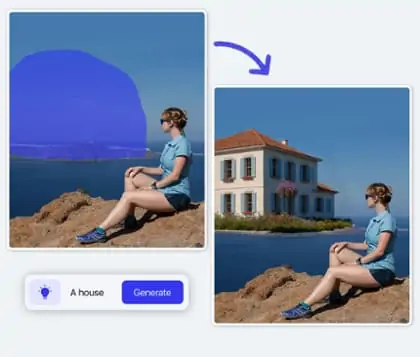
Extend the frame while keeping the added background connected to the original image. Pokecut analyzes nearby lighting, color, texture, and perspective to continue the scene with high-definition detail instead of a visible patch or hard border.
With AI Image Extender, the outpainted photo gives the subject more breathing room while preserving visual continuity. You can use the added space to place copy beside a product, restore cropped portrait edges, or extend a landscape horizon without distracting joins.

Outpaint Any Image Type and Composition
Generate perfectly sized visuals for any creative projects with seamless AI outpainting.Whether the subject is centered, off to one side, tightly cropped, or surrounded by uneven space, Pokecut extends the frame around the original arrangement instead of forcing every photo into the same crop.
You can outpaint portraits, product shots, landscapes, group photos, or casual snapshots in the composition each image needs. Enlarge the outpainted picture for sharper detail. The flexible process adapts to different subjects, framing problems, and creative formats.
What Can You Create with AI Outpainting?


How Does Pokecut Compare with AI Outpainting Tools?
Compare AI outpainting tools by their best use, expansion quality, output access, canvas control, workflow, and pricing.
$69.99/year
$8/month billed yearly
$8/month billed yearly
Paid Asset Downloads
How to Outpaint an Image Online
Step 1: Upload the Image
Upload a clear image by clicking Upload or dragging it into the editor. Choose a photo with visible subject edges and background details for a more controlled expansion.
Step 2: Adjust the Canvas
Drag the original image inside the background canvas to adjust its size and position. This controls which side receives more space and how large the generated area will be. Then select a preset or enter a custom size.
Step 3: Generate and Download
Preview the generated HD result and check the new edges, background continuity, and subject position. Download the version that gives your image the best framing.

What Independent Sources Say About Pokecut
Independent pages describe Pokecut from the perspectives of image expansion, online editing, and practical uncropping workflows.


ToolsApp
Pokecut Free Online Image Resizer is an AI-powered, all-in-one online tool designed to resize images quickly while preserving quality. Leveraging intelligent cropping and expanding, it lets you adjust images to a wide range of preset sizes for personal IDs, social media, and e-commerce product images.
Learn More
DGM News
Pokecut's Uncrop AI tackles this challenge by intelligently predicting and recreating the missing parts of an image. It analyses context, textures and patterns around the cropped area and fills it in with realistic details, so the final picture looks complete instead of patched together.
Learn More
BestofAI
Effortlessly uncrop photo online using AI. Never sacrifice the quality or the look of your visuals.With Pokecut's AI uncrop image tool, you can effortlessly restore your photos with just one click. Experience unparalleled convenience as you upload your image, select your desired size, and let our powerful AI image uncropper do the rest.
Learn MoreWhat Creators Say About AI Outpainting
Creators use a larger canvas to protect subjects, reduce reshoots, and prepare images for different layouts.


Maya Chen

"I extended a tight product crop into a storefront banner and kept enough room for the headline without another photo shoot."
Daniel Brooks
"The direction controls made it easy to add space only where the social layout needed it, while the subject stayed in place."
Sofia Martinez
"I used the extra sky as poster copy space, so the title stayed readable without covering the portrait."
Ethan Wilson
"Extending the table and wall around a product shot gave me a more complete e-commerce composition to work with."
Priya Shah
"One original photo became several wider campaign layouts instead of a series of awkward crops."
Lucas Martin
"The generated background was a useful starting point for a landscape revision, especially when the horizon felt too close to the edge."
Olivia Turner
"I could leave the portrait subject where it was and create a clean area for supporting copy on the left."
Noah Kim
"The workflow is straightforward: upload, choose the canvas direction, review the extension, and keep the version that fits."
Ava Rossi
"It helped me test a wider banner concept before deciding whether a reshoot was actually necessary."
James Lee
"The tool is most useful when the original image is strong but the framing is too tight for the final design."
Maya Chen
"I extended a tight product crop into a storefront banner and kept enough room for the headline without another photo shoot."
Daniel Brooks
"The direction controls made it easy to add space only where the social layout needed it, while the subject stayed in place."
Sofia Martinez
"I used the extra sky as poster copy space, so the title stayed readable without covering the portrait."
Ethan Wilson
"Extending the table and wall around a product shot gave me a more complete e-commerce composition to work with."
Priya Shah
"One original photo became several wider campaign layouts instead of a series of awkward crops."
Lucas Martin
"The generated background was a useful starting point for a landscape revision, especially when the horizon felt too close to the edge."
Olivia Turner
"I could leave the portrait subject where it was and create a clean area for supporting copy on the left."
Noah Kim
"The workflow is straightforward: upload, choose the canvas direction, review the extension, and keep the version that fits."
Ava Rossi
"It helped me test a wider banner concept before deciding whether a reshoot was actually necessary."
James Lee
"The tool is most useful when the original image is strong but the framing is too tight for the final design."
Maya Chen
"I extended a tight product crop into a storefront banner and kept enough room for the headline without another photo shoot."
Daniel Brooks
"The direction controls made it easy to add space only where the social layout needed it, while the subject stayed in place."
Sofia Martinez
"I used the extra sky as poster copy space, so the title stayed readable without covering the portrait."
Ethan Wilson
"Extending the table and wall around a product shot gave me a more complete e-commerce composition to work with."
Priya Shah
"One original photo became several wider campaign layouts instead of a series of awkward crops."
Lucas Martin
"The generated background was a useful starting point for a landscape revision, especially when the horizon felt too close to the edge."
Olivia Turner
"I could leave the portrait subject where it was and create a clean area for supporting copy on the left."
Noah Kim
"The workflow is straightforward: upload, choose the canvas direction, review the extension, and keep the version that fits."
Ava Rossi
"It helped me test a wider banner concept before deciding whether a reshoot was actually necessary."
James Lee
"The tool is most useful when the original image is strong but the framing is too tight for the final design."
Maya Chen
"I extended a tight product crop into a storefront banner and kept enough room for the headline without another photo shoot."
Daniel Brooks
"The direction controls made it easy to add space only where the social layout needed it, while the subject stayed in place."
Sofia Martinez
"I used the extra sky as poster copy space, so the title stayed readable without covering the portrait."
Ethan Wilson
"Extending the table and wall around a product shot gave me a more complete e-commerce composition to work with."
Priya Shah
"One original photo became several wider campaign layouts instead of a series of awkward crops."
Lucas Martin
"The generated background was a useful starting point for a landscape revision, especially when the horizon felt too close to the edge."
Olivia Turner
"I could leave the portrait subject where it was and create a clean area for supporting copy on the left."
Noah Kim
"The workflow is straightforward: upload, choose the canvas direction, review the extension, and keep the version that fits."
Ava Rossi
"It helped me test a wider banner concept before deciding whether a reshoot was actually necessary."
James Lee
"The tool is most useful when the original image is strong but the framing is too tight for the final design."
Maya Chen
"I extended a tight product crop into a storefront banner and kept enough room for the headline without another photo shoot."
Daniel Brooks
"The direction controls made it easy to add space only where the social layout needed it, while the subject stayed in place."
Sofia Martinez
"I used the extra sky as poster copy space, so the title stayed readable without covering the portrait."
Ethan Wilson
"Extending the table and wall around a product shot gave me a more complete e-commerce composition to work with."
Priya Shah
"One original photo became several wider campaign layouts instead of a series of awkward crops."
Lucas Martin
"The generated background was a useful starting point for a landscape revision, especially when the horizon felt too close to the edge."
Olivia Turner
"I could leave the portrait subject where it was and create a clean area for supporting copy on the left."
Noah Kim
"The workflow is straightforward: upload, choose the canvas direction, review the extension, and keep the version that fits."
Ava Rossi
"It helped me test a wider banner concept before deciding whether a reshoot was actually necessary."
James Lee
"The tool is most useful when the original image is strong but the framing is too tight for the final design."
Ethan Wilson
"Extending the table and wall around a product shot gave me a more complete e-commerce composition to work with."
Priya Shah
"One original photo became several wider campaign layouts instead of a series of awkward crops."
Lucas Martin
"The generated background was a useful starting point for a landscape revision, especially when the horizon felt too close to the edge."
Olivia Turner
"I could leave the portrait subject where it was and create a clean area for supporting copy on the left."
Noah Kim
"The workflow is straightforward: upload, choose the canvas direction, review the extension, and keep the version that fits."
Ava Rossi
"It helped me test a wider banner concept before deciding whether a reshoot was actually necessary."
James Lee
"The tool is most useful when the original image is strong but the framing is too tight for the final design."
Maya Chen
"I extended a tight product crop into a storefront banner and kept enough room for the headline without another photo shoot."
Daniel Brooks
"The direction controls made it easy to add space only where the social layout needed it, while the subject stayed in place."
Sofia Martinez
"I used the extra sky as poster copy space, so the title stayed readable without covering the portrait."
Ethan Wilson
"Extending the table and wall around a product shot gave me a more complete e-commerce composition to work with."
Priya Shah
"One original photo became several wider campaign layouts instead of a series of awkward crops."
Lucas Martin
"The generated background was a useful starting point for a landscape revision, especially when the horizon felt too close to the edge."
Olivia Turner
"I could leave the portrait subject where it was and create a clean area for supporting copy on the left."
Noah Kim
"The workflow is straightforward: upload, choose the canvas direction, review the extension, and keep the version that fits."
Ava Rossi
"It helped me test a wider banner concept before deciding whether a reshoot was actually necessary."
James Lee
"The tool is most useful when the original image is strong but the framing is too tight for the final design."
Maya Chen
"I extended a tight product crop into a storefront banner and kept enough room for the headline without another photo shoot."
Daniel Brooks
"The direction controls made it easy to add space only where the social layout needed it, while the subject stayed in place."
Sofia Martinez
"I used the extra sky as poster copy space, so the title stayed readable without covering the portrait."
Ethan Wilson
"Extending the table and wall around a product shot gave me a more complete e-commerce composition to work with."
Priya Shah
"One original photo became several wider campaign layouts instead of a series of awkward crops."
Lucas Martin
"The generated background was a useful starting point for a landscape revision, especially when the horizon felt too close to the edge."
Olivia Turner
"I could leave the portrait subject where it was and create a clean area for supporting copy on the left."
Noah Kim
"The workflow is straightforward: upload, choose the canvas direction, review the extension, and keep the version that fits."
Ava Rossi
"It helped me test a wider banner concept before deciding whether a reshoot was actually necessary."
James Lee
"The tool is most useful when the original image is strong but the framing is too tight for the final design."
Maya Chen
"I extended a tight product crop into a storefront banner and kept enough room for the headline without another photo shoot."
Daniel Brooks
"The direction controls made it easy to add space only where the social layout needed it, while the subject stayed in place."
Sofia Martinez
"I used the extra sky as poster copy space, so the title stayed readable without covering the portrait."
Ethan Wilson
"Extending the table and wall around a product shot gave me a more complete e-commerce composition to work with."
Priya Shah
"One original photo became several wider campaign layouts instead of a series of awkward crops."
Lucas Martin
"The generated background was a useful starting point for a landscape revision, especially when the horizon felt too close to the edge."
Olivia Turner
"I could leave the portrait subject where it was and create a clean area for supporting copy on the left."
Noah Kim
"The workflow is straightforward: upload, choose the canvas direction, review the extension, and keep the version that fits."
Ava Rossi
"It helped me test a wider banner concept before deciding whether a reshoot was actually necessary."
James Lee
"The tool is most useful when the original image is strong but the framing is too tight for the final design."
Maya Chen
"I extended a tight product crop into a storefront banner and kept enough room for the headline without another photo shoot."
Daniel Brooks
"The direction controls made it easy to add space only where the social layout needed it, while the subject stayed in place."
Sofia Martinez
"I used the extra sky as poster copy space, so the title stayed readable without covering the portrait."
Ethan Wilson
"Extending the table and wall around a product shot gave me a more complete e-commerce composition to work with."
Priya Shah
"One original photo became several wider campaign layouts instead of a series of awkward crops."
Lucas Martin
"The generated background was a useful starting point for a landscape revision, especially when the horizon felt too close to the edge."
Olivia Turner
"I could leave the portrait subject where it was and create a clean area for supporting copy on the left."
Noah Kim
"The workflow is straightforward: upload, choose the canvas direction, review the extension, and keep the version that fits."
Ava Rossi
"It helped me test a wider banner concept before deciding whether a reshoot was actually necessary."
James Lee
"The tool is most useful when the original image is strong but the framing is too tight for the final design."
Maya Chen
"I extended a tight product crop into a storefront banner and kept enough room for the headline without another photo shoot."
Daniel Brooks
"The direction controls made it easy to add space only where the social layout needed it, while the subject stayed in place."
Sofia Martinez
"I used the extra sky as poster copy space, so the title stayed readable without covering the portrait."
Reviews from: Reddit, Product Hunt, G2, TrustRadius, Google Play, App Store, and more.
Frequently Asked Questions About AI Outpainting
What is AI outpainting and how does it work?
AI outpainting extends an image beyond its original borders by generating new pixels that follow the surrounding subject, lighting, colors, textures, and perspective. It changes the canvas outside the photo instead of stretching the original pixels.
How can I keep the extended background consistent with my photo?
Upload a clear image with visible edges, lighting, and background texture. Extend one direction at a time, then check the new area for repeated patterns, broken lines, shadow changes, and mismatched perspective before choosing the final version.
Can I expand an image in one direction and choose the size?
Yes. Choose up, down, left, or right expansion and set the target canvas size. Place the subject first, then reserve the added space for headlines, product details, or other layout elements.
Is Pokecut's AI outpainting free to use?
Yes. Pokecut offers AI outpainting online for free, so you can upload an image, choose the expansion direction and canvas size, generate the extended area, and download the result in your browser.
Will AI outpainting keep my image clear?
Yes. The original subject stays at the center of the edit while AI generates the added area around it. Use a high-quality source image and review the subject edge and extended background at full size before downloading.
Can I use AI outpainting on a smartphone or tablet?
Yes. The online AI outpaint tool works in mobile and tablet browsers as well as on desktop computers. Upload a photo, set the canvas, review the generated area, and download the finished image from the same workflow.
Why Creators and Brands Trust Pokecut

1M+ Users Worldwide
Pokecut generates over 500,000 images every day

#2 on Product Hunt
Pokecut was voted #2 Product of the Day on launch

Professional Privacy Protection
Ensure 100% data privacy for every photo

Trusted by Well-Known Brands
Apple, Google, PayPal, Stripe, Product Hunt, G2, TrustRadius