





AI Speech Bubble Generator for Effortless Photo Customization and Memes
Add speech bubbles to photos with our intuitive speech bubble maker. Personalize your images for memes, comics, and marketing with customizable templates and creative text.





By uploading an image or URL you agree to our Terms of Use and Privacy Policy
Use Cases for Speech Bubble Maker
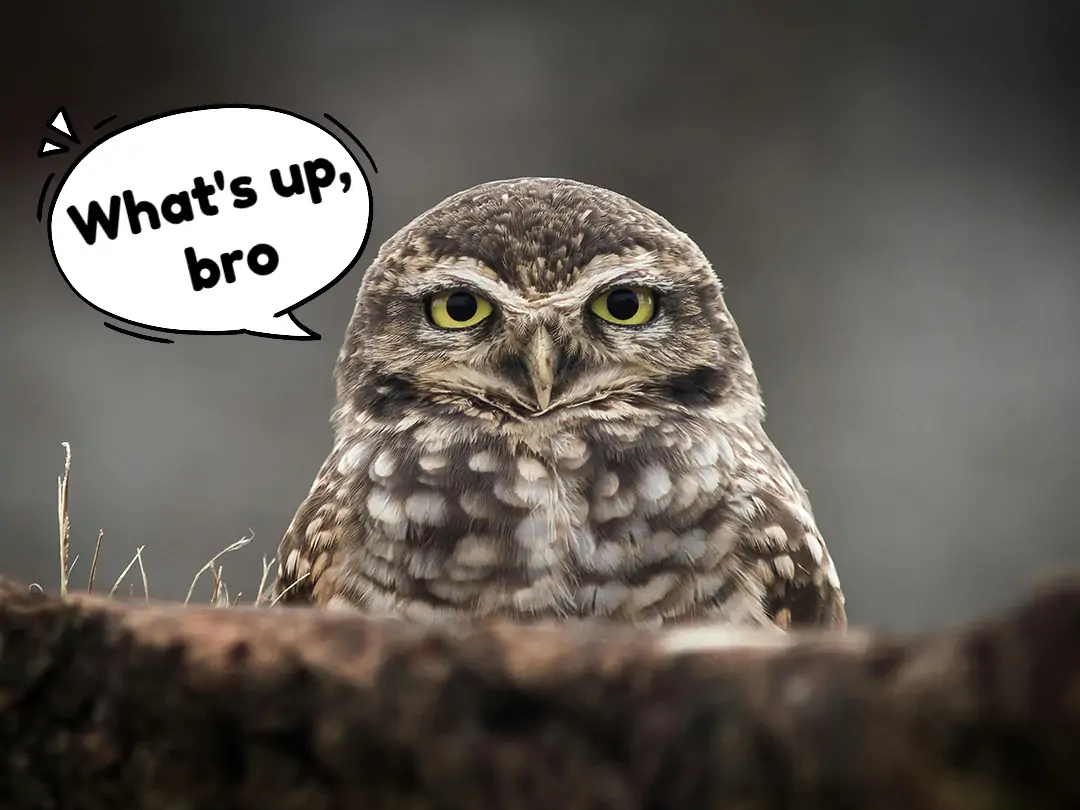
Create Viral Memes with Funny
Tired of sharing dull static images? Make your pet photos or friends' candid moments come alive and speak with Pokecut's speech bubble meme generator. Add text to images using unique and trending meme bubble styles.
Share your creations to Instagram or Reddit and stand out with custom comic speech bubbles. With Pokecut's free online speech bubble tool, transform your photos into funny memes and join the latest viral trends. It's simple to add a speech bubble to photo and make everyone laugh.

Craft Unique Comic Stories
Transform everyday moments into creative comics with our comic speech bubble maker. Use a collage maker to combine multiple photos and add speech balloon for dynamic storytelling. Arrange dialogue in different comic bubble styles and assign lines to your characters with just a few clicks.
Whether you want to capture travel adventures or narrate daily life, Pokecut lets you make a speech bubble and build a personal comic strip easily and affordably.

Highlight Product Sales
Capture attention for your products by adding speech bubbles to photos displays. Position vibrant, comic-inspired or pixel-style bubbles near your featured items to show offers like '50% Off' or 'New Arrival'.
You can easily make pixel speech bubble designs for maximum visual impact. Highlight your products by changing backgrounds and boost engagement with our text bubble generator.
Why Choose Pokecut's as Your Speech Bubble Generator?

Extensive Speech Bubble Sticker Library
Browse a wide range of templates in our speech bubble generator. From pixel speech bubble maker styles to comic speech bubble maker options, Pokecut offers hundreds of unique stickers. Easily match your photo's mood, whether it's for memes or festive greetings, and say goodbye to repetitive assets.

Precise Speech Bubble Pointer Control
Enjoy flexible design with Pokecut's speech bubble creator. Drag and rotate the speech bubble tail to any direction using our bubble chat maker. Achieve perfect alignment for every chat bubble creator scene, and seamlessly blend bubbles with your photo for a natural, custom look.

HD Export Without Watermark
After you finish adding speech bubbles to photos with our cartoon bubble generator, export your creation in full HD with no watermark. Pokecut lets you download sharp, high-quality images for free, even when you add speech bubble to photo meme projects. Enjoy clear results and preserve every detail for any use.
How to Add a Speech Bubble to Your Photo
Step1

Upload Your Photo to Add Chat Bubbles
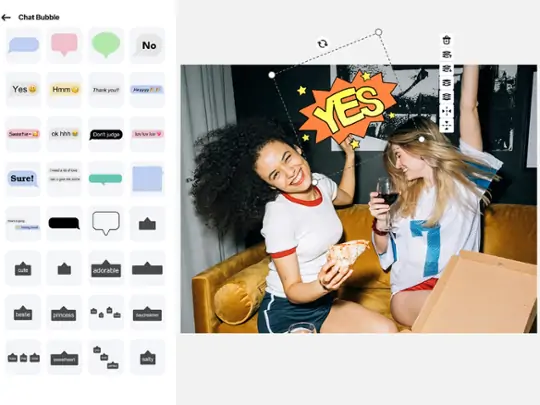
Open our online speech bubble generator, drag and drop any image you like. Click "Sticker>>Chat Bubble" to pick various comic, pixel, thought bubble styles, etc. from our free library.
Step2
Adjust Speech Bubbles in Your Image
Once you select your preferred speech bubble, you can adjust the size, color, font, and position to match your creative idea. If you want to customize the text, you can choose a blank speech bubble, then go to "Text>>Add Text" to add your words.
Step3
Download Photo with Chat Bubbles
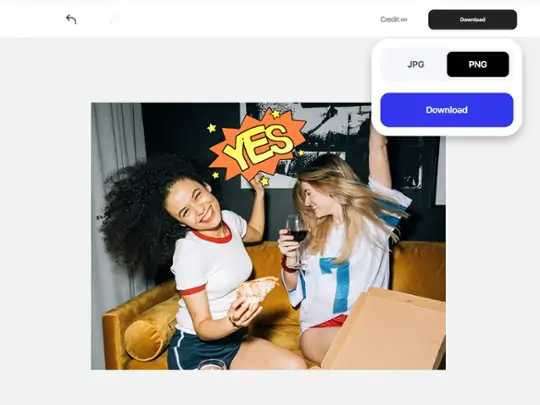
Download your image as a PNG or JPG in HD. Share directly on Discord, Instagram, or any other platform to make fun. It's that easy to make a speech bubble with Pokecut!
Sharper, Freer, and More Exclusive: A Comparative Analysis of Pokecut vs Competitors
Pokecut stands out with 4096px ultra-high resolution output, 100% unlocked premium fonts, and exclusive designer templates. Compared to other tools, it delivers a premium design experience without the paywalls or subscription limits.
Pokecut's Speech Bubble Maker Trusted by Millions of Leaders and Users

1M+ Users Worldwide
Pokecut generate over 500,000 images every day

#2 on Product Hunt
Pokecut launched and won #2 product of the day

Professional Privacy Protection
Ensure 100% data privacy for every photo

Trusted by well-known brands
Apple、Google、Paypal、Stripe、Product hunt、G2、TrustRadius
What Do Users Say About Pokecut's Speech Bubble Generator?
Users love how quick and intuitive it is to create professional, eye-catching speech bubbles for any project.


Jessica H.

"I needed to add speech bubbles for a client’s social campaign and this was so much easier than I expected. The interface is smooth and intuitive, and I liked being able to try different bubble styles. Totally sped up my workflow!"
Brian M.
"Honestly wasn’t sure how this would work with my busy schedule but it was super quick. Just upload, choose a bubble, write your text—it’s done! Made my project look fun and professional with hardly any effort."
Martin G.
"For my Instagram stories, I always struggled with plain text. These speech bubbles made my posts way more eye-catching. Lots of styles to pick from and texts are easy to adjust. Friends even asked what app I used!"
Kristina B.
"Wanted to create some memes for our school group and didn’t want to go through complicated editors. Found this and was surprised how simple it was! All the speech bubbles look great, and I even got creative with the fonts."
Derrick Y.
"I’m always looking for new ways to make my product photos stand out. The speech bubble feature is actually super fun and interactive for social posts. Took less time than I thought and everything looked sharp and clear."
Monica T.
This tool is really helpful for making quick edits, but I wish there were a few more bubble designs to match different moods. Still, it delivered what I needed and the process was way smoother compared to other tools I tried.
Jessica H.
"I needed to add speech bubbles for a client’s social campaign and this was so much easier than I expected. The interface is smooth and intuitive, and I liked being able to try different bubble styles. Totally sped up my workflow!"
Brian M.
"Honestly wasn’t sure how this would work with my busy schedule but it was super quick. Just upload, choose a bubble, write your text—it’s done! Made my project look fun and professional with hardly any effort."
Martin G.
"For my Instagram stories, I always struggled with plain text. These speech bubbles made my posts way more eye-catching. Lots of styles to pick from and texts are easy to adjust. Friends even asked what app I used!"
Kristina B.
"Wanted to create some memes for our school group and didn’t want to go through complicated editors. Found this and was surprised how simple it was! All the speech bubbles look great, and I even got creative with the fonts."
Derrick Y.
"I’m always looking for new ways to make my product photos stand out. The speech bubble feature is actually super fun and interactive for social posts. Took less time than I thought and everything looked sharp and clear."
Monica T.
This tool is really helpful for making quick edits, but I wish there were a few more bubble designs to match different moods. Still, it delivered what I needed and the process was way smoother compared to other tools I tried.
Jessica H.
"I needed to add speech bubbles for a client’s social campaign and this was so much easier than I expected. The interface is smooth and intuitive, and I liked being able to try different bubble styles. Totally sped up my workflow!"
Brian M.
"Honestly wasn’t sure how this would work with my busy schedule but it was super quick. Just upload, choose a bubble, write your text—it’s done! Made my project look fun and professional with hardly any effort."
Martin G.
"For my Instagram stories, I always struggled with plain text. These speech bubbles made my posts way more eye-catching. Lots of styles to pick from and texts are easy to adjust. Friends even asked what app I used!"
Kristina B.
"Wanted to create some memes for our school group and didn’t want to go through complicated editors. Found this and was surprised how simple it was! All the speech bubbles look great, and I even got creative with the fonts."
Derrick Y.
"I’m always looking for new ways to make my product photos stand out. The speech bubble feature is actually super fun and interactive for social posts. Took less time than I thought and everything looked sharp and clear."
Monica T.
This tool is really helpful for making quick edits, but I wish there were a few more bubble designs to match different moods. Still, it delivered what I needed and the process was way smoother compared to other tools I tried.
Jessica H.
"I needed to add speech bubbles for a client’s social campaign and this was so much easier than I expected. The interface is smooth and intuitive, and I liked being able to try different bubble styles. Totally sped up my workflow!"
Brian M.
"Honestly wasn’t sure how this would work with my busy schedule but it was super quick. Just upload, choose a bubble, write your text—it’s done! Made my project look fun and professional with hardly any effort."
Martin G.
"For my Instagram stories, I always struggled with plain text. These speech bubbles made my posts way more eye-catching. Lots of styles to pick from and texts are easy to adjust. Friends even asked what app I used!"
Kristina B.
"Wanted to create some memes for our school group and didn’t want to go through complicated editors. Found this and was surprised how simple it was! All the speech bubbles look great, and I even got creative with the fonts."
Derrick Y.
"I’m always looking for new ways to make my product photos stand out. The speech bubble feature is actually super fun and interactive for social posts. Took less time than I thought and everything looked sharp and clear."
Monica T.
This tool is really helpful for making quick edits, but I wish there were a few more bubble designs to match different moods. Still, it delivered what I needed and the process was way smoother compared to other tools I tried.
Jessica H.
"I needed to add speech bubbles for a client’s social campaign and this was so much easier than I expected. The interface is smooth and intuitive, and I liked being able to try different bubble styles. Totally sped up my workflow!"
Brian M.
"Honestly wasn’t sure how this would work with my busy schedule but it was super quick. Just upload, choose a bubble, write your text—it’s done! Made my project look fun and professional with hardly any effort."
Martin G.
"For my Instagram stories, I always struggled with plain text. These speech bubbles made my posts way more eye-catching. Lots of styles to pick from and texts are easy to adjust. Friends even asked what app I used!"
Kristina B.
"Wanted to create some memes for our school group and didn’t want to go through complicated editors. Found this and was surprised how simple it was! All the speech bubbles look great, and I even got creative with the fonts."
Derrick Y.
"I’m always looking for new ways to make my product photos stand out. The speech bubble feature is actually super fun and interactive for social posts. Took less time than I thought and everything looked sharp and clear."
Monica T.
This tool is really helpful for making quick edits, but I wish there were a few more bubble designs to match different moods. Still, it delivered what I needed and the process was way smoother compared to other tools I tried.
Kristina B.
"Wanted to create some memes for our school group and didn’t want to go through complicated editors. Found this and was surprised how simple it was! All the speech bubbles look great, and I even got creative with the fonts."
Derrick Y.
"I’m always looking for new ways to make my product photos stand out. The speech bubble feature is actually super fun and interactive for social posts. Took less time than I thought and everything looked sharp and clear."
Monica T.
This tool is really helpful for making quick edits, but I wish there were a few more bubble designs to match different moods. Still, it delivered what I needed and the process was way smoother compared to other tools I tried.
Jessica H.
"I needed to add speech bubbles for a client’s social campaign and this was so much easier than I expected. The interface is smooth and intuitive, and I liked being able to try different bubble styles. Totally sped up my workflow!"
Brian M.
"Honestly wasn’t sure how this would work with my busy schedule but it was super quick. Just upload, choose a bubble, write your text—it’s done! Made my project look fun and professional with hardly any effort."
Martin G.
"For my Instagram stories, I always struggled with plain text. These speech bubbles made my posts way more eye-catching. Lots of styles to pick from and texts are easy to adjust. Friends even asked what app I used!"
Kristina B.
"Wanted to create some memes for our school group and didn’t want to go through complicated editors. Found this and was surprised how simple it was! All the speech bubbles look great, and I even got creative with the fonts."
Derrick Y.
"I’m always looking for new ways to make my product photos stand out. The speech bubble feature is actually super fun and interactive for social posts. Took less time than I thought and everything looked sharp and clear."
Monica T.
This tool is really helpful for making quick edits, but I wish there were a few more bubble designs to match different moods. Still, it delivered what I needed and the process was way smoother compared to other tools I tried.
Jessica H.
"I needed to add speech bubbles for a client’s social campaign and this was so much easier than I expected. The interface is smooth and intuitive, and I liked being able to try different bubble styles. Totally sped up my workflow!"
Brian M.
"Honestly wasn’t sure how this would work with my busy schedule but it was super quick. Just upload, choose a bubble, write your text—it’s done! Made my project look fun and professional with hardly any effort."
Martin G.
"For my Instagram stories, I always struggled with plain text. These speech bubbles made my posts way more eye-catching. Lots of styles to pick from and texts are easy to adjust. Friends even asked what app I used!"
Kristina B.
"Wanted to create some memes for our school group and didn’t want to go through complicated editors. Found this and was surprised how simple it was! All the speech bubbles look great, and I even got creative with the fonts."
Derrick Y.
"I’m always looking for new ways to make my product photos stand out. The speech bubble feature is actually super fun and interactive for social posts. Took less time than I thought and everything looked sharp and clear."
Monica T.
This tool is really helpful for making quick edits, but I wish there were a few more bubble designs to match different moods. Still, it delivered what I needed and the process was way smoother compared to other tools I tried.
Jessica H.
"I needed to add speech bubbles for a client’s social campaign and this was so much easier than I expected. The interface is smooth and intuitive, and I liked being able to try different bubble styles. Totally sped up my workflow!"
Brian M.
"Honestly wasn’t sure how this would work with my busy schedule but it was super quick. Just upload, choose a bubble, write your text—it’s done! Made my project look fun and professional with hardly any effort."
Martin G.
"For my Instagram stories, I always struggled with plain text. These speech bubbles made my posts way more eye-catching. Lots of styles to pick from and texts are easy to adjust. Friends even asked what app I used!"
Kristina B.
"Wanted to create some memes for our school group and didn’t want to go through complicated editors. Found this and was surprised how simple it was! All the speech bubbles look great, and I even got creative with the fonts."
Derrick Y.
"I’m always looking for new ways to make my product photos stand out. The speech bubble feature is actually super fun and interactive for social posts. Took less time than I thought and everything looked sharp and clear."
Monica T.
This tool is really helpful for making quick edits, but I wish there were a few more bubble designs to match different moods. Still, it delivered what I needed and the process was way smoother compared to other tools I tried.
Jessica H.
"I needed to add speech bubbles for a client’s social campaign and this was so much easier than I expected. The interface is smooth and intuitive, and I liked being able to try different bubble styles. Totally sped up my workflow!"
Brian M.
"Honestly wasn’t sure how this would work with my busy schedule but it was super quick. Just upload, choose a bubble, write your text—it’s done! Made my project look fun and professional with hardly any effort."
Martin G.
"For my Instagram stories, I always struggled with plain text. These speech bubbles made my posts way more eye-catching. Lots of styles to pick from and texts are easy to adjust. Friends even asked what app I used!"
Kristina B.
"Wanted to create some memes for our school group and didn’t want to go through complicated editors. Found this and was surprised how simple it was! All the speech bubbles look great, and I even got creative with the fonts."
Derrick Y.
"I’m always looking for new ways to make my product photos stand out. The speech bubble feature is actually super fun and interactive for social posts. Took less time than I thought and everything looked sharp and clear."
Monica T.
This tool is really helpful for making quick edits, but I wish there were a few more bubble designs to match different moods. Still, it delivered what I needed and the process was way smoother compared to other tools I tried.
Jessica H.
"I needed to add speech bubbles for a client’s social campaign and this was so much easier than I expected. The interface is smooth and intuitive, and I liked being able to try different bubble styles. Totally sped up my workflow!"
Brian M.
"Honestly wasn’t sure how this would work with my busy schedule but it was super quick. Just upload, choose a bubble, write your text—it’s done! Made my project look fun and professional with hardly any effort."
Martin G.
"For my Instagram stories, I always struggled with plain text. These speech bubbles made my posts way more eye-catching. Lots of styles to pick from and texts are easy to adjust. Friends even asked what app I used!"
Reviews from: Reddit, Product Hunt, G2, TrustRadius, Google Play, App Store, and more.
FAQs about Speech Bubble Maker
How do I add a custom speech bubble to my photo?
Upload your image to Pokecut and select from the comic bubble generator or pixel speech bubble maker. Choose your preferred template, add your text, and adjust the speech balloon maker for perfect placement. Download your edited photo in high quality.
How can I add a speech bubble to my meme image?
Start by uploading your meme to Pokecut's speech bubble meme generator. Pick a speech bubble maker template, type your custom text, and place the bubble where you want. Save your new meme instantly in full quality.
Can I add multiple speech bubbles to one photo?
Yes, Pokecut lets you use the chat bubble creator and bubble chat maker to add several speech bubbles to a single image. Drag and arrange each bubble individually for complex scenes or conversations.
Is Pokecut's speech bubble generator free to use for editing photos?
Pokecut offers a free speech bubble editor with access to various comic bubble generator templates. You can add speech bubbles, customize text, and download high-quality images at no cost.
Can I use Pokecut on my mobile device to create speech bubbles?
Yes, Pokecut is an online speech bubble tool compatible with mobile browsers. Upload your image, use the speech bubble creator, and easily add or edit speech bubbles on your phone.







