





Free WhatsApp Sticker Maker: Turn Photo into Sticker Online
Create custom stickers with Pokecut's WhatsApp sticker editor. Easily turn photos into funny stickers for group chats with AI precision.


By uploading an image or URL you agree to our Terms of Use and Privacy Policy
Which Professional Methods Can You Use to Create WhatsApp Sticker?

Custom Sticker Editor
Easily make WhatsApp sticker assets by uploading your own photos. Pokecut's editor handles the cropping and background removal so your designs look professional every time.

AI Text-to-Sticker Generator
Use the AI sticker generator for WhatsApp to turn simple text descriptions into unique graphics. It is the perfect way to generate original art without needing any drawing skills.

Add Emojis to Photos
Personalize any WhatsApp chatting photo by layering fun emojis or icons onto your images. This simple method helps you express emotions and create engaging content for your friends instantly.
What Can Pokecut's WhatsApp Sticker Maker Do for You?
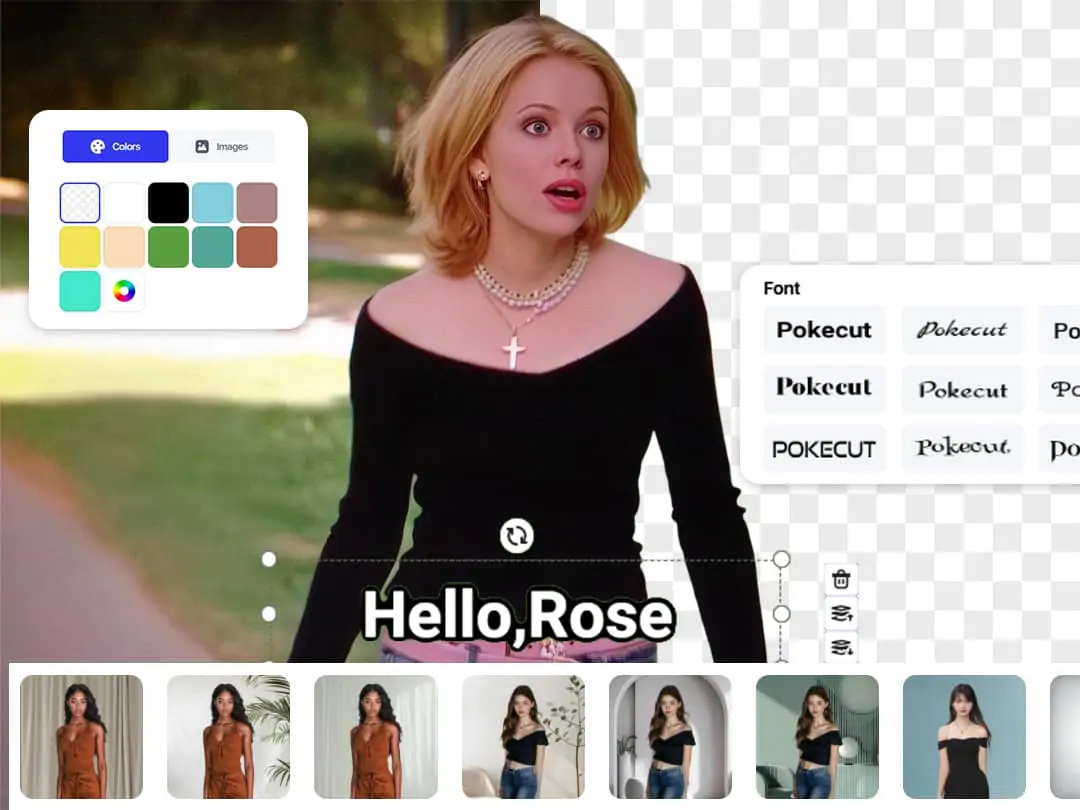
Change Background Automatically
Pokecut's WhatsApp sticker creator uses smart AI to remove messy backgrounds in just one click. You can instantly isolate people, pets, or objects from any photo without needing manual editing skills. This ensures your custom stickers look professional and clean, fitting perfectly into your chat bubbles with 100% transparency.
The tool automatically handles tricky edges like hair or fur to give you a smooth, high quality cutout. This fast process saves you time and lets you focus on creating more engaging content for your friends and family.

Enhance Funny Sticker Image Quality
Pokecut acts as a powerful WhatsApp sticker editor to ensure your stickers are crystal clear. This AI technology automatically sharpens blurry images and enhances resolution to make every detail pop. You will never have to worry about pixelated or low-quality images when sharing your AI stickers in group chats.
Enjoy seamless compatibility across various platforms. Instantly enhance your chats by sharing high-quality with your friends and family. Pokecut ensures every exported sticker maintains its original quality and clarity. If your sticker's resolution isn't clear enough, try our 4K Image Upscaler to instantly enhance image quality.

Add Custom Text to Show Your Idea
You can easily add expressive captions to your creations using Pokecut's online sticker editor. Simply type your message and choose from various trendy fonts and colors to make your funny WhatsApp stickers even more hilarious. Adding text helps you convey emotions or inside jokes that images alone might not capture.
Adding text helps you convey emotions or inside jokes that images alone might not capture.Whether it is a birthday wish or a witty reply, your customized text will make every conversation much more memorable.
Where Can You Use WhatsApp Sticker Maker to Enhance Your Chats?

Personal Selfie Stickers & WhatsApp DP
Stop using generic images and make WhatsApp sticker packs from your own selfies. You can even create an eye-catching WhatsApp DP to show off your unique personality.

Exclusive Pet Meme Packs
Easily create WhatsApp sticker sets featuring your pets' funniest moments. Adding humorous text to your cat or dog photos makes them the most popular emojis in any group chat.

Brand and E-commerce Marketing
Boost your business professionalism by using Pokecut's WhatsApp sticker editor. Custom stickers with your brand logo or sales info help you build closer relationships with your customers.

See Why Millions of Creators Love Pokecut's WhatsApp Sticker Maker
Join a global community of users who have transformed their social experience. Pokecut's users consistently praise the effortless AI removal, the fun customization options, and the professional quality of every sticker created.


Liam F.

"I'm obsessed! I finally figured out how to make stickers on whatsApp of my cat. It's so fast and the edges look incredibly clean and professional."
Sophie B.
"This is the best online whatsApp DP maker I've found. I updated my profile photo in seconds and the quality is much sharper than the original."
Arjun M.
"I use this for every group chat! Making funny whatsApp stickers from my friends' faces is way too easy. We haven't stopped laughing since I started."
Isabella R.
"As a small business owner, I needed to create a sticker for whatsApp with my logo. This tool made it look official without needing a designer."
Marcus G.
"I love that there's no login required. I just wanted to make whatsApp sticker versions of my vacation photos and it worked perfectly on my phone."
Tyler V.
"The AI sticker maker for whatsApp is pure magic. I just typed in an idea and it generated a cool graphic I could use immediately. Super creative!"
Liam F.
"I'm obsessed! I finally figured out how to make stickers on whatsApp of my cat. It's so fast and the edges look incredibly clean and professional."
Sophie B.
"This is the best online whatsApp DP maker I've found. I updated my profile photo in seconds and the quality is much sharper than the original."
Arjun M.
"I use this for every group chat! Making funny whatsApp stickers from my friends' faces is way too easy. We haven't stopped laughing since I started."
Isabella R.
"As a small business owner, I needed to create a sticker for whatsApp with my logo. This tool made it look official without needing a designer."
Marcus G.
"I love that there's no login required. I just wanted to make whatsApp sticker versions of my vacation photos and it worked perfectly on my phone."
Tyler V.
"The AI sticker maker for whatsApp is pure magic. I just typed in an idea and it generated a cool graphic I could use immediately. Super creative!"
Liam F.
"I'm obsessed! I finally figured out how to make stickers on whatsApp of my cat. It's so fast and the edges look incredibly clean and professional."
Sophie B.
"This is the best online whatsApp DP maker I've found. I updated my profile photo in seconds and the quality is much sharper than the original."
Arjun M.
"I use this for every group chat! Making funny whatsApp stickers from my friends' faces is way too easy. We haven't stopped laughing since I started."
Isabella R.
"As a small business owner, I needed to create a sticker for whatsApp with my logo. This tool made it look official without needing a designer."
Marcus G.
"I love that there's no login required. I just wanted to make whatsApp sticker versions of my vacation photos and it worked perfectly on my phone."
Tyler V.
"The AI sticker maker for whatsApp is pure magic. I just typed in an idea and it generated a cool graphic I could use immediately. Super creative!"
Liam F.
"I'm obsessed! I finally figured out how to make stickers on whatsApp of my cat. It's so fast and the edges look incredibly clean and professional."
Sophie B.
"This is the best online whatsApp DP maker I've found. I updated my profile photo in seconds and the quality is much sharper than the original."
Arjun M.
"I use this for every group chat! Making funny whatsApp stickers from my friends' faces is way too easy. We haven't stopped laughing since I started."
Isabella R.
"As a small business owner, I needed to create a sticker for whatsApp with my logo. This tool made it look official without needing a designer."
Marcus G.
"I love that there's no login required. I just wanted to make whatsApp sticker versions of my vacation photos and it worked perfectly on my phone."
Tyler V.
"The AI sticker maker for whatsApp is pure magic. I just typed in an idea and it generated a cool graphic I could use immediately. Super creative!"
Liam F.
"I'm obsessed! I finally figured out how to make stickers on whatsApp of my cat. It's so fast and the edges look incredibly clean and professional."
Sophie B.
"This is the best online whatsApp DP maker I've found. I updated my profile photo in seconds and the quality is much sharper than the original."
Arjun M.
"I use this for every group chat! Making funny whatsApp stickers from my friends' faces is way too easy. We haven't stopped laughing since I started."
Isabella R.
"As a small business owner, I needed to create a sticker for whatsApp with my logo. This tool made it look official without needing a designer."
Marcus G.
"I love that there's no login required. I just wanted to make whatsApp sticker versions of my vacation photos and it worked perfectly on my phone."
Tyler V.
"The AI sticker maker for whatsApp is pure magic. I just typed in an idea and it generated a cool graphic I could use immediately. Super creative!"
Isabella R.
"As a small business owner, I needed to create a sticker for whatsApp with my logo. This tool made it look official without needing a designer."
Marcus G.
"I love that there's no login required. I just wanted to make whatsApp sticker versions of my vacation photos and it worked perfectly on my phone."
Tyler V.
"The AI sticker maker for whatsApp is pure magic. I just typed in an idea and it generated a cool graphic I could use immediately. Super creative!"
Liam F.
"I'm obsessed! I finally figured out how to make stickers on whatsApp of my cat. It's so fast and the edges look incredibly clean and professional."
Sophie B.
"This is the best online whatsApp DP maker I've found. I updated my profile photo in seconds and the quality is much sharper than the original."
Arjun M.
"I use this for every group chat! Making funny whatsApp stickers from my friends' faces is way too easy. We haven't stopped laughing since I started."
Isabella R.
"As a small business owner, I needed to create a sticker for whatsApp with my logo. This tool made it look official without needing a designer."
Marcus G.
"I love that there's no login required. I just wanted to make whatsApp sticker versions of my vacation photos and it worked perfectly on my phone."
Tyler V.
"The AI sticker maker for whatsApp is pure magic. I just typed in an idea and it generated a cool graphic I could use immediately. Super creative!"
Liam F.
"I'm obsessed! I finally figured out how to make stickers on whatsApp of my cat. It's so fast and the edges look incredibly clean and professional."
Sophie B.
"This is the best online whatsApp DP maker I've found. I updated my profile photo in seconds and the quality is much sharper than the original."
Arjun M.
"I use this for every group chat! Making funny whatsApp stickers from my friends' faces is way too easy. We haven't stopped laughing since I started."
Isabella R.
"As a small business owner, I needed to create a sticker for whatsApp with my logo. This tool made it look official without needing a designer."
Marcus G.
"I love that there's no login required. I just wanted to make whatsApp sticker versions of my vacation photos and it worked perfectly on my phone."
Tyler V.
"The AI sticker maker for whatsApp is pure magic. I just typed in an idea and it generated a cool graphic I could use immediately. Super creative!"
Liam F.
"I'm obsessed! I finally figured out how to make stickers on whatsApp of my cat. It's so fast and the edges look incredibly clean and professional."
Sophie B.
"This is the best online whatsApp DP maker I've found. I updated my profile photo in seconds and the quality is much sharper than the original."
Arjun M.
"I use this for every group chat! Making funny whatsApp stickers from my friends' faces is way too easy. We haven't stopped laughing since I started."
Isabella R.
"As a small business owner, I needed to create a sticker for whatsApp with my logo. This tool made it look official without needing a designer."
Marcus G.
"I love that there's no login required. I just wanted to make whatsApp sticker versions of my vacation photos and it worked perfectly on my phone."
Tyler V.
"The AI sticker maker for whatsApp is pure magic. I just typed in an idea and it generated a cool graphic I could use immediately. Super creative!"
Liam F.
"I'm obsessed! I finally figured out how to make stickers on whatsApp of my cat. It's so fast and the edges look incredibly clean and professional."
Sophie B.
"This is the best online whatsApp DP maker I've found. I updated my profile photo in seconds and the quality is much sharper than the original."
Arjun M.
"I use this for every group chat! Making funny whatsApp stickers from my friends' faces is way too easy. We haven't stopped laughing since I started."
Isabella R.
"As a small business owner, I needed to create a sticker for whatsApp with my logo. This tool made it look official without needing a designer."
Marcus G.
"I love that there's no login required. I just wanted to make whatsApp sticker versions of my vacation photos and it worked perfectly on my phone."
Tyler V.
"The AI sticker maker for whatsApp is pure magic. I just typed in an idea and it generated a cool graphic I could use immediately. Super creative!"
Liam F.
"I'm obsessed! I finally figured out how to make stickers on whatsApp of my cat. It's so fast and the edges look incredibly clean and professional."
Sophie B.
"This is the best online whatsApp DP maker I've found. I updated my profile photo in seconds and the quality is much sharper than the original."
Arjun M.
"I use this for every group chat! Making funny whatsApp stickers from my friends' faces is way too easy. We haven't stopped laughing since I started."
Reviews from: Reddit, Product Hunt, G2, TrustRadius, Google Play, App Store, and more.
Pokecut Trusted by Millions of Leaders and Users

1M+ Users Worldwide
Pokecut generates over 500,000 images every day

#2 on Product Hunt
Pokecut launched and won #2 product of the day

Professional Privacy Protection
Ensure 100% data privacy for every photo

Trusted by Well-known Brands
Apple, Google, PayPal, Stripe, Product Hunt, G2, TrustRadius
FAQs About Pokecut's WhatsApp Sticker Editor
What is the best size for a WhatsApp sticker?
WhatsApp requires stickers to be exactly 512 x 512 pixels. Pokecut's WhatsApp sticker tool can help you resize your images to these exact specifications, ensuring your photos aren't blurry or stretched when you upload them to your profile.
Do I need to install any software to use Pokecut's Sticker Maker?
No, Pokecut's WhatsApp Sticker Maker is completely web-based. You can create stickers directly from your browser without installing any additional software or apps.
What image formats are supported for sticker creation?
You can upload popular image formats such as JPG, PNG, and WebP. For best results, we recommend using high-resolution images with a transparent or solid background.
Is my privacy protected when I upload photos to Pokecut?
Your privacy is Pokecut's priority. As a secure online sticker maker, we do not store your personal images on our servers longer than necessary for the editing process. Your photos are encrypted and are never shared with third parties or used for other purposes.
Can I use Pokeuct's WhatsApp sticker editor to make stickers from text?
Yes! Pokecut features an AI sticker generator. Simply type a description like "a cool cat wearing sunglasses" into prompt box, and the AI will create a unique image from scratch that you can instantly convert into a funny WhatsApp sticker.





