





Free Online DV Photo Tool: Simplify Green Card Photo Uploads
Use Pokecut DV loterry photo tool to crop, clean, and prepare a 600x600 DV Lottery photo that follows green card upload rules with less guesswork.





By uploading an image or URL you agree to our Terms of Use and Privacy Policy
What You Get With Pokecut's DV Photo Tool?
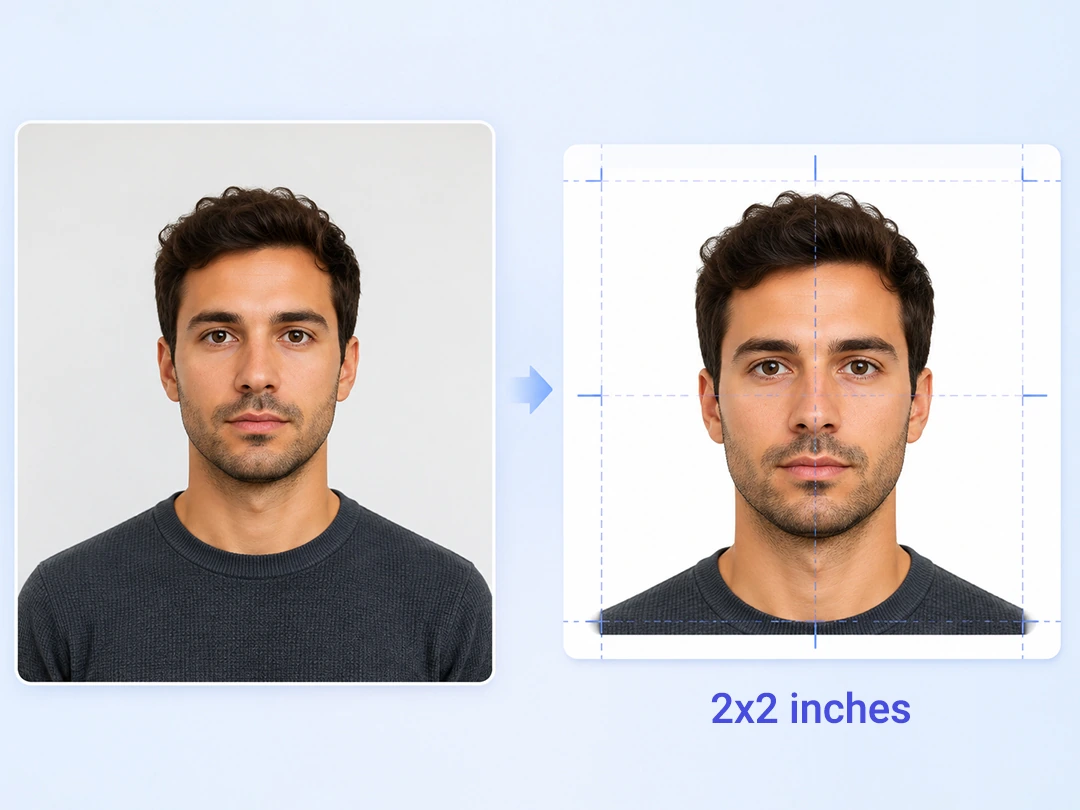
Create Official DV Photos in Seconds
Upload one photo and Pokecut turns it into a 600x600 digital file built for the DV Lottery photo upload page. The hard parts, like head size, eye position, crop ratio, file size, and square framing, are handled inside this green card photo editor so you do not have to measure your face on the screen or guess by feel.
The DV photo tool reads facial landmarks, centers the head, and keeps the face within the common 50% to 69% range required by official guidance. If your original shot is slightly off angle, the tool still helps you prepare a green card photo that is easier to submit without another round of manual cropping.
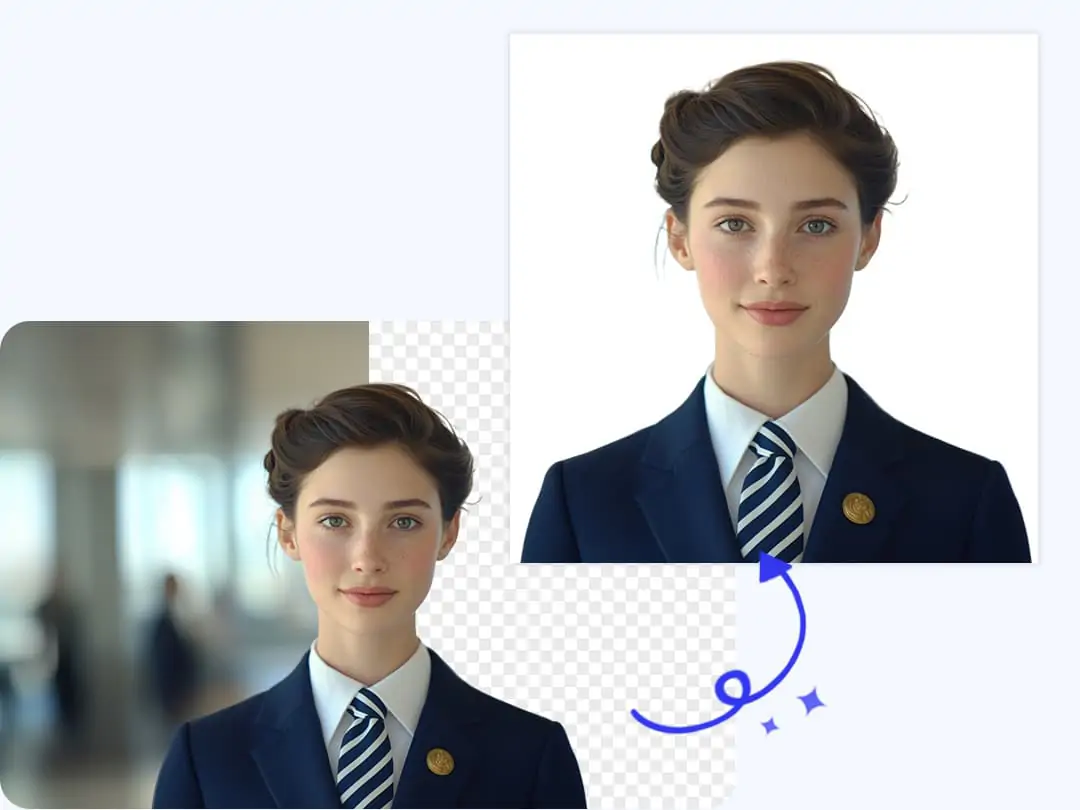
Get White Background and Fix Shadows
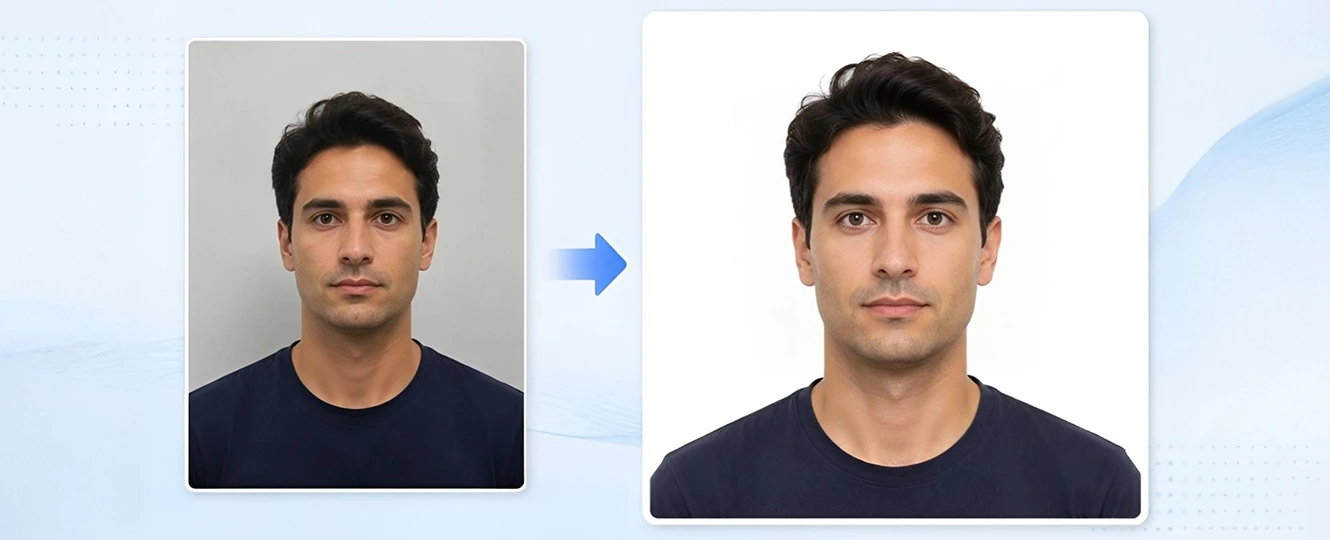
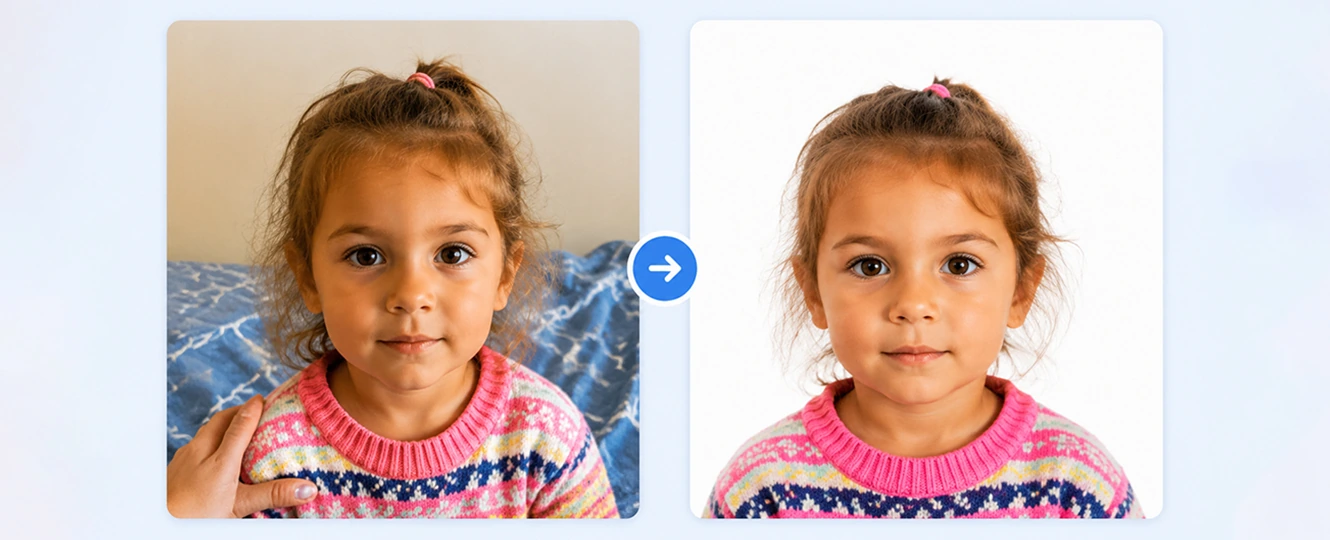
A green card photo can fail for a reason that looks tiny on your screen: a gray wall, a shadow behind the head, or a messy edge around the hair. Pokecut detects the person in the photo, separates the background, and helps you change the photo background to clean white or off-white without asking you to draw a mask by hand.
It also remove photo shadows near the face or shoulders when home lighting gets in the way. The result feels closer to a simple studio ID photo, even if the original was taken in a living room, at a desk, or beside a plain wall that was not quite plain enough.
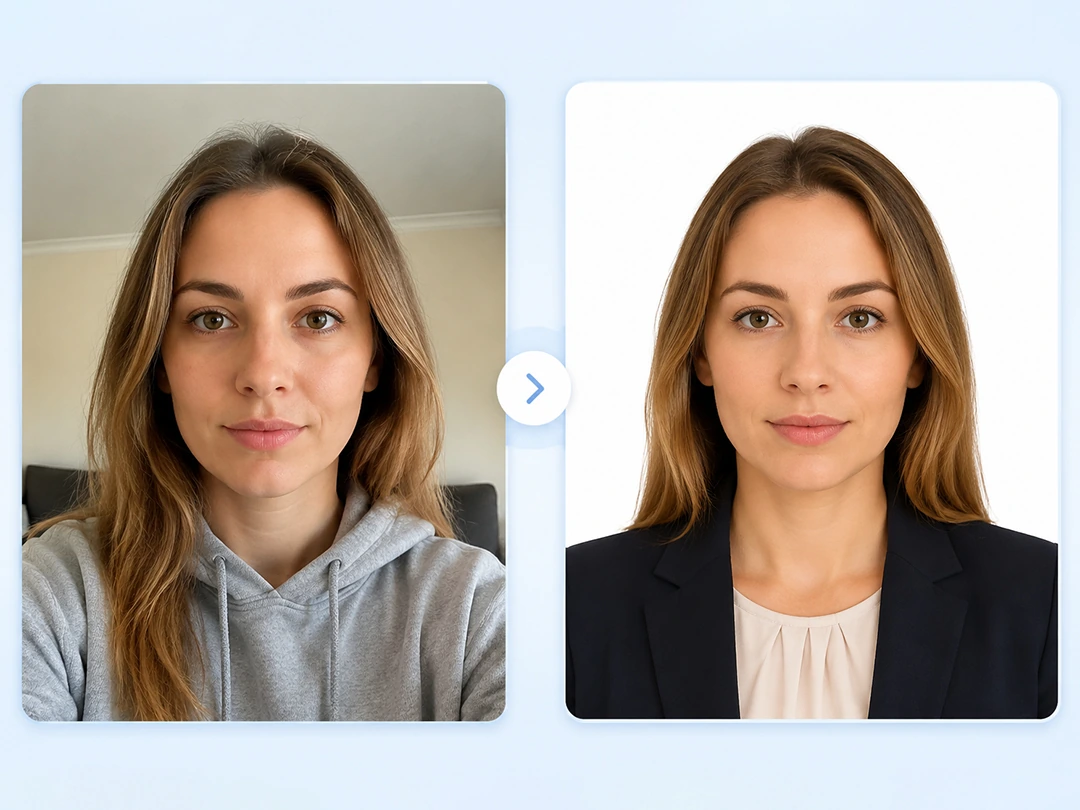
Change Into Formal Attire for Applications
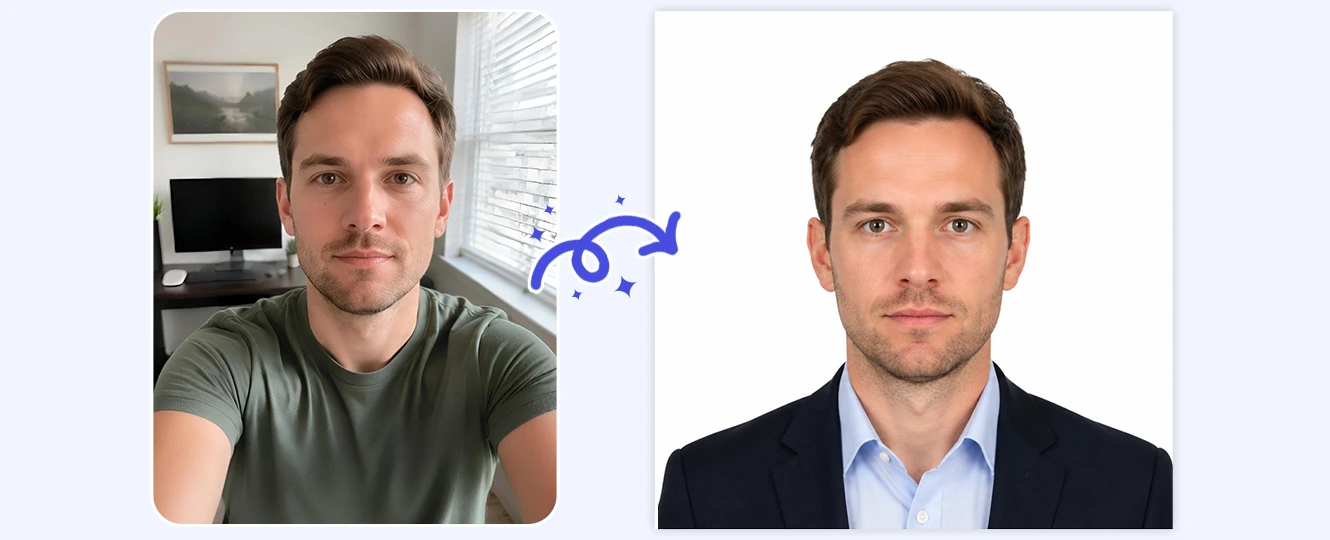
If the best face photo you have was taken in a hoodie or a pale T-shirt, the file may still look too casual or blend into the white background. Pokecut can help you change into formal attire by adding a neat dark jacket or shirt that fits the neck and shoulders without a pasted-on look.
This is useful when you need to submit soon and do not want to book a studio just for clothing. Upload a clear selfie or daily photo, let the tool rebuild the outfit area, and keep the final image serious enough for a government form while still looking like you.
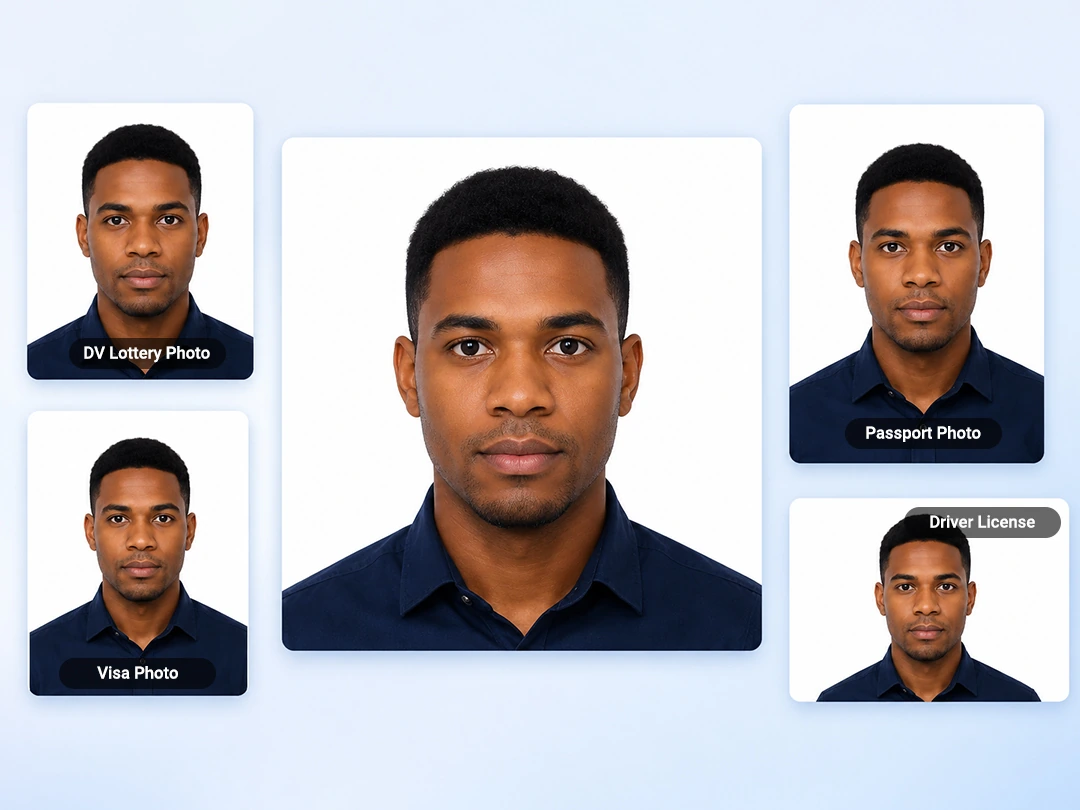
Use More ID Photo Templates When Needed
Pokecut is not limited to one green card size. The page includes official-style presets for people who also need a passport, visa, driver license, or another ID photo after finishing the DV Lottery file. If you want a broader workflow, the ID photo maker helps you move between common document formats without starting from zero each time.
That matters when one family is preparing several applications at once. You can make a child's photo, adjust an adult headshot, and then switch to another preset with less research into each country's photo rules. The tool keeps the choices simple, so the work feels like editing a photo, not reading a government PDF.
Perfect DV Photo Tool for Every Situation
How to Use Pokecut's DV Lottery Photo Tool?
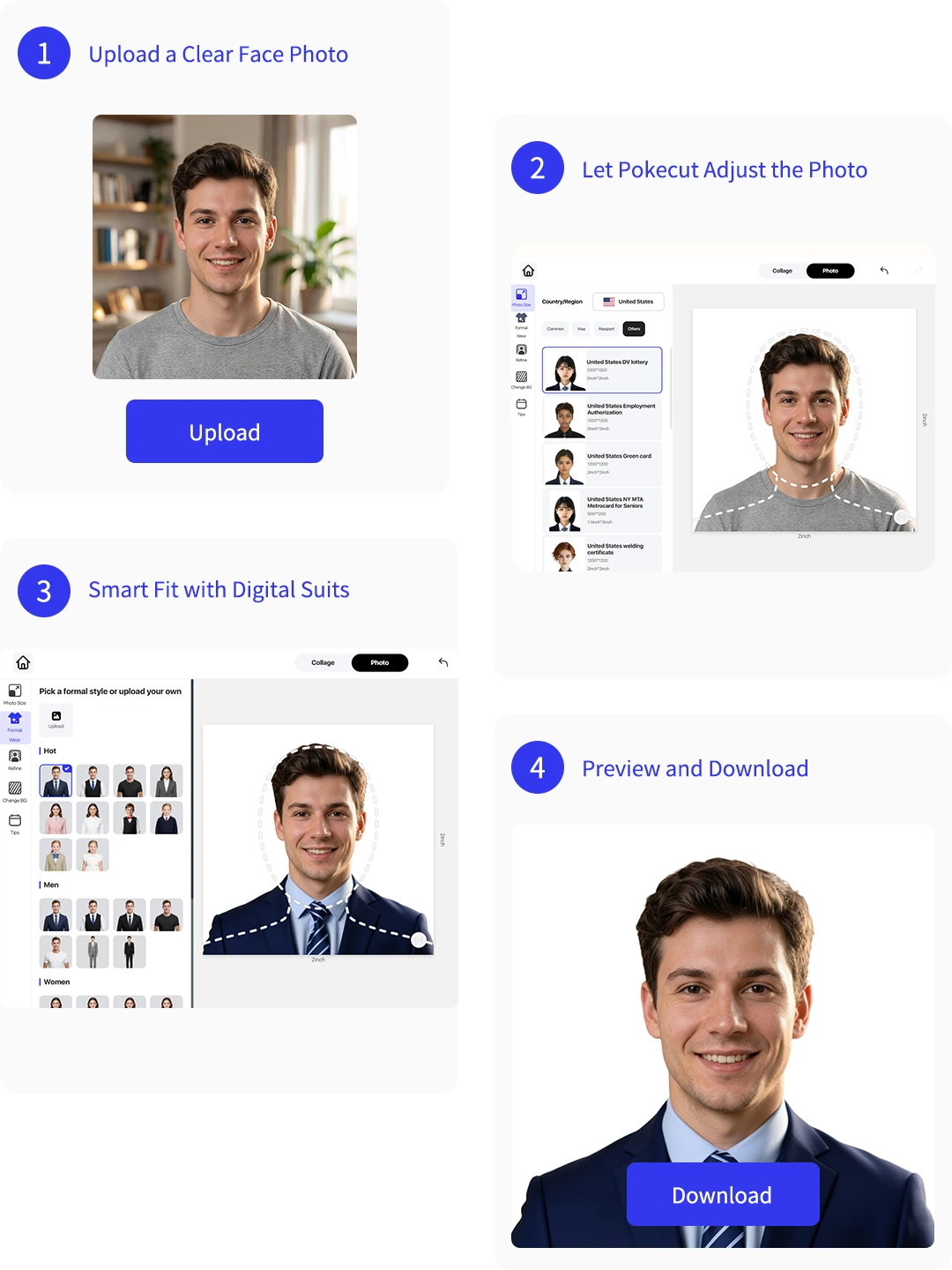
Step 1: Upload a Clear Face Photo
Choose a front-facing selfie or ID photo with visible eyes, natural expression, and enough space around the head.
Step 2: Let Pokecut Adjust the Photo
The DV lottery photo tool crops the image, fixes the white background, checks face placement, and prepares the 600x600 layout.
Step 3: Smart Fit with Digital Suits
The AI automatically dresses you in a professional, compliant suit over your casual clothes, ensuring you meet formal attire standards seamlessly.
Step 4: Preview and Download the File
Review the final green card photo, then download a digital file ready for the official upload step.

Explore More Features of Pokecut
Official US Green Card Photo Requirements
Before submitting your DV Lottery or permanent residency application, ensure your photo meets the strict specifications mandated by the US Department of State. PokeCut AI automatically handles all these parameters for you.
Why Do Users Love Pokecut's DV Photo Tool?
Users trust Pokecut for quick, practical ID photo fixes.


Maya R.

"I had a passport photo, but the DV site kept rejecting the crop. Pokecut made the square version and cleaned the background without making my face look edited."
Daniel K.
"The shadow behind my head was the problem. I uploaded the same photo here, fixed the white background, and used the new file for my green card lottery form."
Sara M.
"I was wearing a sweatshirt in my best selfie. The formal outfit edit looked natural enough for an application photo and saved me a trip to the studio."
Omar J.
"We needed photos for two adults and one child. The child photo cleanup helped the most because getting another picture would have been a nightmare."
Priya S.
"The page explains the file size and 600x600 crop in a way I could actually follow. I did not have to open Photoshop or guess the head height."
Kevin T.
"I used it first for my DV Lottery photo, then made a visa photo from the same picture. The template switch was the part that made it worth using."
Maya R.
"I had a passport photo, but the DV site kept rejecting the crop. Pokecut made the square version and cleaned the background without making my face look edited."
Daniel K.
"The shadow behind my head was the problem. I uploaded the same photo here, fixed the white background, and used the new file for my green card lottery form."
Sara M.
"I was wearing a sweatshirt in my best selfie. The formal outfit edit looked natural enough for an application photo and saved me a trip to the studio."
Omar J.
"We needed photos for two adults and one child. The child photo cleanup helped the most because getting another picture would have been a nightmare."
Priya S.
"The page explains the file size and 600x600 crop in a way I could actually follow. I did not have to open Photoshop or guess the head height."
Kevin T.
"I used it first for my DV Lottery photo, then made a visa photo from the same picture. The template switch was the part that made it worth using."
Maya R.
"I had a passport photo, but the DV site kept rejecting the crop. Pokecut made the square version and cleaned the background without making my face look edited."
Daniel K.
"The shadow behind my head was the problem. I uploaded the same photo here, fixed the white background, and used the new file for my green card lottery form."
Sara M.
"I was wearing a sweatshirt in my best selfie. The formal outfit edit looked natural enough for an application photo and saved me a trip to the studio."
Omar J.
"We needed photos for two adults and one child. The child photo cleanup helped the most because getting another picture would have been a nightmare."
Priya S.
"The page explains the file size and 600x600 crop in a way I could actually follow. I did not have to open Photoshop or guess the head height."
Kevin T.
"I used it first for my DV Lottery photo, then made a visa photo from the same picture. The template switch was the part that made it worth using."
Maya R.
"I had a passport photo, but the DV site kept rejecting the crop. Pokecut made the square version and cleaned the background without making my face look edited."
Daniel K.
"The shadow behind my head was the problem. I uploaded the same photo here, fixed the white background, and used the new file for my green card lottery form."
Sara M.
"I was wearing a sweatshirt in my best selfie. The formal outfit edit looked natural enough for an application photo and saved me a trip to the studio."
Omar J.
"We needed photos for two adults and one child. The child photo cleanup helped the most because getting another picture would have been a nightmare."
Priya S.
"The page explains the file size and 600x600 crop in a way I could actually follow. I did not have to open Photoshop or guess the head height."
Kevin T.
"I used it first for my DV Lottery photo, then made a visa photo from the same picture. The template switch was the part that made it worth using."
Maya R.
"I had a passport photo, but the DV site kept rejecting the crop. Pokecut made the square version and cleaned the background without making my face look edited."
Daniel K.
"The shadow behind my head was the problem. I uploaded the same photo here, fixed the white background, and used the new file for my green card lottery form."
Sara M.
"I was wearing a sweatshirt in my best selfie. The formal outfit edit looked natural enough for an application photo and saved me a trip to the studio."
Omar J.
"We needed photos for two adults and one child. The child photo cleanup helped the most because getting another picture would have been a nightmare."
Priya S.
"The page explains the file size and 600x600 crop in a way I could actually follow. I did not have to open Photoshop or guess the head height."
Kevin T.
"I used it first for my DV Lottery photo, then made a visa photo from the same picture. The template switch was the part that made it worth using."
Omar J.
"We needed photos for two adults and one child. The child photo cleanup helped the most because getting another picture would have been a nightmare."
Priya S.
"The page explains the file size and 600x600 crop in a way I could actually follow. I did not have to open Photoshop or guess the head height."
Kevin T.
"I used it first for my DV Lottery photo, then made a visa photo from the same picture. The template switch was the part that made it worth using."
Maya R.
"I had a passport photo, but the DV site kept rejecting the crop. Pokecut made the square version and cleaned the background without making my face look edited."
Daniel K.
"The shadow behind my head was the problem. I uploaded the same photo here, fixed the white background, and used the new file for my green card lottery form."
Sara M.
"I was wearing a sweatshirt in my best selfie. The formal outfit edit looked natural enough for an application photo and saved me a trip to the studio."
Omar J.
"We needed photos for two adults and one child. The child photo cleanup helped the most because getting another picture would have been a nightmare."
Priya S.
"The page explains the file size and 600x600 crop in a way I could actually follow. I did not have to open Photoshop or guess the head height."
Kevin T.
"I used it first for my DV Lottery photo, then made a visa photo from the same picture. The template switch was the part that made it worth using."
Maya R.
"I had a passport photo, but the DV site kept rejecting the crop. Pokecut made the square version and cleaned the background without making my face look edited."
Daniel K.
"The shadow behind my head was the problem. I uploaded the same photo here, fixed the white background, and used the new file for my green card lottery form."
Sara M.
"I was wearing a sweatshirt in my best selfie. The formal outfit edit looked natural enough for an application photo and saved me a trip to the studio."
Omar J.
"We needed photos for two adults and one child. The child photo cleanup helped the most because getting another picture would have been a nightmare."
Priya S.
"The page explains the file size and 600x600 crop in a way I could actually follow. I did not have to open Photoshop or guess the head height."
Kevin T.
"I used it first for my DV Lottery photo, then made a visa photo from the same picture. The template switch was the part that made it worth using."
Maya R.
"I had a passport photo, but the DV site kept rejecting the crop. Pokecut made the square version and cleaned the background without making my face look edited."
Daniel K.
"The shadow behind my head was the problem. I uploaded the same photo here, fixed the white background, and used the new file for my green card lottery form."
Sara M.
"I was wearing a sweatshirt in my best selfie. The formal outfit edit looked natural enough for an application photo and saved me a trip to the studio."
Omar J.
"We needed photos for two adults and one child. The child photo cleanup helped the most because getting another picture would have been a nightmare."
Priya S.
"The page explains the file size and 600x600 crop in a way I could actually follow. I did not have to open Photoshop or guess the head height."
Kevin T.
"I used it first for my DV Lottery photo, then made a visa photo from the same picture. The template switch was the part that made it worth using."
Maya R.
"I had a passport photo, but the DV site kept rejecting the crop. Pokecut made the square version and cleaned the background without making my face look edited."
Daniel K.
"The shadow behind my head was the problem. I uploaded the same photo here, fixed the white background, and used the new file for my green card lottery form."
Sara M.
"I was wearing a sweatshirt in my best selfie. The formal outfit edit looked natural enough for an application photo and saved me a trip to the studio."
Omar J.
"We needed photos for two adults and one child. The child photo cleanup helped the most because getting another picture would have been a nightmare."
Priya S.
"The page explains the file size and 600x600 crop in a way I could actually follow. I did not have to open Photoshop or guess the head height."
Kevin T.
"I used it first for my DV Lottery photo, then made a visa photo from the same picture. The template switch was the part that made it worth using."
Maya R.
"I had a passport photo, but the DV site kept rejecting the crop. Pokecut made the square version and cleaned the background without making my face look edited."
Daniel K.
"The shadow behind my head was the problem. I uploaded the same photo here, fixed the white background, and used the new file for my green card lottery form."
Sara M.
"I was wearing a sweatshirt in my best selfie. The formal outfit edit looked natural enough for an application photo and saved me a trip to the studio."
Reviews from: Reddit, Product Hunt, G2, TrustRadius, Google Play, App Store, and more.
Pokecut Trusted by Millions of Leaders and Users

1M+ Users Worldwide
Pokecut generate over 500,000 images every day

#2 on Product Hunt
Pokecut launched and won #2 product of the day

Professional Privacy Protection
Ensure 100% data privacy for every photo

Trusted by well-known brands
Apple、Google、Paypal、Stripe、Product hunt、G2、TrustRadius
Frequently Asked Questions
Does the AI tool alter my core facial features?
No. Pokecut only modifies background elements, lighting, framing, and attire. It does not retouch or alter your natural facial structure, skin texture, or moles, keeping the image 100% compliant with biometric security standards.
Can I use a photo that I scanned from my physical print?
Yes, as long as the scanned image is high-resolution, clear, and free of physical creases or scanner textures. Once uploaded, our AI will automatically optimize the dimensions and file size for digital submission.
How recent does my uploaded photo need to be?
The US Department of State requires your photo to be taken within the last 6 months. If your appearance has changed significantly (e.g., due to major weight change or facial surgery), you should upload a new selfie to process.
Is my uploaded photo secure?
Yes, your privacy is our priority. All uploaded images and processed files are encrypted and automatically deleted from our servers after processing, ensuring your personal biometric data remains completely confidential.
Can I use the photo tool directly on my iPhone or Android device?
Yes, PokeCut is fully optimized fot mobile browser. You can upload from your photo library instantly, and download the verified file straight to your phone.





