





Gemini AI Photo Enhancer for Sharper AI Images Online
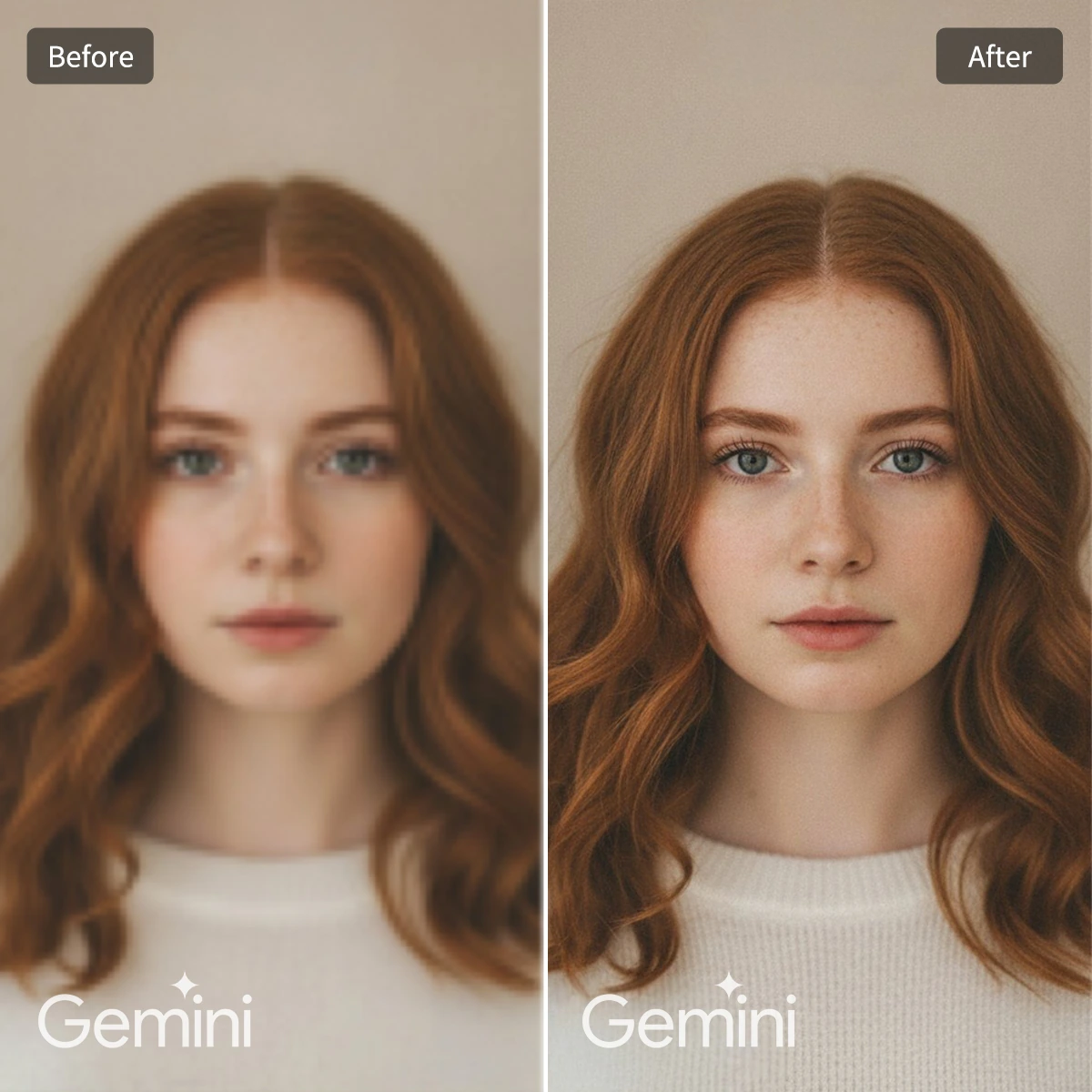
When a Gemini image has the right scene but looks soft after download, use Pokecut's Gemini AI photo enhancer to refine details for a cleaner final version.






By uploading an image or URL you agree to our Terms of Use and Privacy Policy
Why Use Pokecut for Gemini Image Enhancement?
Sharper Gemini Images Without Re-Prompting
Gemini can give you the right composition, but the saved file may still look soft around eyes, hair, small text, or background detail. Use Pokecut as a final-pass AI photo enhancer to sharpen the finished image instead of sending the same idea back through Gemini.
It works best when the subject and style are already correct. Upload the download, preview the clearer version, and keep the image ready for avatars, concept posts, or client drafts without changing the core design.
Batch Enhance Gemini Downloads
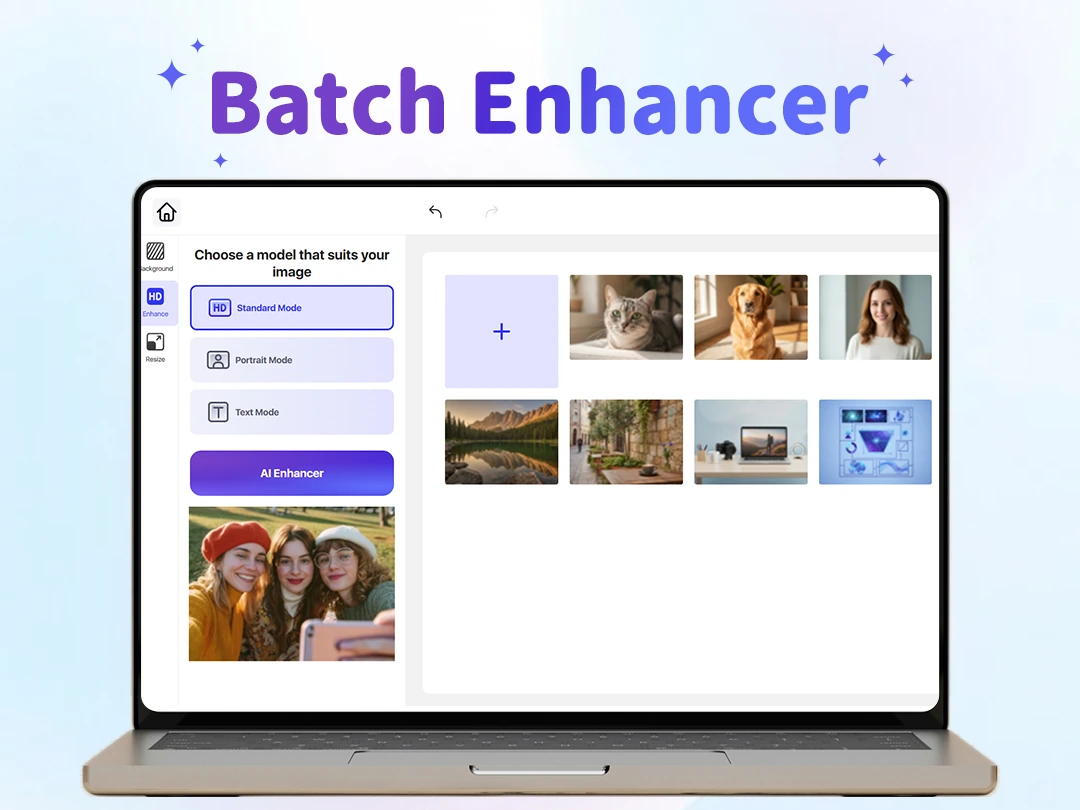
If you download several Gemini images for the same campaign, inconsistent softness can make the set feel unfinished. Pokecut helps you batch enhance up to 50 files with one quality standard, so a blog header, a social cover, and a product concept do not need separate manual retouching.
This workflow is useful for content teams that already approved the creative direction. Keep the Gemini variations you like, process them together, and export cleaner assets that are easier to publish across channels.
4 Enhancement Modes for Different Gemini Images
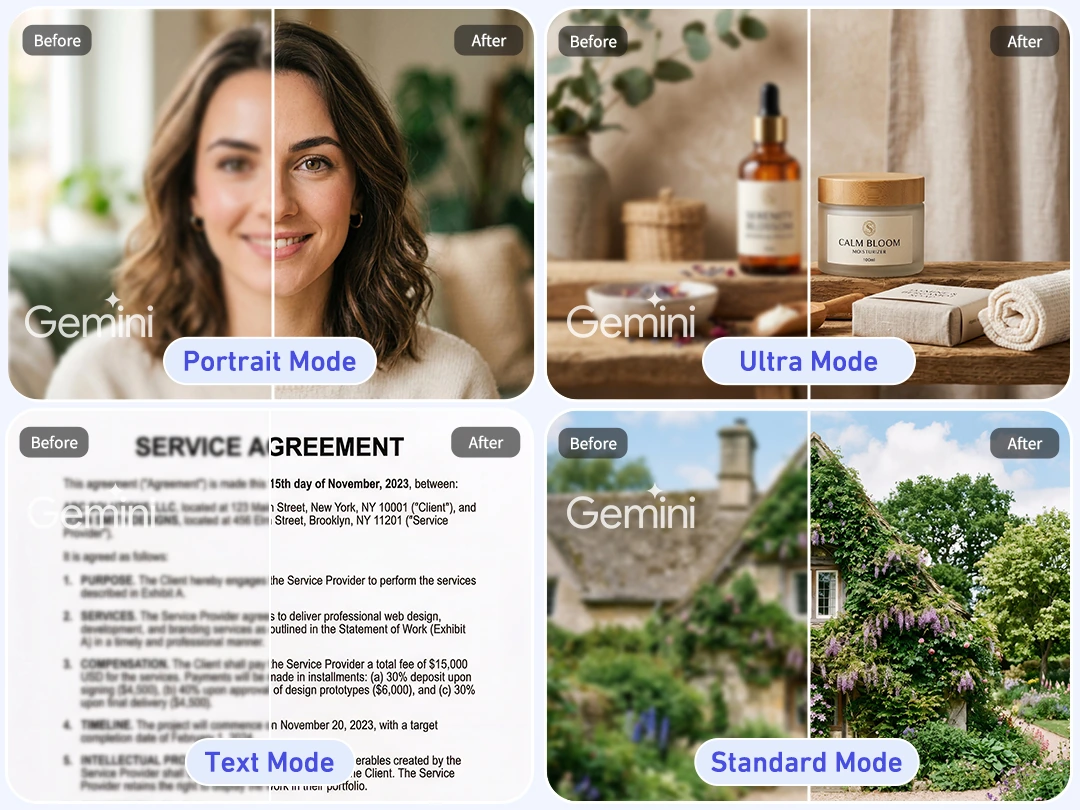
Not every Gemini image needs the same type of correction. A portrait often needs natural detail around skin and hair, while a product render needs clearer edges and material texture. Pokecut keeps the enhancement focused on the final image you already chose.
For example, for faces, use Portrait Mode to refine skin texture, hair edges, and facial details while keeping the original identity recognizable. For posters, slides, or text-heavy Gemini images, use Text Mode to improve readability, clean compression artifacts, and make small typography easier to scan.
How to Enhance Gemini Photos with Pokecut
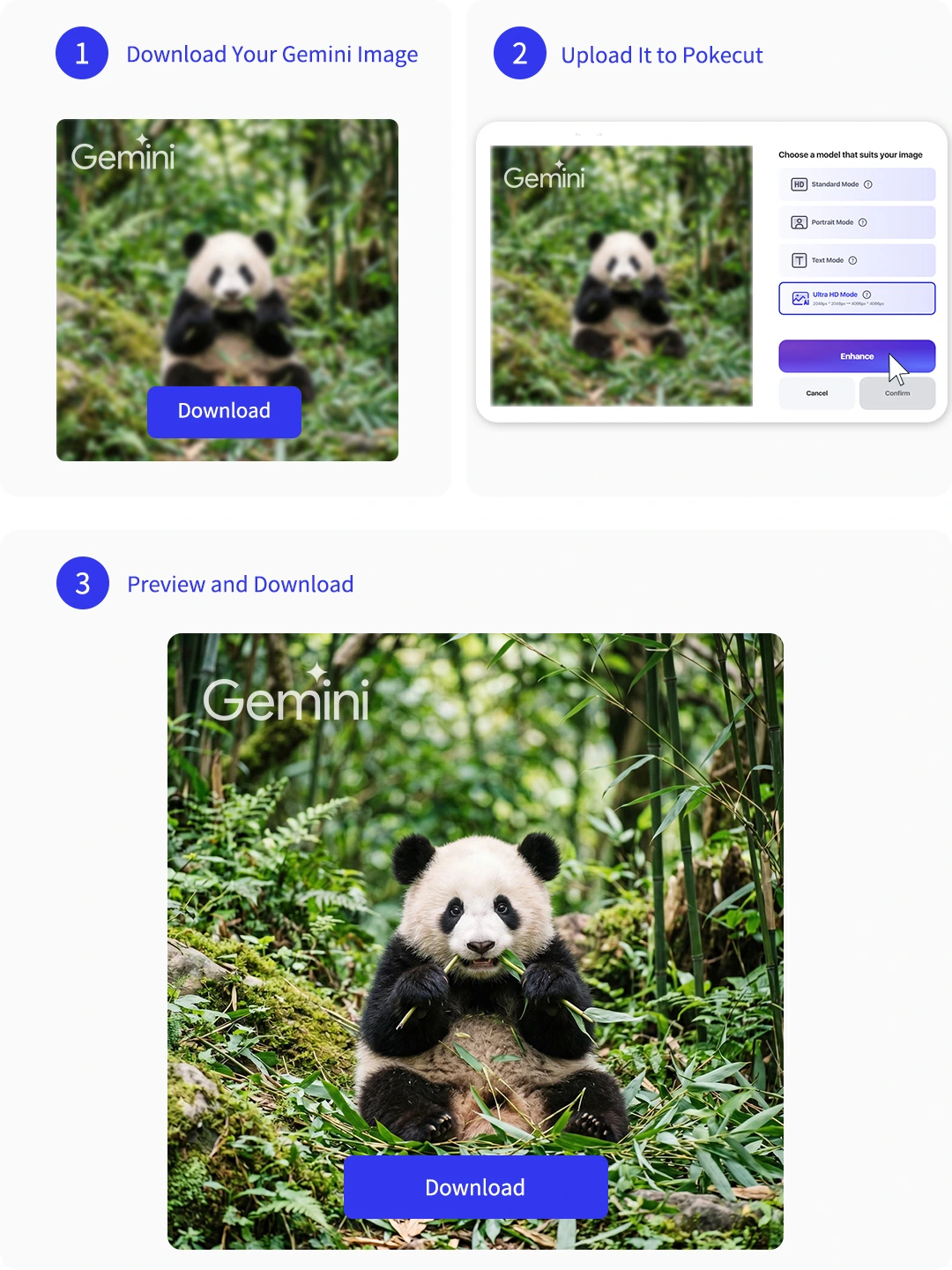
Step 1: Download Your Gemini Image
Choose the Gemini result with the best subject and style, then download it as your source image before running enhancement.
Step 2: Upload It to Pokecut
Add the Gemini download to Pokecut. Once uploaded, the enhancer will focus on clarity, edges, and texture without changing the idea.
Step 3: Preview and Export
Check the enhanced preview, confirm the details still look natural, and export the final image for publishing.

Bonus Tips: Gemini Prompts for Sharper Image Quality
Copy a prompt for your scene, send it to Gemini, then enhance the final image in Pokecut.
What Creators Say About Pokecut
Feedback from creators who polish Gemini-generated photos for profiles, posts, product concepts, and client drafts.


Mia C.

"Pokecut helped sharpen the Gemini avatar I already liked. The face kept its original look, but the hairline and eye detail felt cleaner for a profile update."
Noah B.
"I liked that I did not have to rewrite the prompt. When the composition was already right, enhancing the download gave me a cleaner version to post."
Ava P.
"For product concept images, the edges and material texture looked clearer after processing. It saved me from opening heavier editing software for a quick draft."
Ethan M.
"Batch enhancement worked well for a blog set. The Gemini images kept the same style, but the final exports felt more consistent across the article."
Sofia G.
"The enhanced image did not look over-sharpened. Skin, background texture, and small edges stayed natural enough for my portfolio preview."
Liam W.
"My workflow is to generate in Gemini first and use Pokecut for the final polish. It is faster than generating the same scene again just for clarity."
Mia C.
"Pokecut helped sharpen the Gemini avatar I already liked. The face kept its original look, but the hairline and eye detail felt cleaner for a profile update."
Noah B.
"I liked that I did not have to rewrite the prompt. When the composition was already right, enhancing the download gave me a cleaner version to post."
Ava P.
"For product concept images, the edges and material texture looked clearer after processing. It saved me from opening heavier editing software for a quick draft."
Ethan M.
"Batch enhancement worked well for a blog set. The Gemini images kept the same style, but the final exports felt more consistent across the article."
Sofia G.
"The enhanced image did not look over-sharpened. Skin, background texture, and small edges stayed natural enough for my portfolio preview."
Liam W.
"My workflow is to generate in Gemini first and use Pokecut for the final polish. It is faster than generating the same scene again just for clarity."
Mia C.
"Pokecut helped sharpen the Gemini avatar I already liked. The face kept its original look, but the hairline and eye detail felt cleaner for a profile update."
Noah B.
"I liked that I did not have to rewrite the prompt. When the composition was already right, enhancing the download gave me a cleaner version to post."
Ava P.
"For product concept images, the edges and material texture looked clearer after processing. It saved me from opening heavier editing software for a quick draft."
Ethan M.
"Batch enhancement worked well for a blog set. The Gemini images kept the same style, but the final exports felt more consistent across the article."
Sofia G.
"The enhanced image did not look over-sharpened. Skin, background texture, and small edges stayed natural enough for my portfolio preview."
Liam W.
"My workflow is to generate in Gemini first and use Pokecut for the final polish. It is faster than generating the same scene again just for clarity."
Mia C.
"Pokecut helped sharpen the Gemini avatar I already liked. The face kept its original look, but the hairline and eye detail felt cleaner for a profile update."
Noah B.
"I liked that I did not have to rewrite the prompt. When the composition was already right, enhancing the download gave me a cleaner version to post."
Ava P.
"For product concept images, the edges and material texture looked clearer after processing. It saved me from opening heavier editing software for a quick draft."
Ethan M.
"Batch enhancement worked well for a blog set. The Gemini images kept the same style, but the final exports felt more consistent across the article."
Sofia G.
"The enhanced image did not look over-sharpened. Skin, background texture, and small edges stayed natural enough for my portfolio preview."
Liam W.
"My workflow is to generate in Gemini first and use Pokecut for the final polish. It is faster than generating the same scene again just for clarity."
Mia C.
"Pokecut helped sharpen the Gemini avatar I already liked. The face kept its original look, but the hairline and eye detail felt cleaner for a profile update."
Noah B.
"I liked that I did not have to rewrite the prompt. When the composition was already right, enhancing the download gave me a cleaner version to post."
Ava P.
"For product concept images, the edges and material texture looked clearer after processing. It saved me from opening heavier editing software for a quick draft."
Ethan M.
"Batch enhancement worked well for a blog set. The Gemini images kept the same style, but the final exports felt more consistent across the article."
Sofia G.
"The enhanced image did not look over-sharpened. Skin, background texture, and small edges stayed natural enough for my portfolio preview."
Liam W.
"My workflow is to generate in Gemini first and use Pokecut for the final polish. It is faster than generating the same scene again just for clarity."
Ethan M.
"Batch enhancement worked well for a blog set. The Gemini images kept the same style, but the final exports felt more consistent across the article."
Sofia G.
"The enhanced image did not look over-sharpened. Skin, background texture, and small edges stayed natural enough for my portfolio preview."
Liam W.
"My workflow is to generate in Gemini first and use Pokecut for the final polish. It is faster than generating the same scene again just for clarity."
Mia C.
"Pokecut helped sharpen the Gemini avatar I already liked. The face kept its original look, but the hairline and eye detail felt cleaner for a profile update."
Noah B.
"I liked that I did not have to rewrite the prompt. When the composition was already right, enhancing the download gave me a cleaner version to post."
Ava P.
"For product concept images, the edges and material texture looked clearer after processing. It saved me from opening heavier editing software for a quick draft."
Ethan M.
"Batch enhancement worked well for a blog set. The Gemini images kept the same style, but the final exports felt more consistent across the article."
Sofia G.
"The enhanced image did not look over-sharpened. Skin, background texture, and small edges stayed natural enough for my portfolio preview."
Liam W.
"My workflow is to generate in Gemini first and use Pokecut for the final polish. It is faster than generating the same scene again just for clarity."
Mia C.
"Pokecut helped sharpen the Gemini avatar I already liked. The face kept its original look, but the hairline and eye detail felt cleaner for a profile update."
Noah B.
"I liked that I did not have to rewrite the prompt. When the composition was already right, enhancing the download gave me a cleaner version to post."
Ava P.
"For product concept images, the edges and material texture looked clearer after processing. It saved me from opening heavier editing software for a quick draft."
Ethan M.
"Batch enhancement worked well for a blog set. The Gemini images kept the same style, but the final exports felt more consistent across the article."
Sofia G.
"The enhanced image did not look over-sharpened. Skin, background texture, and small edges stayed natural enough for my portfolio preview."
Liam W.
"My workflow is to generate in Gemini first and use Pokecut for the final polish. It is faster than generating the same scene again just for clarity."
Mia C.
"Pokecut helped sharpen the Gemini avatar I already liked. The face kept its original look, but the hairline and eye detail felt cleaner for a profile update."
Noah B.
"I liked that I did not have to rewrite the prompt. When the composition was already right, enhancing the download gave me a cleaner version to post."
Ava P.
"For product concept images, the edges and material texture looked clearer after processing. It saved me from opening heavier editing software for a quick draft."
Ethan M.
"Batch enhancement worked well for a blog set. The Gemini images kept the same style, but the final exports felt more consistent across the article."
Sofia G.
"The enhanced image did not look over-sharpened. Skin, background texture, and small edges stayed natural enough for my portfolio preview."
Liam W.
"My workflow is to generate in Gemini first and use Pokecut for the final polish. It is faster than generating the same scene again just for clarity."
Mia C.
"Pokecut helped sharpen the Gemini avatar I already liked. The face kept its original look, but the hairline and eye detail felt cleaner for a profile update."
Noah B.
"I liked that I did not have to rewrite the prompt. When the composition was already right, enhancing the download gave me a cleaner version to post."
Ava P.
"For product concept images, the edges and material texture looked clearer after processing. It saved me from opening heavier editing software for a quick draft."
Ethan M.
"Batch enhancement worked well for a blog set. The Gemini images kept the same style, but the final exports felt more consistent across the article."
Sofia G.
"The enhanced image did not look over-sharpened. Skin, background texture, and small edges stayed natural enough for my portfolio preview."
Liam W.
"My workflow is to generate in Gemini first and use Pokecut for the final polish. It is faster than generating the same scene again just for clarity."
Mia C.
"Pokecut helped sharpen the Gemini avatar I already liked. The face kept its original look, but the hairline and eye detail felt cleaner for a profile update."
Noah B.
"I liked that I did not have to rewrite the prompt. When the composition was already right, enhancing the download gave me a cleaner version to post."
Ava P.
"For product concept images, the edges and material texture looked clearer after processing. It saved me from opening heavier editing software for a quick draft."
Reviews from: Reddit, Product Hunt, G2, TrustRadius, Google Play, App Store, and more.
Pokecut Trusted by Millions of Leaders and Users

1M+ Users Worldwide
Pokecut generates over 500,000 images every day

#2 on Product Hunt
Pokecut launched and won #2 product of the day

Professional Privacy Protection
Pokecut supports practical photo editing workflows with careful image handling.

Trusted by Well-known Brands
Apple, Google, PayPal, Stripe, Product Hunt, G2, TrustRadius
FAQs About Gemini Image Enhancement
How do I enhance a photo generated by Gemini?
Download the Gemini image you already like, then upload it to Pokecut for image enhancement. This keeps the chosen subject, composition, and style as the starting point while improving clarity, edge definition, and small texture for a more publishable final image.
Can Pokecut fix blurry Gemini images?
Pokecut can help fix blurry Gemini images when the base picture is still usable. If the face, product shape, or scene is already heavily distorted, generate a better source in Gemini first, then enhance the cleaner download for sharper detail.
What Gemini photo quality enhancer prompt should I use?
Use prompts that ask Gemini to preserve identity, composition, and lighting while removing blur and noise. The Bonus Tips table gives ready-to-copy examples for portraits, product images, landscapes, and text-heavy designs before you finish the result in Pokecut.
Will enhancing a Gemini image change the face or background?
The goal is to improve the existing image, not redraw it from scratch. Upload a Gemini result whose face, product, or background is already acceptable, then compare the preview before export so you can avoid using a source that needs a full regeneration.
Can I batch enhance Gemini images for posts or product concepts?
Yes, you can make batch enhancement with up to 50 photos in Pokecut. It is useful when several Gemini downloads need a consistent finish.





