Create Authentic Grainy Effect with Online Image Editor
Effortlessly add a unique photo grain for vintage, artistic, or cinematic styles. Perfect for enhancing depth, mood, and creativity in every photo.




By uploading an image or URL you agree to our Terms of Use and Privacy Policy
How to Add Grainy Effect to Your Photos
Step 1

Upload or Select Your Image
Choose a photo from your device or select one from the trial image. Start editing instantly with our AI image editor. Perfect for creating a unique grainy effect.
Step 2
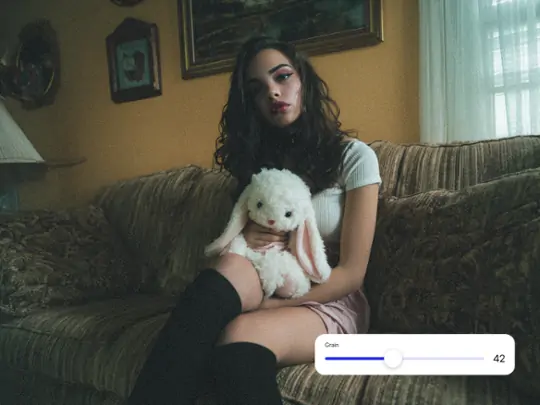
Apply Grain Filter and Adjust Intensity
Click the grain button for an instant film grain effect. Drag the slider to adjust the intensity. Preview changes in real time for perfect results.
Step 3
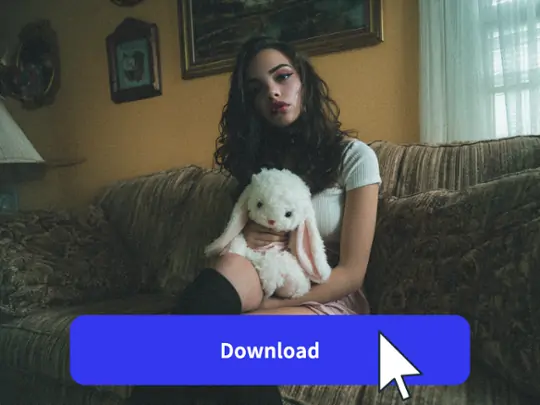
Download the Edited Photo
Preview your photo with the grainy effect applied. If necessary, you can further adjust the parameters related to color and saturation. Click download to save your high-quality, vintage-inspired image.

Enhance Textural Richness with Authentic Photo Grain
Simulate classic film grain and elevate your photo's textural richness using Pokecut's advanced grain effect. Add a subtle photo grain to intensify the mood and create a true vintage photo effect.
The grain filter provides a layered and analog film grain appearance. It offers more depth and a cinematic feel. Achieve a realistic film-inspired look. And image noise techniques further enhance the overall composition.

Combine Grainy Filter with Retro Effects for Artistic Photo
Easily adjust the intensity of the grainy filter and add distinctive photo grain to achieve a classic film effect. Enhance your images and enrich photo textures with unique vintage photo effect. It makes each photo visually rich and full of depth.
Pair the grain effect with retro photo filter options to prevent overly smooth or flat visuals. Create nostalgic and artistic vibes, giving your photos a timeless and expressive feel with Pokecut's advanced AI image editor.

Experience Instant Results with Advanced Photo Grain
Preview your grainy effect in real time and adjust every detail with 100-level precision. Control the intensity of the photo grain and fine-tune the grainy filter for perfect results on every image.
For a striking old movie poster look, convert your photo to black and white and then apply the grain filter. Pokecut's AI image editor lets you achieve authentic film grain filter effects and gives your images the unique texture overlay of classic cinema.

Customize Grain Photo with Creative Edits
Add handwritten text to your grainy photo to give it a personal and artistic touch. Handwriting adds warmth and uniqueness, making your image truly one of a kind. You can choose different styles and colors of text to match the mood of your photo.
In addition, add vintage stamps to enhance the nostalgic feel. They make your photo look like a treasured keepsake from the past.Once you have customized your photo, print it as a retro postcard. Share it with friends and family to spread the charm and memories of past decades.
Versatile Applications of Grainy Filter for Unique Photo Styles

Travel Photography: Capture Nostalgic Moments
Add a grainy filter to your travel photos to create a vintage vibe. This effect recalls memories from past journeys. It helps turn ordinary snapshots into timeless keepsakes. This filter is perfect for storytellers who want their photos to evoke feelings and nostalgia.

Artistic Creations and Illustrations: Enrich Visual Appeal
Grain can enhance digital art and illustrations by adding a tactile quality. The filter breaks the smoothness of digital images. It introduces texture that makes artworks feel more organic. This effect helps artists express mood and atmosphere more vividly.

Product Photography: Build a Retro Brand Image
Applying a grainy filter can give product photos a classic or vintage feel. This style appeals to audiences who appreciate authenticity and tradition. It can enhance packaging and branding visuals by emphasizing texture.
Frequently Asked Questions
Can I adjust the level of photo grain and texture for a more personalized image with Pokecut?
Yes, Pokecut lets you easily adjust the grainy effect. Use the sliders to fine-tune image noise and achieve your desired film grain filter. Preview changes instantly before downloading.
Is it possible to use retro photo filter and grainy effect together in Pokecut?
Yes, Pokecut supports combining retro photo filter with grainy effect. Create stunning images with vintage mood and unique photo grain. Blend effects for creative, cinematic results every time.
Can I preview image noise and grain effect changes in real time with Pokecut?
Yes, Pokecut offers real-time preview for image noise and grain effect. Instantly see all adjustments to grain filter and photo texture. Make perfect edits before saving your final photo.
Does Pokecut allow me to beautify photos after adding grain to make them more artistic?
Yes, Pokecut lets you enhance your photos after adding grain. You can adjust saturation to make colors pop, tweak color temperature for warm or cool tones, and add vignettes to focus attention. These features help give your image a unique artistic feel easily.