





Photo Border: Add Border to Image Online for Free
Pokecut is a fast tool designed for creators and sellers to instantly add border to image. Apply custom photo frames without cropping. Try it free now!






By uploading an image or URL you agree to our Terms of Use and Privacy Policy
How to Add Border to Image Online
Step 1
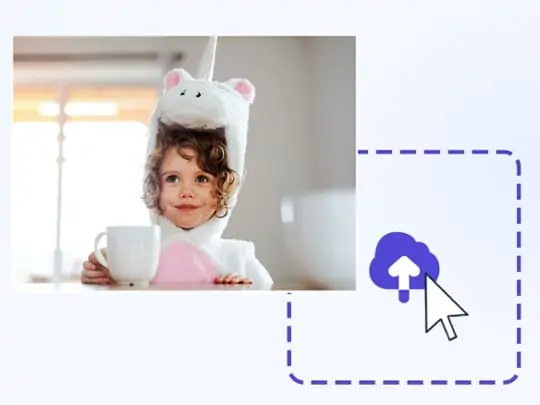
Upload Your Image
Upload a JPG, JPEG, PNG, WebP or BMP photo to the editor. Start with your own image, paste a URL, or try a sample before you add border to image.
Step 2
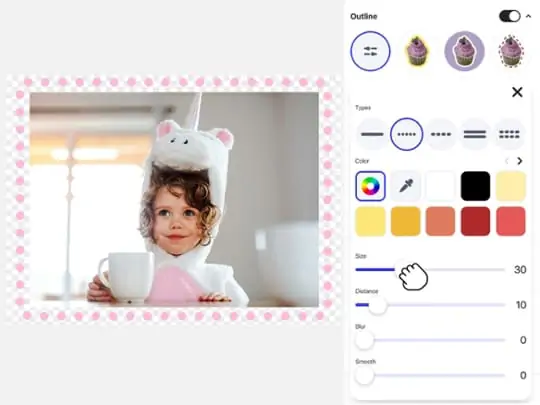
Customize the Border & Canvas
Slightly scale down your photo to make room on the canvas, then use the outline controls to adjust the border type, color, size, and effect. Or, choose a frame template for a creative look.
Step 3
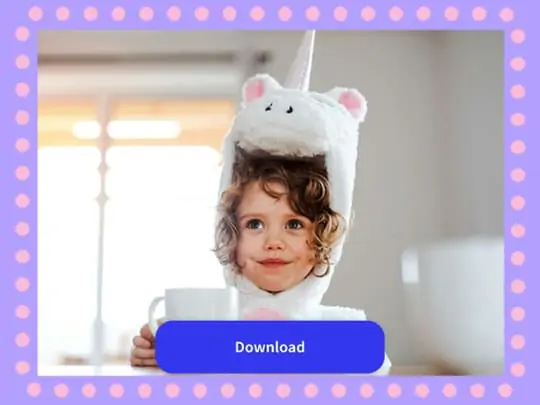
Download Your Bordered Image
Preview the border around the full image so the original photo stays visible. Make small edits if needed, then download the high-quality result without a watermark.
How Does Pokecut's Photo Border Help Your Photos Stand Out

Add Border to Image Online for Free in Seconds
Add a clean photo border to your image without opening a complex design app. Upload a photo, adjust the border options, and preview the edge before you download. Pokecut keeps the process simple for quick profile photos, product pictures, and daily edits that only need a clear frame around the image.
The image border editor works well when a picture blends into a light background or needs a stronger edge. Use Pokecut online for fast touch-ups, then keep editing on the same canvas if you need text, stickers, or other small changes.

Customize Border Type, Color, Size, and Softness
Custom border controls give each image a more exact edge. Pick a border type, set the color, and adjust the size until the outline feels right for the photo. Distance, blur, and smoothness help the border sit closer to the subject or look softer around the outside edge.
This is useful when a plain line feels too harsh. You can add a soft outline to make a cutout, logo, or portrait easier to read on busy backgrounds, ensuring the contrast looks completely natural.

Choose Photo Frame Templates for Creative Looks
Choose from multiple frame templates that give your photo a finished look without building the design from scratch. Choose a Polaroid frame, a film-style edge, or a simple decorative border when the image needs more personality than a basic outline. The result feels more like a designed post than a plain upload.
Use these templates for mood boards, social posts, or small creative projects where the frame is part of the style. A ready-made photo frame border can save time while still leaving room for edits on the canvas.

Add an Outline Border Without Cropping Your Photo
An outline border adds a visible edge without cutting into the original photo. Pokecut places the border around the image edge, so the main content stays visible while the picture gains more separation from the background. This works best when you need a clean frame, not an automatic social media resize.
Use a white, black, or colored outline for posts, profile images, covers, and thumbnails that need clearer edges. The border ensures your full image stays intact while making it instantly stand out in any social feed.
What Can You Make When You Add Border to Image?


What Users Say About Pokecut's Photo Border Editor
Users love how easily our tool adds clean edges to photos. It is the perfect quick fix for making social media posts and client projects stand out.


Emily R.

"My dark photos kept blending into Instagram's dark mode. I added a simple white border here in two seconds. It completely saved my feed layout. So happy!"
Jason T.
"I was rushing to upload product shots and they looked terrible on a white background. This outline tool framed them perfectly. Huge lifesaver for my shop."
Chloe S.
"I hesitated to post my digital art because the edges felt lost. Putting a clean frame around my pieces made them look like a real gallery wall. I love it!"
Marcus J.
"Great tool for making my video thumbnails pop. The neon borders are super cool. I just wish there were a few more pattern options, but still highly recommend."
Sarah W.
"Other tools forced me to crop my original image just to add a frame. Pokecut puts the border right on the outside edge. Finally, my whole picture stays intact!"
Kevin H.
"I needed a vintage vibe for a quick client mood board. The Polaroid frame template was exactly what I pictured. It took me zero effort to make it look designed."
Emily R.
"My dark photos kept blending into Instagram's dark mode. I added a simple white border here in two seconds. It completely saved my feed layout. So happy!"
Jason T.
"I was rushing to upload product shots and they looked terrible on a white background. This outline tool framed them perfectly. Huge lifesaver for my shop."
Chloe S.
"I hesitated to post my digital art because the edges felt lost. Putting a clean frame around my pieces made them look like a real gallery wall. I love it!"
Marcus J.
"Great tool for making my video thumbnails pop. The neon borders are super cool. I just wish there were a few more pattern options, but still highly recommend."
Sarah W.
"Other tools forced me to crop my original image just to add a frame. Pokecut puts the border right on the outside edge. Finally, my whole picture stays intact!"
Kevin H.
"I needed a vintage vibe for a quick client mood board. The Polaroid frame template was exactly what I pictured. It took me zero effort to make it look designed."
Emily R.
"My dark photos kept blending into Instagram's dark mode. I added a simple white border here in two seconds. It completely saved my feed layout. So happy!"
Jason T.
"I was rushing to upload product shots and they looked terrible on a white background. This outline tool framed them perfectly. Huge lifesaver for my shop."
Chloe S.
"I hesitated to post my digital art because the edges felt lost. Putting a clean frame around my pieces made them look like a real gallery wall. I love it!"
Marcus J.
"Great tool for making my video thumbnails pop. The neon borders are super cool. I just wish there were a few more pattern options, but still highly recommend."
Sarah W.
"Other tools forced me to crop my original image just to add a frame. Pokecut puts the border right on the outside edge. Finally, my whole picture stays intact!"
Kevin H.
"I needed a vintage vibe for a quick client mood board. The Polaroid frame template was exactly what I pictured. It took me zero effort to make it look designed."
Emily R.
"My dark photos kept blending into Instagram's dark mode. I added a simple white border here in two seconds. It completely saved my feed layout. So happy!"
Jason T.
"I was rushing to upload product shots and they looked terrible on a white background. This outline tool framed them perfectly. Huge lifesaver for my shop."
Chloe S.
"I hesitated to post my digital art because the edges felt lost. Putting a clean frame around my pieces made them look like a real gallery wall. I love it!"
Marcus J.
"Great tool for making my video thumbnails pop. The neon borders are super cool. I just wish there were a few more pattern options, but still highly recommend."
Sarah W.
"Other tools forced me to crop my original image just to add a frame. Pokecut puts the border right on the outside edge. Finally, my whole picture stays intact!"
Kevin H.
"I needed a vintage vibe for a quick client mood board. The Polaroid frame template was exactly what I pictured. It took me zero effort to make it look designed."
Emily R.
"My dark photos kept blending into Instagram's dark mode. I added a simple white border here in two seconds. It completely saved my feed layout. So happy!"
Jason T.
"I was rushing to upload product shots and they looked terrible on a white background. This outline tool framed them perfectly. Huge lifesaver for my shop."
Chloe S.
"I hesitated to post my digital art because the edges felt lost. Putting a clean frame around my pieces made them look like a real gallery wall. I love it!"
Marcus J.
"Great tool for making my video thumbnails pop. The neon borders are super cool. I just wish there were a few more pattern options, but still highly recommend."
Sarah W.
"Other tools forced me to crop my original image just to add a frame. Pokecut puts the border right on the outside edge. Finally, my whole picture stays intact!"
Kevin H.
"I needed a vintage vibe for a quick client mood board. The Polaroid frame template was exactly what I pictured. It took me zero effort to make it look designed."
Marcus J.
"Great tool for making my video thumbnails pop. The neon borders are super cool. I just wish there were a few more pattern options, but still highly recommend."
Sarah W.
"Other tools forced me to crop my original image just to add a frame. Pokecut puts the border right on the outside edge. Finally, my whole picture stays intact!"
Kevin H.
"I needed a vintage vibe for a quick client mood board. The Polaroid frame template was exactly what I pictured. It took me zero effort to make it look designed."
Emily R.
"My dark photos kept blending into Instagram's dark mode. I added a simple white border here in two seconds. It completely saved my feed layout. So happy!"
Jason T.
"I was rushing to upload product shots and they looked terrible on a white background. This outline tool framed them perfectly. Huge lifesaver for my shop."
Chloe S.
"I hesitated to post my digital art because the edges felt lost. Putting a clean frame around my pieces made them look like a real gallery wall. I love it!"
Marcus J.
"Great tool for making my video thumbnails pop. The neon borders are super cool. I just wish there were a few more pattern options, but still highly recommend."
Sarah W.
"Other tools forced me to crop my original image just to add a frame. Pokecut puts the border right on the outside edge. Finally, my whole picture stays intact!"
Kevin H.
"I needed a vintage vibe for a quick client mood board. The Polaroid frame template was exactly what I pictured. It took me zero effort to make it look designed."
Emily R.
"My dark photos kept blending into Instagram's dark mode. I added a simple white border here in two seconds. It completely saved my feed layout. So happy!"
Jason T.
"I was rushing to upload product shots and they looked terrible on a white background. This outline tool framed them perfectly. Huge lifesaver for my shop."
Chloe S.
"I hesitated to post my digital art because the edges felt lost. Putting a clean frame around my pieces made them look like a real gallery wall. I love it!"
Marcus J.
"Great tool for making my video thumbnails pop. The neon borders are super cool. I just wish there were a few more pattern options, but still highly recommend."
Sarah W.
"Other tools forced me to crop my original image just to add a frame. Pokecut puts the border right on the outside edge. Finally, my whole picture stays intact!"
Kevin H.
"I needed a vintage vibe for a quick client mood board. The Polaroid frame template was exactly what I pictured. It took me zero effort to make it look designed."
Emily R.
"My dark photos kept blending into Instagram's dark mode. I added a simple white border here in two seconds. It completely saved my feed layout. So happy!"
Jason T.
"I was rushing to upload product shots and they looked terrible on a white background. This outline tool framed them perfectly. Huge lifesaver for my shop."
Chloe S.
"I hesitated to post my digital art because the edges felt lost. Putting a clean frame around my pieces made them look like a real gallery wall. I love it!"
Marcus J.
"Great tool for making my video thumbnails pop. The neon borders are super cool. I just wish there were a few more pattern options, but still highly recommend."
Sarah W.
"Other tools forced me to crop my original image just to add a frame. Pokecut puts the border right on the outside edge. Finally, my whole picture stays intact!"
Kevin H.
"I needed a vintage vibe for a quick client mood board. The Polaroid frame template was exactly what I pictured. It took me zero effort to make it look designed."
Emily R.
"My dark photos kept blending into Instagram's dark mode. I added a simple white border here in two seconds. It completely saved my feed layout. So happy!"
Jason T.
"I was rushing to upload product shots and they looked terrible on a white background. This outline tool framed them perfectly. Huge lifesaver for my shop."
Chloe S.
"I hesitated to post my digital art because the edges felt lost. Putting a clean frame around my pieces made them look like a real gallery wall. I love it!"
Marcus J.
"Great tool for making my video thumbnails pop. The neon borders are super cool. I just wish there were a few more pattern options, but still highly recommend."
Sarah W.
"Other tools forced me to crop my original image just to add a frame. Pokecut puts the border right on the outside edge. Finally, my whole picture stays intact!"
Kevin H.
"I needed a vintage vibe for a quick client mood board. The Polaroid frame template was exactly what I pictured. It took me zero effort to make it look designed."
Emily R.
"My dark photos kept blending into Instagram's dark mode. I added a simple white border here in two seconds. It completely saved my feed layout. So happy!"
Jason T.
"I was rushing to upload product shots and they looked terrible on a white background. This outline tool framed them perfectly. Huge lifesaver for my shop."
Chloe S.
"I hesitated to post my digital art because the edges felt lost. Putting a clean frame around my pieces made them look like a real gallery wall. I love it!"
Reviews from: Reddit, Product Hunt, G2, TrustRadius, Google Play, App Store, and more.
Frequently Asked Questions
How do I add a border to an image online?
Upload your photo to Pokecut, choose the outline border or a frame template, then adjust the look before downloading. The add border to image process stays simple for quick edits.
Can I change the border color, size, and style?
Yes. Pokecut lets you adjust the border type, color, size, distance, blur, and smoothness. You can also choose a photo frame border template when you want a ready-made style.
Does adding a border crop my original photo?
No. Pokecut places the border entirely around the outside edge of your image, so the main content stays fully visible. Your original photo remains untouched without any unwanted cropping.
Will adding a border reduce image quality?
Pokecut keeps the original photo quality clear when you add a border. Export the edited image in high quality without a watermark, so the new edge does not blur your photo.
Is the photo border editor free to use?
Yes. Pokecut is a free online photo border editor that helps you add a border to a photo without installing software. Upload an image, edit the edge, and download it online.
What image formats can I upload?
Pokecut supports common image formats for photo border editing, including JPEG, JPG, PNG, WebP, and BMP. Upload your file and use the image border online tools right away.
Pokecut's Image Border Editor Trusted by Users

1M+ Users Worldwide
Pokecut generates over 500,000 images every day

#2 on Product Hunt
Pokecut was voted #2 Product of the Day on launch

Professional Privacy Protection
Ensure 100% data privacy for every photo

Trusted by Well-Known Brands
Apple, Google, PayPal, Stripe, Product Hunt, G2, TrustRadius






