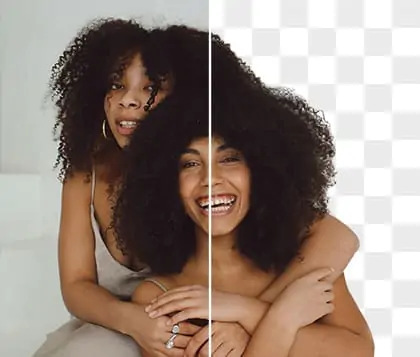
Outline Images With Fast AI To Create Clean And Perfect Borders
Skip complex tools. Use our fast image outliner to get clean edges. Create a transparent picture outline for your YouTube thumbnails right now.





By uploading an image or URL you agree to our Terms of Use and Privacy Policy
How to Outline an Image Online with Pokecut Image Outliner?
Step 1: Upload Your Image
Upload any photo to outline an image online. Pokecut automatically removes the background to prepare a clean image outline.
Step 2: Adjust the Outline Style
Open the Outline menu to fine-tune your outline image. Adjust edge type, color, thickness, distance, and blur for a custom picture outline.
Step 3: Edit or Download Your Outlined Image
Preview the photo outline online, then add filters, stickers, or backgrounds. Download your outlined image once it looks right.

Best Image Outliner Features

Remove Background And Outline Photo Online
Stop wasting time doing manual edits. You do not need to build layers step by step to outline an image. Just upload your photo to our smart tool. The AI finds the main subject, drops the background, and draws a clean border in one go.
Skip the heavy software and get your work done faster. When you finish, you can save your transparent PNG file right away. This makes your picture outline ready for YouTube thumbnails, store items, or social media posts without any extra steps.

Keep Your Full Picture With Smart Canvas
Keep the full edges of your photo even when you use thick borders. Our picture outline maker automatically grows the canvas size to fit wide lines. Your original subject stays completely safe without any flat cuts.
Basic tools often crop your picture if you make the line too big. We solve this problem entirely. Just drag the slider to add a thicker border, and our AI gives your image the space it needs. Add outline to image files and never lose important parts of your subject.

Get Smooth Edges For A Professional Look
Say goodbye to ugly pixelated edges that make your work look cheap. Our AI engine uses advanced rendering tech to give you super smooth lines every single time. It handles complex shapes like hair or tricky product corners with ease.
No matter how thick you make the border, the lines stay clean and sharp. Use this image outliner to create top-quality graphics that build trust with your audience. Give your photos a clean border that looks like it was made by a pro.

Pick Any Custom Color To Match Your Brand
Stand out from the crowd with custom colors. You do not have to stick with boring black or white borders. Our tool lets you pick any exact color shade to match your brand identity perfectly.
Just click the color picker or type your brand code to change the look. Add stroke to image files in bright yellow, neon pink, or deep blue. Make your subjects pop on e-commerce sites or grab more views on your video channels with a simple color tweak.
What Users Say About Our Image Outliner
Join 200,000 monthly creators who save time using Pokecut to outline images for YouTube, e-commerce, and digital art.


Linda P.

"I used to waste so much time in Photoshop just to make YouTube thumbnails. Now I just upload my photo, and this tool drops the background and adds a perfect white border in two seconds!"
Mark W.
"As an Etsy seller, I need clean cut lines for my stickers. Other tools cut off my picture when I make the border thick, but this one grows the canvas automatically. The edges are super smooth!"
Emily R.
"I use this to add brand colors to my Amazon product photos. It is much faster than Fotor, and the lines never look cheap or pixelated. It helps my items get more clicks."
David K.
"This is perfect for making funny pet memes for my group chats. I love adding a bright neon border to my dog's photos. I can download the transparent PNG right away without learning any hard software."
Sarah J.
"My slide presentations used to look boring because the pictures blended into the background. Now I add a thick black outline to animal photos for my students. It makes the pictures pop right away!"
Tom H.
"I always hated messing with the shadow settings in Canva just to get a basic outline. This picture outline maker is exactly what I needed. It is a true one-click tool with super clean results."
Linda P.
"I used to waste so much time in Photoshop just to make YouTube thumbnails. Now I just upload my photo, and this tool drops the background and adds a perfect white border in two seconds!"
Mark W.
"As an Etsy seller, I need clean cut lines for my stickers. Other tools cut off my picture when I make the border thick, but this one grows the canvas automatically. The edges are super smooth!"
Emily R.
"I use this to add brand colors to my Amazon product photos. It is much faster than Fotor, and the lines never look cheap or pixelated. It helps my items get more clicks."
David K.
"This is perfect for making funny pet memes for my group chats. I love adding a bright neon border to my dog's photos. I can download the transparent PNG right away without learning any hard software."
Sarah J.
"My slide presentations used to look boring because the pictures blended into the background. Now I add a thick black outline to animal photos for my students. It makes the pictures pop right away!"
Tom H.
"I always hated messing with the shadow settings in Canva just to get a basic outline. This picture outline maker is exactly what I needed. It is a true one-click tool with super clean results."
Linda P.
"I used to waste so much time in Photoshop just to make YouTube thumbnails. Now I just upload my photo, and this tool drops the background and adds a perfect white border in two seconds!"
Mark W.
"As an Etsy seller, I need clean cut lines for my stickers. Other tools cut off my picture when I make the border thick, but this one grows the canvas automatically. The edges are super smooth!"
Emily R.
"I use this to add brand colors to my Amazon product photos. It is much faster than Fotor, and the lines never look cheap or pixelated. It helps my items get more clicks."
David K.
"This is perfect for making funny pet memes for my group chats. I love adding a bright neon border to my dog's photos. I can download the transparent PNG right away without learning any hard software."
Sarah J.
"My slide presentations used to look boring because the pictures blended into the background. Now I add a thick black outline to animal photos for my students. It makes the pictures pop right away!"
Tom H.
"I always hated messing with the shadow settings in Canva just to get a basic outline. This picture outline maker is exactly what I needed. It is a true one-click tool with super clean results."
Linda P.
"I used to waste so much time in Photoshop just to make YouTube thumbnails. Now I just upload my photo, and this tool drops the background and adds a perfect white border in two seconds!"
Mark W.
"As an Etsy seller, I need clean cut lines for my stickers. Other tools cut off my picture when I make the border thick, but this one grows the canvas automatically. The edges are super smooth!"
Emily R.
"I use this to add brand colors to my Amazon product photos. It is much faster than Fotor, and the lines never look cheap or pixelated. It helps my items get more clicks."
David K.
"This is perfect for making funny pet memes for my group chats. I love adding a bright neon border to my dog's photos. I can download the transparent PNG right away without learning any hard software."
Sarah J.
"My slide presentations used to look boring because the pictures blended into the background. Now I add a thick black outline to animal photos for my students. It makes the pictures pop right away!"
Tom H.
"I always hated messing with the shadow settings in Canva just to get a basic outline. This picture outline maker is exactly what I needed. It is a true one-click tool with super clean results."
Linda P.
"I used to waste so much time in Photoshop just to make YouTube thumbnails. Now I just upload my photo, and this tool drops the background and adds a perfect white border in two seconds!"
Mark W.
"As an Etsy seller, I need clean cut lines for my stickers. Other tools cut off my picture when I make the border thick, but this one grows the canvas automatically. The edges are super smooth!"
Emily R.
"I use this to add brand colors to my Amazon product photos. It is much faster than Fotor, and the lines never look cheap or pixelated. It helps my items get more clicks."
David K.
"This is perfect for making funny pet memes for my group chats. I love adding a bright neon border to my dog's photos. I can download the transparent PNG right away without learning any hard software."
Sarah J.
"My slide presentations used to look boring because the pictures blended into the background. Now I add a thick black outline to animal photos for my students. It makes the pictures pop right away!"
Tom H.
"I always hated messing with the shadow settings in Canva just to get a basic outline. This picture outline maker is exactly what I needed. It is a true one-click tool with super clean results."
David K.
"This is perfect for making funny pet memes for my group chats. I love adding a bright neon border to my dog's photos. I can download the transparent PNG right away without learning any hard software."
Sarah J.
"My slide presentations used to look boring because the pictures blended into the background. Now I add a thick black outline to animal photos for my students. It makes the pictures pop right away!"
Tom H.
"I always hated messing with the shadow settings in Canva just to get a basic outline. This picture outline maker is exactly what I needed. It is a true one-click tool with super clean results."
Linda P.
"I used to waste so much time in Photoshop just to make YouTube thumbnails. Now I just upload my photo, and this tool drops the background and adds a perfect white border in two seconds!"
Mark W.
"As an Etsy seller, I need clean cut lines for my stickers. Other tools cut off my picture when I make the border thick, but this one grows the canvas automatically. The edges are super smooth!"
Emily R.
"I use this to add brand colors to my Amazon product photos. It is much faster than Fotor, and the lines never look cheap or pixelated. It helps my items get more clicks."
David K.
"This is perfect for making funny pet memes for my group chats. I love adding a bright neon border to my dog's photos. I can download the transparent PNG right away without learning any hard software."
Sarah J.
"My slide presentations used to look boring because the pictures blended into the background. Now I add a thick black outline to animal photos for my students. It makes the pictures pop right away!"
Tom H.
"I always hated messing with the shadow settings in Canva just to get a basic outline. This picture outline maker is exactly what I needed. It is a true one-click tool with super clean results."
Linda P.
"I used to waste so much time in Photoshop just to make YouTube thumbnails. Now I just upload my photo, and this tool drops the background and adds a perfect white border in two seconds!"
Mark W.
"As an Etsy seller, I need clean cut lines for my stickers. Other tools cut off my picture when I make the border thick, but this one grows the canvas automatically. The edges are super smooth!"
Emily R.
"I use this to add brand colors to my Amazon product photos. It is much faster than Fotor, and the lines never look cheap or pixelated. It helps my items get more clicks."
David K.
"This is perfect for making funny pet memes for my group chats. I love adding a bright neon border to my dog's photos. I can download the transparent PNG right away without learning any hard software."
Sarah J.
"My slide presentations used to look boring because the pictures blended into the background. Now I add a thick black outline to animal photos for my students. It makes the pictures pop right away!"
Tom H.
"I always hated messing with the shadow settings in Canva just to get a basic outline. This picture outline maker is exactly what I needed. It is a true one-click tool with super clean results."
Linda P.
"I used to waste so much time in Photoshop just to make YouTube thumbnails. Now I just upload my photo, and this tool drops the background and adds a perfect white border in two seconds!"
Mark W.
"As an Etsy seller, I need clean cut lines for my stickers. Other tools cut off my picture when I make the border thick, but this one grows the canvas automatically. The edges are super smooth!"
Emily R.
"I use this to add brand colors to my Amazon product photos. It is much faster than Fotor, and the lines never look cheap or pixelated. It helps my items get more clicks."
David K.
"This is perfect for making funny pet memes for my group chats. I love adding a bright neon border to my dog's photos. I can download the transparent PNG right away without learning any hard software."
Sarah J.
"My slide presentations used to look boring because the pictures blended into the background. Now I add a thick black outline to animal photos for my students. It makes the pictures pop right away!"
Tom H.
"I always hated messing with the shadow settings in Canva just to get a basic outline. This picture outline maker is exactly what I needed. It is a true one-click tool with super clean results."
Linda P.
"I used to waste so much time in Photoshop just to make YouTube thumbnails. Now I just upload my photo, and this tool drops the background and adds a perfect white border in two seconds!"
Mark W.
"As an Etsy seller, I need clean cut lines for my stickers. Other tools cut off my picture when I make the border thick, but this one grows the canvas automatically. The edges are super smooth!"
Emily R.
"I use this to add brand colors to my Amazon product photos. It is much faster than Fotor, and the lines never look cheap or pixelated. It helps my items get more clicks."
David K.
"This is perfect for making funny pet memes for my group chats. I love adding a bright neon border to my dog's photos. I can download the transparent PNG right away without learning any hard software."
Sarah J.
"My slide presentations used to look boring because the pictures blended into the background. Now I add a thick black outline to animal photos for my students. It makes the pictures pop right away!"
Tom H.
"I always hated messing with the shadow settings in Canva just to get a basic outline. This picture outline maker is exactly what I needed. It is a true one-click tool with super clean results."
Linda P.
"I used to waste so much time in Photoshop just to make YouTube thumbnails. Now I just upload my photo, and this tool drops the background and adds a perfect white border in two seconds!"
Mark W.
"As an Etsy seller, I need clean cut lines for my stickers. Other tools cut off my picture when I make the border thick, but this one grows the canvas automatically. The edges are super smooth!"
Emily R.
"I use this to add brand colors to my Amazon product photos. It is much faster than Fotor, and the lines never look cheap or pixelated. It helps my items get more clicks."
Reviews from: Reddit, Product Hunt, G2, TrustRadius, Google Play, App Store, and more.
Trust Pokecut To Deliver Fast And Secure Image Editing Powered By Expert AI Technology

Ranked Top 2
Choose a platform recognized globally for top daily product innovations.

200,000 Monthly Users
Trust the choice of thousands who edit photos safely every single day.

10 Years Experience
Rely on our deep AI knowledge to get perfect outlines fast.

100% Secure Processing
Upload your pictures with confidence knowing we protect your private data fully.
What Can Your Do with Pokecut's Image Outline Maker

Outline Images for E-commerce Products
Clear product visuals matter in online stores. With Pokecut's image outliner, you can outline a photo to separate products from busy backgrounds. A clean picture outline helps highlight shape and details, making outline images ideal for product listings, catalogs, and promotional banners.

Create Outline Images for Design and Stickers
Design projects often need simple and bold visuals. Use the photo outline generator to create outline pictures for posters, stickers, or printable graphics. If you want playful results, try our AI sticker generator to turn outline images into custom designs ready for print.

Add Outline to Image For Social Media Posts
Social posts stand out when the subject is clear. You can outline an image online in seconds and convert image to outline for a unique visual . Use outline photo styles to match your mood and share outline pictures that feel personal and creative across social platforms.

Explore Similar Al Features Like Image Outline Maker
FAQs
Will a thick border cut off the edges of my picture?
No, it will never cut off. Pokecut automatically expands the canvas size to fit your new outline. Your original subject stays perfectly intact. You can add the thickest borders without losing any parts of your image. Your design remains complete.
Can I download the final image with a clear transparent background?
Yes, absolutely. You can save your outlined subject as a high-quality PNG file. This format keeps the background completely transparent. You can easily drop this image onto YouTube thumbnails or e-commerce banners. It blends into your projects flawlessly.
Does the tool create smooth lines for complex shapes like hair?
Yes, the lines stay perfectly smooth. Pokecut uses an advanced AI model to handle tricky and complex edges. It accurately traces hair or furry pets without creating jagged or pixelated lines. You always get a clean and professional look.
Must I remove the messy background before adding an image outline?
No, you do not need to do that. Just upload your original photo directly. Our smart AI automatically drops the background and adds your custom border at the exact same time. This simple process saves you a lot of editing time.
Will adding a border reduce the quality of my original subject?
No, your picture quality remains completely safe. Pokecut uses a lossless editing process to add your custom lines. We protect every single detail of your original photo. The final result stays sharp and crisp for your professional design needs.