





Free Online Photo Blender for Stunning Visuals
Elevate your creativity with Pokecut's advanced image blender. Easily overlay images to tell a story or promote products. Its AI matches tones and smooths edges for a natural look.


How to Blend Two Photos Together?
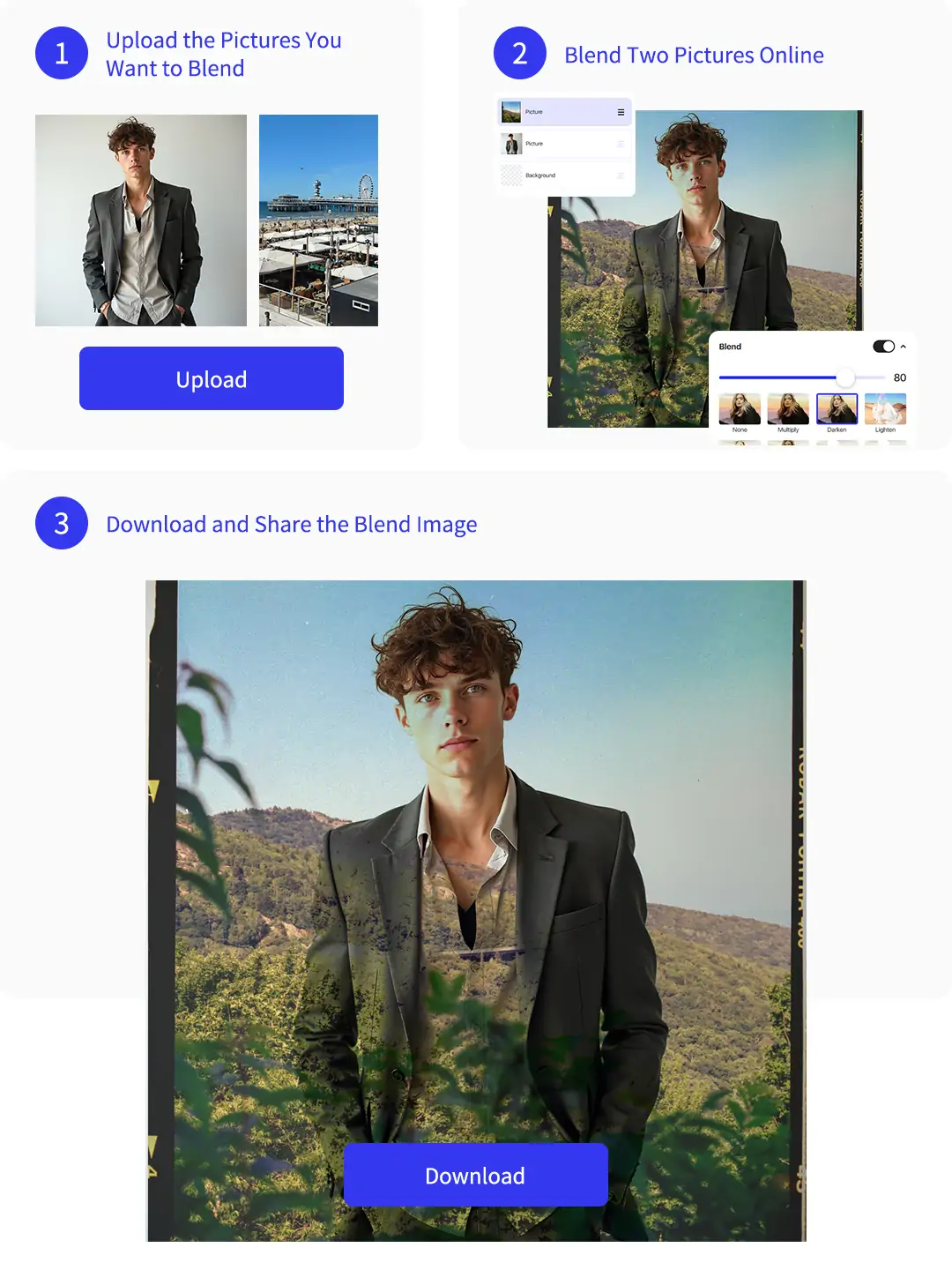
Step 1: Upload the Pictures You Want to Blend
Choose the two photos you want to blend. Upload images like portraits, product shots, scenery, or text backgrounds from your device.
Step 2: Blend Two Pictures Online
Use the photo blender to layer one image on top of another. Adjust the size, position, and opacity of the images. Play around with these settings until you get the blend you like. Keep experimenting with the pic blender to achieve the perfect result.
Step 3: Download and Share the Blend Image
Please confirm your satisfaction with the image blending results. Then, click 'Download' to get your high-resolution blended image.
What's the Benefits of Pokecut's Photo Blender?

Blend Two Photos Together Online with Ease
Easily merge your favorite images without downloading any complex software. This photo blend tool is designed for speed, allowing you to achieve a professional-looking result in just a few clicks from your browser.
Experience a user-friendly interface that simplifies the entire editing process. You can overlay two photos even if you have no design experience, as Pokecut's AI handles the technical adjustments automatically for you.

Explore Professional Templates to Blend Photos
Choose from a wide variety of pre-designed templates to kickstart your project. Using a photo blender with built-in layouts helps you find the perfect artistic style for social media or personal gifts quickly.
Unlock your creativity by experimenting with different artistic themes like linear dodge, exclusion, subtract, luminosity and so on. These templates allow you to blend photos together with stunning textures and light effects that make your artwork stand out from the crowd.

Blend More than Two Photos for Complex Compositions
Go beyond simple editing by combining three or more images into one frame. Pokecut's advanced image blender supports multiple layers, giving you the freedom to create rich, storytelling visuals without any limitations.
Create intricate digital collages and deep artistic layers effortlessly. Whether you want to blend 2 photos or a whole collection, the tool maintains high resolution and smooth transitions across every single layer.
What Can Pokecut's Photo Blender Help You?


What Do Users Say About Pokecut's Photo Blender?
Real feedback from creators who turned their simple photos into stunning art pieces with Pokecut's seamless AI blending tool.


Jason W.

"I used it to blend a portrait with a text background for a video cover. The opacity controls were easy to understand, and the result looked clean enough to post."
Laura X.
"The tool helped me combine two travel photos into one wallpaper. I did not need to learn layers, which saved a lot of time."
Nicholas B.
"I tried a double exposure idea for a profile image. Pokecut made it simple to move the second image and lower the opacity until it felt right."
Amy T.
"I'm a total beginner with zero Photoshop skills, but I made a sick double exposure poster for my band in like two minutes. Super easy to use!"
Scott H.
"I needed a fast header image for a small campaign. Blending the product photo with a simple background made the design feel more finished."
Olivia A.
"The controls are beginner friendly. I could test several blend styles and download the one that matched my social post best."
Jason W.
"I used it to blend a portrait with a text background for a video cover. The opacity controls were easy to understand, and the result looked clean enough to post."
Laura X.
"The tool helped me combine two travel photos into one wallpaper. I did not need to learn layers, which saved a lot of time."
Nicholas B.
"I tried a double exposure idea for a profile image. Pokecut made it simple to move the second image and lower the opacity until it felt right."
Amy T.
"I'm a total beginner with zero Photoshop skills, but I made a sick double exposure poster for my band in like two minutes. Super easy to use!"
Scott H.
"I needed a fast header image for a small campaign. Blending the product photo with a simple background made the design feel more finished."
Olivia A.
"The controls are beginner friendly. I could test several blend styles and download the one that matched my social post best."
Jason W.
"I used it to blend a portrait with a text background for a video cover. The opacity controls were easy to understand, and the result looked clean enough to post."
Laura X.
"The tool helped me combine two travel photos into one wallpaper. I did not need to learn layers, which saved a lot of time."
Nicholas B.
"I tried a double exposure idea for a profile image. Pokecut made it simple to move the second image and lower the opacity until it felt right."
Amy T.
"I'm a total beginner with zero Photoshop skills, but I made a sick double exposure poster for my band in like two minutes. Super easy to use!"
Scott H.
"I needed a fast header image for a small campaign. Blending the product photo with a simple background made the design feel more finished."
Olivia A.
"The controls are beginner friendly. I could test several blend styles and download the one that matched my social post best."
Jason W.
"I used it to blend a portrait with a text background for a video cover. The opacity controls were easy to understand, and the result looked clean enough to post."
Laura X.
"The tool helped me combine two travel photos into one wallpaper. I did not need to learn layers, which saved a lot of time."
Nicholas B.
"I tried a double exposure idea for a profile image. Pokecut made it simple to move the second image and lower the opacity until it felt right."
Amy T.
"I'm a total beginner with zero Photoshop skills, but I made a sick double exposure poster for my band in like two minutes. Super easy to use!"
Scott H.
"I needed a fast header image for a small campaign. Blending the product photo with a simple background made the design feel more finished."
Olivia A.
"The controls are beginner friendly. I could test several blend styles and download the one that matched my social post best."
Jason W.
"I used it to blend a portrait with a text background for a video cover. The opacity controls were easy to understand, and the result looked clean enough to post."
Laura X.
"The tool helped me combine two travel photos into one wallpaper. I did not need to learn layers, which saved a lot of time."
Nicholas B.
"I tried a double exposure idea for a profile image. Pokecut made it simple to move the second image and lower the opacity until it felt right."
Amy T.
"I'm a total beginner with zero Photoshop skills, but I made a sick double exposure poster for my band in like two minutes. Super easy to use!"
Scott H.
"I needed a fast header image for a small campaign. Blending the product photo with a simple background made the design feel more finished."
Olivia A.
"The controls are beginner friendly. I could test several blend styles and download the one that matched my social post best."
Amy T.
"I'm a total beginner with zero Photoshop skills, but I made a sick double exposure poster for my band in like two minutes. Super easy to use!"
Scott H.
"I needed a fast header image for a small campaign. Blending the product photo with a simple background made the design feel more finished."
Olivia A.
"The controls are beginner friendly. I could test several blend styles and download the one that matched my social post best."
Jason W.
"I used it to blend a portrait with a text background for a video cover. The opacity controls were easy to understand, and the result looked clean enough to post."
Laura X.
"The tool helped me combine two travel photos into one wallpaper. I did not need to learn layers, which saved a lot of time."
Nicholas B.
"I tried a double exposure idea for a profile image. Pokecut made it simple to move the second image and lower the opacity until it felt right."
Amy T.
"I'm a total beginner with zero Photoshop skills, but I made a sick double exposure poster for my band in like two minutes. Super easy to use!"
Scott H.
"I needed a fast header image for a small campaign. Blending the product photo with a simple background made the design feel more finished."
Olivia A.
"The controls are beginner friendly. I could test several blend styles and download the one that matched my social post best."
Jason W.
"I used it to blend a portrait with a text background for a video cover. The opacity controls were easy to understand, and the result looked clean enough to post."
Laura X.
"The tool helped me combine two travel photos into one wallpaper. I did not need to learn layers, which saved a lot of time."
Nicholas B.
"I tried a double exposure idea for a profile image. Pokecut made it simple to move the second image and lower the opacity until it felt right."
Amy T.
"I'm a total beginner with zero Photoshop skills, but I made a sick double exposure poster for my band in like two minutes. Super easy to use!"
Scott H.
"I needed a fast header image for a small campaign. Blending the product photo with a simple background made the design feel more finished."
Olivia A.
"The controls are beginner friendly. I could test several blend styles and download the one that matched my social post best."
Jason W.
"I used it to blend a portrait with a text background for a video cover. The opacity controls were easy to understand, and the result looked clean enough to post."
Laura X.
"The tool helped me combine two travel photos into one wallpaper. I did not need to learn layers, which saved a lot of time."
Nicholas B.
"I tried a double exposure idea for a profile image. Pokecut made it simple to move the second image and lower the opacity until it felt right."
Amy T.
"I'm a total beginner with zero Photoshop skills, but I made a sick double exposure poster for my band in like two minutes. Super easy to use!"
Scott H.
"I needed a fast header image for a small campaign. Blending the product photo with a simple background made the design feel more finished."
Olivia A.
"The controls are beginner friendly. I could test several blend styles and download the one that matched my social post best."
Jason W.
"I used it to blend a portrait with a text background for a video cover. The opacity controls were easy to understand, and the result looked clean enough to post."
Laura X.
"The tool helped me combine two travel photos into one wallpaper. I did not need to learn layers, which saved a lot of time."
Nicholas B.
"I tried a double exposure idea for a profile image. Pokecut made it simple to move the second image and lower the opacity until it felt right."
Amy T.
"I'm a total beginner with zero Photoshop skills, but I made a sick double exposure poster for my band in like two minutes. Super easy to use!"
Scott H.
"I needed a fast header image for a small campaign. Blending the product photo with a simple background made the design feel more finished."
Olivia A.
"The controls are beginner friendly. I could test several blend styles and download the one that matched my social post best."
Jason W.
"I used it to blend a portrait with a text background for a video cover. The opacity controls were easy to understand, and the result looked clean enough to post."
Laura X.
"The tool helped me combine two travel photos into one wallpaper. I did not need to learn layers, which saved a lot of time."
Nicholas B.
"I tried a double exposure idea for a profile image. Pokecut made it simple to move the second image and lower the opacity until it felt right."
Reviews from: Reddit, Product Hunt, G2, TrustRadius, Google Play, App Store, and more.
Pokecut Trusted by Millions of Leaders and Users

1M+ Users Worldwide
Pokecut generates over 500,000 images every day

#2 on Product Hunt
Pokecut launched and won #2 product of the day

Professional Privacy Protection
Ensure 100% data privacy for every photo

Trusted by Well-known Brands
Apple, Google, PayPal, Stripe, Product Hunt, G2, TrustRadius
FAQs About Photo Blender
Does this tool require any professional Photoshop skills?
Not at all! Unlike complex software, Pokecut's blend photo feature is built for beginners. The AI handles the difficult parts like edge smoothing and tone matching. You only need to drag a slider to find the perfect balance for your creation.
Can I use the photo blender for free?
Yes. You can enjoy 20 free editing credits to experience this tool. This allows you to blend photos at no cost. If you find yourself needing more creative power or advanced features, feel free to check out store for flexible premium plans.
What photos work best for a natural blend?
Choose images with a clear subject and enough empty space for overlap. Similar light direction or matching colors will usually make the photo blend look more natural, especially for portraits and backgrounds.
Can I adjust the transparency of the overlaid image?
Absolutely. After you overlay images, you will see a transparency slider. This allows you to precisely control how much of the background image shows through the top layer, giving you total creative freedom over the final look of your project.
Can I use the photo blender on my mobile phone?
Yes, Pokecut is fully optimized for mobile browsers. You can easily blend two photos directly from your iPhone or Android gallery. The interface is touch-friendly, making it simple to create stunning overlays while you are on the go.





