





AI Copyright Remover: Remove Text & Logos Online Free
Automatically remove copyright from photo files with AI. Our tool detects watermarks and restores the background instantly. No skills needed, just upload to get clean results.






By uploading an image or URL you agree to our Terms of Use and Privacy Policy
How to Remove Copyright from Photo Online Free?
Step 1: Upload Your Image
Click "Upload" to select your image. Our copyright remover supports JPG, JPEG, PNG, BMP and WebP formats, letting you remove copyright from image files instantly.
Step 2: Wait for AI to Remove the Copyright
Let the AI copyright remover auto-detect and erase marks. You can also use the manual brush for precision to remove copyright from photo details seamlessly.
Step 3: Download the Image Without Copyright
Preview the image online and export it in high-quality. Our copyright removal tool makes it simple to get rid of copyright on pictures and save them for personal use.

Why Choose Our AI Copyright Remover to Clean Up Images?

Free Copyright Remover Online: No Install Needed
Access this copyright removal tool directly in any web browser without downloads or plugins. We support major formats like JPG, JPEG, PNG, BMP and WebP, allowing you to remove copyright from photo files instantly. Enjoy a secure, completely free experience optimized for high-speed processing.
Edit on the go with our online tool to get rid of copyright on pictures anytime. For complex watermarks or background details, use the Magic Eraser to ensure precision. Pokecut ensures your workflow remains flexible, smart, and efficient anywhere.
Auto Remove Copyright from Image with AI
Use our advanced AI copyright remover to automatically detect and erase text, logos, or stamps. From a subtle copyright symbol remover task to complex full-screen overlays, the algorithm identifies and processes targets precisely without the need for manual brushing.
There's no need for professional editing skills or complex software like Photoshop. Simply upload your file and our AI remove copyright watermark layers instantly. This image copyright remover ensures you get clean, usable visuals with just one single click.
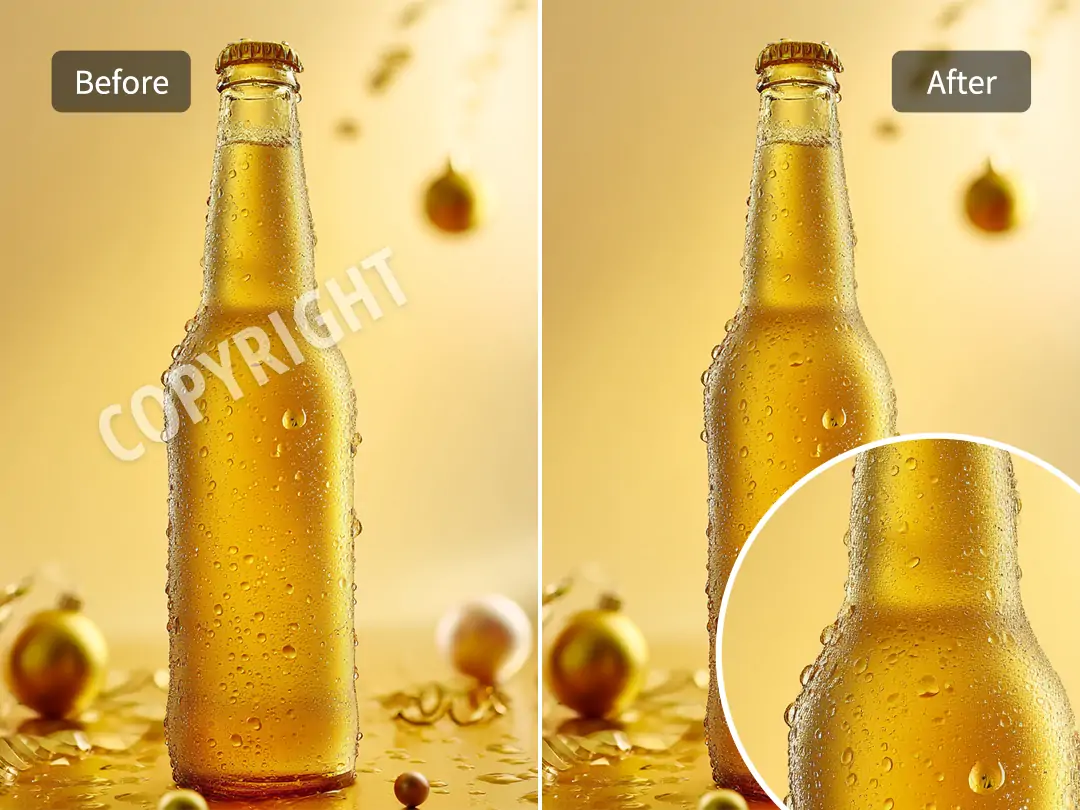
Remove Copyright from Picture in 4K Quality
Maintain original quality when you remove copyright from picture files. Our AI quickly fills the removed areas, restoring original details and colors. Your images look natural, with no visible editing marks.
Get a clean, high-definition result after you get rid of copyright on pictures. If your source image is small or fuzzy, apply our photo enhancer to further upgrade pixel clarity. We deliver high-definition results perfect for professional printing or commercial HD displays.

All-in-One Photo Copyright Remover & Editor
Go beyond simple cleanup with our all-in-one copyright eraser. Pokecut allow you to modify images immediately after processing. There is no need to switch apps or download extra software for further adjustments.
Add custom text, apply trendy templates, or adjust colors instantly. Transform a basic image into a professional design in seconds. We make copyright removal and creative editing effortless for everyone.
What Can You Do with Pokecut's Copyright Removal Tool?


See What Users Say About Pokecut's Image Copyright Remover
Users praise our tool for its ease of use and natural results, perfect for both personal edits and urgent commercial needs.


Sarah J.

"I run a dropshipping store and supplier photos always have logos. This tool wiped them clean in seconds. Saved me so much time editing manually!"
Mike T.
"Needed to show a client a concept but the stock photo watermark was distracting. This AI removed it perfectly without blurring the details. Amazing."
Emily R.
"Found an old photo of my grandma with a date stamp on her face. I was skeptical, but it removed the red numbers and filled the skin texture perfectly."
Alex B.
"The removal quality is great for most images. It struggled a bit with a very complex patterned background, but for 99% of my photos, it works like magic."
David L.
"Honestly, I tried other tools and they just made a blurry mess. This one actually reconstructed the background behind the text. Highly recommend!"
Jessica K.
"I use this to clean up images for my blog headers. It detects the copyright text automatically, so I do not have to brush over it. Super fast workflow."
Sarah J.
"I run a dropshipping store and supplier photos always have logos. This tool wiped them clean in seconds. Saved me so much time editing manually!"
Mike T.
"Needed to show a client a concept but the stock photo watermark was distracting. This AI removed it perfectly without blurring the details. Amazing."
Emily R.
"Found an old photo of my grandma with a date stamp on her face. I was skeptical, but it removed the red numbers and filled the skin texture perfectly."
Alex B.
"The removal quality is great for most images. It struggled a bit with a very complex patterned background, but for 99% of my photos, it works like magic."
David L.
"Honestly, I tried other tools and they just made a blurry mess. This one actually reconstructed the background behind the text. Highly recommend!"
Jessica K.
"I use this to clean up images for my blog headers. It detects the copyright text automatically, so I do not have to brush over it. Super fast workflow."
Sarah J.
"I run a dropshipping store and supplier photos always have logos. This tool wiped them clean in seconds. Saved me so much time editing manually!"
Mike T.
"Needed to show a client a concept but the stock photo watermark was distracting. This AI removed it perfectly without blurring the details. Amazing."
Emily R.
"Found an old photo of my grandma with a date stamp on her face. I was skeptical, but it removed the red numbers and filled the skin texture perfectly."
Alex B.
"The removal quality is great for most images. It struggled a bit with a very complex patterned background, but for 99% of my photos, it works like magic."
David L.
"Honestly, I tried other tools and they just made a blurry mess. This one actually reconstructed the background behind the text. Highly recommend!"
Jessica K.
"I use this to clean up images for my blog headers. It detects the copyright text automatically, so I do not have to brush over it. Super fast workflow."
Sarah J.
"I run a dropshipping store and supplier photos always have logos. This tool wiped them clean in seconds. Saved me so much time editing manually!"
Mike T.
"Needed to show a client a concept but the stock photo watermark was distracting. This AI removed it perfectly without blurring the details. Amazing."
Emily R.
"Found an old photo of my grandma with a date stamp on her face. I was skeptical, but it removed the red numbers and filled the skin texture perfectly."
Alex B.
"The removal quality is great for most images. It struggled a bit with a very complex patterned background, but for 99% of my photos, it works like magic."
David L.
"Honestly, I tried other tools and they just made a blurry mess. This one actually reconstructed the background behind the text. Highly recommend!"
Jessica K.
"I use this to clean up images for my blog headers. It detects the copyright text automatically, so I do not have to brush over it. Super fast workflow."
Sarah J.
"I run a dropshipping store and supplier photos always have logos. This tool wiped them clean in seconds. Saved me so much time editing manually!"
Mike T.
"Needed to show a client a concept but the stock photo watermark was distracting. This AI removed it perfectly without blurring the details. Amazing."
Emily R.
"Found an old photo of my grandma with a date stamp on her face. I was skeptical, but it removed the red numbers and filled the skin texture perfectly."
Alex B.
"The removal quality is great for most images. It struggled a bit with a very complex patterned background, but for 99% of my photos, it works like magic."
David L.
"Honestly, I tried other tools and they just made a blurry mess. This one actually reconstructed the background behind the text. Highly recommend!"
Jessica K.
"I use this to clean up images for my blog headers. It detects the copyright text automatically, so I do not have to brush over it. Super fast workflow."
Alex B.
"The removal quality is great for most images. It struggled a bit with a very complex patterned background, but for 99% of my photos, it works like magic."
David L.
"Honestly, I tried other tools and they just made a blurry mess. This one actually reconstructed the background behind the text. Highly recommend!"
Jessica K.
"I use this to clean up images for my blog headers. It detects the copyright text automatically, so I do not have to brush over it. Super fast workflow."
Sarah J.
"I run a dropshipping store and supplier photos always have logos. This tool wiped them clean in seconds. Saved me so much time editing manually!"
Mike T.
"Needed to show a client a concept but the stock photo watermark was distracting. This AI removed it perfectly without blurring the details. Amazing."
Emily R.
"Found an old photo of my grandma with a date stamp on her face. I was skeptical, but it removed the red numbers and filled the skin texture perfectly."
Alex B.
"The removal quality is great for most images. It struggled a bit with a very complex patterned background, but for 99% of my photos, it works like magic."
David L.
"Honestly, I tried other tools and they just made a blurry mess. This one actually reconstructed the background behind the text. Highly recommend!"
Jessica K.
"I use this to clean up images for my blog headers. It detects the copyright text automatically, so I do not have to brush over it. Super fast workflow."
Sarah J.
"I run a dropshipping store and supplier photos always have logos. This tool wiped them clean in seconds. Saved me so much time editing manually!"
Mike T.
"Needed to show a client a concept but the stock photo watermark was distracting. This AI removed it perfectly without blurring the details. Amazing."
Emily R.
"Found an old photo of my grandma with a date stamp on her face. I was skeptical, but it removed the red numbers and filled the skin texture perfectly."
Alex B.
"The removal quality is great for most images. It struggled a bit with a very complex patterned background, but for 99% of my photos, it works like magic."
David L.
"Honestly, I tried other tools and they just made a blurry mess. This one actually reconstructed the background behind the text. Highly recommend!"
Jessica K.
"I use this to clean up images for my blog headers. It detects the copyright text automatically, so I do not have to brush over it. Super fast workflow."
Sarah J.
"I run a dropshipping store and supplier photos always have logos. This tool wiped them clean in seconds. Saved me so much time editing manually!"
Mike T.
"Needed to show a client a concept but the stock photo watermark was distracting. This AI removed it perfectly without blurring the details. Amazing."
Emily R.
"Found an old photo of my grandma with a date stamp on her face. I was skeptical, but it removed the red numbers and filled the skin texture perfectly."
Alex B.
"The removal quality is great for most images. It struggled a bit with a very complex patterned background, but for 99% of my photos, it works like magic."
David L.
"Honestly, I tried other tools and they just made a blurry mess. This one actually reconstructed the background behind the text. Highly recommend!"
Jessica K.
"I use this to clean up images for my blog headers. It detects the copyright text automatically, so I do not have to brush over it. Super fast workflow."
Sarah J.
"I run a dropshipping store and supplier photos always have logos. This tool wiped them clean in seconds. Saved me so much time editing manually!"
Mike T.
"Needed to show a client a concept but the stock photo watermark was distracting. This AI removed it perfectly without blurring the details. Amazing."
Emily R.
"Found an old photo of my grandma with a date stamp on her face. I was skeptical, but it removed the red numbers and filled the skin texture perfectly."
Alex B.
"The removal quality is great for most images. It struggled a bit with a very complex patterned background, but for 99% of my photos, it works like magic."
David L.
"Honestly, I tried other tools and they just made a blurry mess. This one actually reconstructed the background behind the text. Highly recommend!"
Jessica K.
"I use this to clean up images for my blog headers. It detects the copyright text automatically, so I do not have to brush over it. Super fast workflow."
Sarah J.
"I run a dropshipping store and supplier photos always have logos. This tool wiped them clean in seconds. Saved me so much time editing manually!"
Mike T.
"Needed to show a client a concept but the stock photo watermark was distracting. This AI removed it perfectly without blurring the details. Amazing."
Emily R.
"Found an old photo of my grandma with a date stamp on her face. I was skeptical, but it removed the red numbers and filled the skin texture perfectly."
Reviews from: Reddit, Product Hunt, G2, TrustRadius, Google Play, App Store, and more.
FAQs About Pokecut's Copyright Remover Online Free
How can I remove copyright from photo with Pokecut?
Just upload your picture, and Pokecut's copyright remover AI will clean the image automatically. No brushing or manual steps needed. The AI detects and removes marks in seconds.
Is there a free watermark remover?
Yes. Pokecut is a copyright remover online free tool that works directly in your browser. No downloads or sign-ups needed, and it supports phones, tablets, and computers.
Does the copyright removal process affect final image quality?
No, our copyright remover photo tool preserves the original resolution. It uses AI to fill in the background naturally. You get a sharp, HD result after you remove copyright from image files.
Is it legal to remove copyright from images using this AI tool?
Our tool is for personal use or editing photos you own. Please respect intellectual property laws when you remove copyright from photos. We recommend using it for cleanup, not rights violation.
How fast does the AI remove copyright from a picture for me?
It takes just a few seconds. The copyright remover AI engine processes uploads instantly. You can get rid of copyright on pictures and download the clean version in less than five seconds.
Can I use this copyright remover tool on my mobile phone browser?
Yes, our platform is fully responsive. You can learn how to remove copyright from photos on iOS or Android. It is the perfect copyright remover online solution for editing on the go quickly.

Explore Similar Al Features Like Free Copyright Remover
Pokecut's AI Copyright Remover Trusted by Professionals and Users

1M+ Users Worldwide
Pokecut generates over 500,000 images every day

#2 on Product Hunt
Pokecut launched and won #2 product of the day

Professional Privacy Protection
Ensure 100% data privacy for every photo

Trusted by Well-Known Brands
Apple、Google、Paypal、Stripe、Product hunt、G2、TrustRadius





