





Instagram Photo Editor for Stunning Instagram Images
Transform your Instagram posts with powerful photo editing features. Easily crop, enhance, and personalize your images for a unique and captivating social media presence.





By uploading an image or URL you agree to our Terms of Use and Privacy Policy
How to Edit a Photo for Instagram
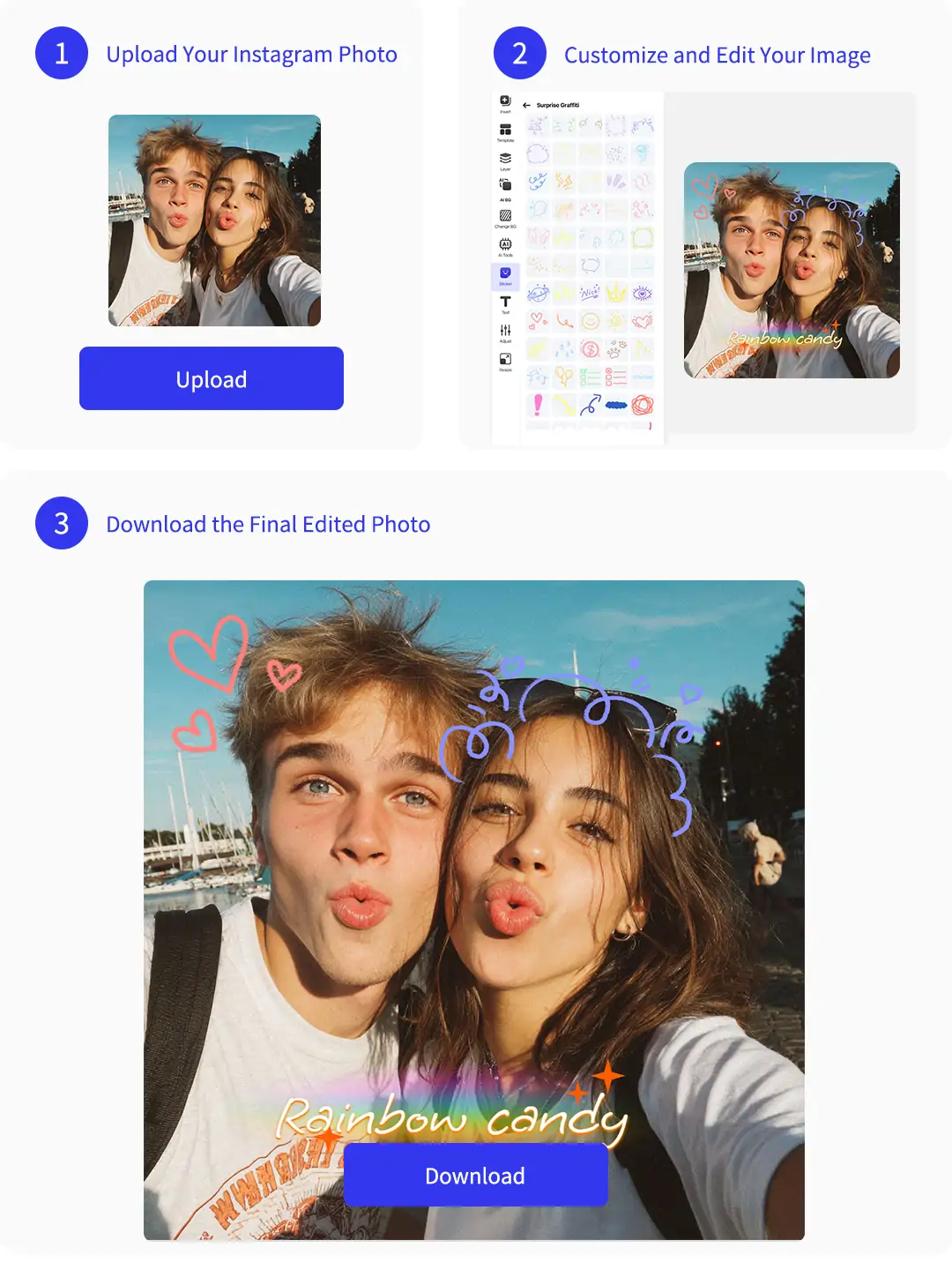
Step 1: Upload Your Instagram Photo
Select your image and upload it to the instagram photo editor. You can choose photos from your device or drag and drop them for quick access and easy editing.
Step 2: Customize and Edit Your Image
Edit photo for instagram based your own need. Pokecut allows you to crop your instagram photo to the perfect size, add creative text or emojis, enhance quality, remove or change backgrounds, apply filters, adjust contrast, and add stylish borders, and so on.
Step 3: Download the Final Edited Photo
Once your edits are complete, download your final instagram image in high quality. Save and share your perfect photo directly to your Instagram account with one click.
All-in-One Photo Editor for Instagram

Add Text, Emojis and Stickers
Pokecut's photo editor for Instagram includes a rich library of fonts, emojis, and creative stickers. Whether you want to add text, fun icons, or branding elements, you can personalize your posts and stories easily, attracting more likes and engagement from your audience.

Enhance Photo Quality Instantly
With AI-powered enhancement, this instagram picture editor sharpens blurry shots and restores details instantly. It's perfect for low-light scenes, vintage images, or product photos, ensuring your content looks crisp, clear, and professional before posting to Instagram.

Remove and Replace Backgrounds
This instagram image editor allows you to remove the original background in one click and replace it with solid colors, gradients, or custom scenes. Ideal for clean product images, creative designs, or unique profile pictures that match your brand aesthetic.

Photo Editor for Instagram to Perfect Your Selfies Instantly
With Pokecut's advanced instagram photo editor, you can easily remove blemishes like pimples, dark circles, wrinkles, spots, and even double chins. Whiten your teeth and achieve flawless, radiant skin for every selfie in just seconds.
Pokecut delivers the best instagram photo editor for users who want to enhance their portraits. Utilize features such as background removal, photo retouch, and image enhancement for professional results. Discover how to edit a photo for instagram with intuitive AI-powered tools.

Edit Instagram Photos with High-Quality Filters Instantly
Apply a variety of instagram photo filters from retro and fresh to cinematic styles. Perfect for travel, food, portraits, and more, these options help you match every photo to your favorite theme. Easily achieve visual consistency for your posts.
With Pokecut, adjust brightness, contrast, saturation, and color temperature for precise control. The instagram photo editing tool allows for vibrant, detailed color enhancement. Experience the best photo editor for instagram when you want to elevate your images with advanced filter effects.

Edit Photo for Instagram with Perfect Aspect Ratios Quickly
Effortlessly crop your images to 1:1, 4:5, or 9:16 using Pokecut's instagram image editor. Adapt your content for Instagram posts and stories, so your photos always look flawless without unwanted cuts.
With Pokecut, streamline your workflow with the instagram photo cropper and enjoy optimal photo dimensions. Experience the best instagram photo editor for resizing and fitting every visual to match your creative needs.

Instagram Picture Editor with a Vast Collection of Templates
Choose from a wide array of ready-to-use templates in Pokecut's instagram profile photo editor. Whether you want to create eye-catching collages, add stylish borders, or design unique Instagram covers, Pokecut has you covered with endless options.
Explore creative layouts for every purpose, from profile pictures to standout posts. The instagram photo editing tool lets you customize templates, ensuring your content always stands out and matches your vision.
More Features in Pokecut's Instagram Photo Editor

One-Click Instagram Profile Photo
Create stunning avatars with this instagram profile photo editor. One click automatically adjusts your image to the ideal Instagram ratio, ensuring your profile looks sharp, professional, and inviting. Perfect for brands, influencers, and anyone who values first impressions.

Creative Photo Collages
Our photo edit for Instagram tools make collage creation easy. Combine an image to another image, add borders or backgrounds, and tell a visual story. Perfect for event highlights, product showcases, or personal moments shared in a single post.

AI Object Removal
With this instagram picture editor, simply brush over unwanted objects, and AI will erase them instantly. Ideal for removing photobombers, clutter, or text overlays, giving you clean, professional images ready for sharing on Instagram.
Frequently Asked Questions
How can I make my Instagram photos stand out with Pokecut's editing tools?
Pokecut offers features like instagram photo filters, background remover, and text editor. You can crop, enhance image quality, add emojis, and adjust colors for a unique look.
Is there any built-in editing from Instagram app
Instagram's built-in editing offers filters, adjustments, resizing, and an expand tool for quick enhancements. For advanced features like background removal, AI quality boost, or creative text and stickers, users need third-party tools such as Pokecut.
What do you need to consider when editing images for Instagram?
When editing for Instagram, focus on audience preferences, keep a consistent style, explore different editing apps, use effective hashtags and captions, and actively engage with followers to strengthen community connection and boost post reach.
Can I use Pokecut to add stylish effects and borders to my Instagram photos?
Yes, Pokecut is an instagram photo editing tool. You can add instagram photo effects, creative borders, and adjust filters for a personalized and eye-catching image.







